Why people unsubscribe (and when it's a good thing)
-
- Understanding email unsubscribe rate
- Good unsubscribes vs bad unsubscribes: Which is which
- The four reasons people unsubscribe
- What your unsubscribe rate is actually telling you
- How to reduce problematic unsubscribes
- Unsubscribe rates: Quality beats quantity
- Frequently asked questions about email unsubscribe rate
You check your email campaign stats and scroll to the unsubscribe count. Three more people left your list today.
It stings a little, right? Was your subject line too pushy? Are you emailing too often? Should you delete everything and start over?
Some of those unsubscribes are actually helping you. That person who never opened a single email? They were tanking your sender reputation. The subscriber who wanted daily deals but you send weekly tips? Wrong fit. Better they unsubscribe now than mark you as spam later.
But not all unsubscribes are the helpful kind. Sometimes they’re warning signs.
So the real question isn’t “is my unsubscribe rate too high?” It’s “who’s leaving and why?”
This article will show you how to figure that out and what to actually do about it.
Key takeaways:
- Not all unsubscribes are bad: low-engagement subscribers leaving actually improves your sender reputation
- SContext matters more than the number: a 1% rate could signal problems or healthy list cleaning depending on who’s leaving
- Unsubscribe rate alongside other metrics tells the real story — high unsubscribes + high opens means your list is improving
- People unsubscribe for four main reasons: wrong frequency, content drift, value mismatch, or life changes
- A smaller list of engaged readers beats a large list of non-openers every time
Understanding email unsubscribe rate
Your unsubscribe rate shows the percentage of people who opt out after receiving your email. But the number itself matters less than what’s behind it — who’s leaving, when, and why. That’s what actually tells you if your list is getting healthier or heading in the wrong direction.
Good unsubscribes vs bad unsubscribes: Which is which
Long story short, good unsubscribes happen when people who weren’t engaging leave your list.
Bad unsubscribes happen when your active, interested subscribers start leaving.
So before you panic or celebrate, you need to figure out which kind you’re dealing with.
Most email marketing benchmarks will tell you that 0.2% to 0.5% is “normal.” But here’s the problem with that number: it doesn’t tell you if your rate is healthy or not.
A 1% unsubscribe rate might be a red flag for an established email newsletter with an engaged audience. But for a new list you’re still refining? Or after you’ve shifted your content strategy? That same 1% could mean you’re successfully filtering out the wrong people.
Think of it like pruning a plant. You’re not losing something valuable. You’re cutting away what’s not working so the rest can thrive.
Your “good” rate depends on:
- List size – Smaller lists feel each unsubscribe more, but percentages can look dramatic (one person leaving a 100-person list is 1%)
- List age – New lists shed mismatched subscribers faster; mature lists stabilize
- Content changes – Pivoting your email marketing strategy? Expect temporary spikes as you find your real audience
- Acquisition method – Bought lists or giveaway signups unsubscribe at higher rates than people who intentionally signed up for your specific content
One more thing worth tracking: how quickly someone unsubscribes tells you more than the unsubscribe alone. Someone who opts out within minutes is reacting to that specific campaign: maybe the subject line promised something different, or your send frequency just hit their limit. Someone who unsubscribes three days later was probably already on their way out and your email just reminded them to clean up their inbox.
Good unsubscribes
Here’s when people leaving actually helps your list:
- Low-engagement subscribers leaving – They haven’t opened your last ten emails. Their departure makes email providers trust you more and gives you a clearer picture of who’s actually paying attention.
- Wrong-fit audience filtering out – They signed up expecting product discounts but you send industry insights. Or they wanted daily tips but you send monthly deep dives. Mismatch fixed.
- Natural churn – People change jobs, shift interests, or clean out overflowing inboxes during their annual “digital declutter.” Life happens. This is normal attrition, not a you problem.
- Post-segmentation departures – You started targeting content more specifically and some people realize it’s not for them anymore. Working exactly as intended.
Bad unsubscribes
These are the warning signs that need your attention:
- Engaged subscribers leaving – People who regularly opened and clicked are suddenly opting out. Something shifted, and you need to figure out what.
- Post-campaign spikes – Your unsubscribe rate jumps after a specific email. That campaign missed the mark. Maybe the subject line promised something different, or the content didn’t match expectations.
- Pattern after changes – You increased sending frequency or shifted topics, and longtime subscribers start leaving. The change isn’t landing well with your core audience.
- Sudden spike without explanation – Multiple unsubscribes within hours of sending, especially from people who’ve been with you a while. Something in that email didn’t work.
Here’s the paradox that trips people up:
Sometimes a higher unsubscribe rate means your list is getting better.
Say you tighten your content focus or increase your send frequency. You might see unsubscribes climb from 0.3% to 0.8%, but your open rate jumps from 18% to 28% and your click rate doubles. The people leaving weren’t your audience anyway. The people staying are more engaged than ever.
The goal isn’t zero unsubscribes. The goal is a list full of people who actually want to hear from you.
The four reasons people unsubscribe
People unsubscribe for four main reasons: you’re emailing too much (or too little), your content drifted from what they expected, you’re not delivering what you promised at signup, or their life circumstances changed.
Here’s how to tell which one you’ve got:
- Frequency issues: This is the most common culprit, and it goes both ways. Send too often and people feel bombarded. Send too sporadically (like once every three months) and they forget who you are. When your email finally lands, they think “who is this?” and hit unsubscribe. The inconsistency is often worse than high frequency.
How to spot it: unsubscribes spike right after a cadence change, or drop off consistently after every send once you increased frequency.
- Relevance drift: Your content slowly shifted away from what they originally signed up for. Maybe you started as a productivity newsletter and gradually became more about email marketing tools. Or you used to share actionable tips and now you mostly share personal updates. They didn’t sign up for the current version of your emails.
How to spot it: departures happen gradually over months, with no single campaign triggering the pattern.
- Value mismatch: They expected one thing at signup and got something different. This happens a lot with lead magnets. Someone downloads “10 Landing Page Templates” and suddenly they’re on a list getting emails about SEO strategy. The disconnect is immediate.
How to spot it: new subscribers leave within their first two or three emails.
- Timing and life changes: This one really isn’t about you. They switched jobs and left that email address behind. They’re in the middle of moving and purging everything non-essential. They had a baby and suddenly 47 newsletters feels like 47 too many. Life gets messy. These unsubscribes aren’t rejecting your content; they’re just making space for what matters right now.
How to spot it: no clear pattern: mixed subscriber ages, no common trigger campaign.
What your unsubscribe rate is actually telling you
Your unsubscribe rate doesn’t exist in a vacuum. The real insight comes from looking at it alongside your other metrics:
| Pattern | What it means | What to do |
| High unsubscribe rate + high open rate | List quality improving | Keep going. This is healthy list cleaning in action. |
| Low unsubscribe rate + low email engagement | Inactive subscribers not leaving | Run a re-engagement email campaign (“Still want to hear from us?”). Remove non-responders to improve email deliverability. |
| Sudden unsubscribe spike after a specific campaign | Content/frequency mismatch | Review what changed in that campaign. If possible, send survey emails to people who left to understand why. |
| Steady unsubscribe climb over time | Relevance or frequency issue | Test your sending cadence. Compare your current content to your original signup promise. |
| High unsubscribes from new subscribers only | Signup-to-content disconnect | Your lead magnet or signup form is promising something your emails don’t deliver. Revisit your onboarding sequence. |
| Low unsubscribe rate + rising spam complaints | People can’t find the exit | Your unsubscribe process is too hard to find or too complicated. Make it easier before mailbox providers start filtering you. |
The pattern and context together tell you whether you’re looking at a problem or progress.
How to reduce problematic unsubscribes
Now that you can spot the difference between healthy list cleaning and actual warning signs, here’s how to prevent the problematic ones:
Set clear expectations at signup
Tell people exactly what they’re signing up for: topic, format, and frequency. “Get weekly marketing tips every Tuesday” is way better than “Join our newsletter.” When people know what’s coming, they’re less likely to be surprised and bail later.
Use double opt-in
Double opt-in means subscribers have to confirm their email address before they’re added to your list. They sign up, get a confirmation email, and click to verify. It filters out accidental signups, mistyped addresses, and people who weren’t serious about subscribing.
Your list grows slower, yes. But the people on it actually chose to be there and that matters more for engagement, delivery, and sales than a big subscriber count. Lists built with double opt-in consistently see lower unsubscribe rates and fewer spam complaints.
With SiteGround Email Marketing, it’s a one-click setup — enable double opt-in on any subscriber group and the confirmation flow runs automatically from there.
Match content to subscriber intent
If someone downloaded a guide about Instagram marketing, don’t immediately pivot to email strategy in your follow-up sequence. Start with more Instagram content, then gradually expand. Give them what they came for first.
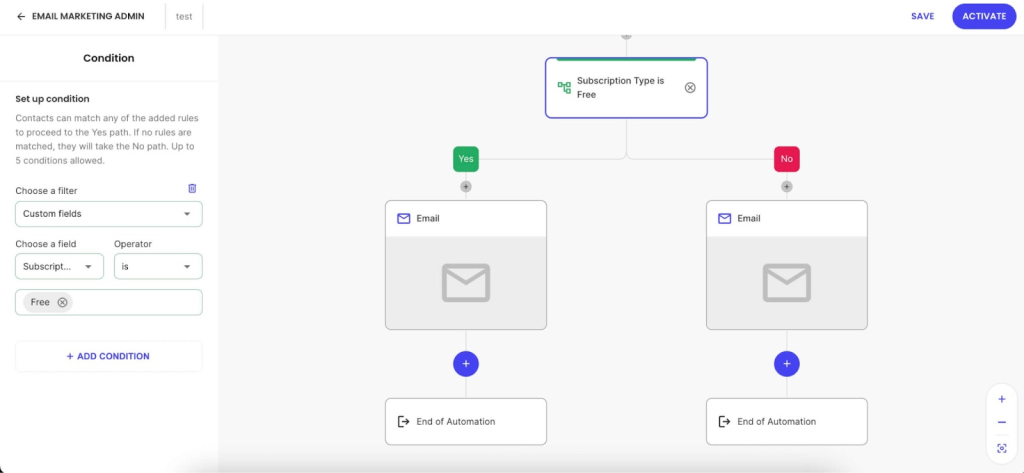
Better yet: ask what they want right from the start. With SiteGround’s Custom Fields, you can collect specific email preferences when people sign up, such as which topics interest them, what type of content they prefer, or what problems they’re trying to solve. You can add them to a WordPress form. Then set up automated email sequences based on what they actually care about.
This stops two major problems: relevance drift and value mismatch. People get content they actually want, so they stick around instead of thinking “this isn’t for me anymore.”
Find your email frequency sweet spot
There’s no universal “right” cadence. Some audiences want daily emails (deal hunters, news junkies). Others want monthly deep dives. Test different frequencies and watch your email marketing metrics; not just unsubscribe rates. If open rates stay strong as you increase email frequency, your audience can handle more.
Send too sporadically (like once every three months) and they forget who you are. Email your list after a four-month silence with ‘Hey! Long time no talk!’ and don’t be surprised when 15% unsubscribe on the spot.
Make it easy for people to leave
This may feel backwards, like you’re helping people escape, but hiding or complicating your unsubscribe process doesn’t keep subscribers. It just makes them more likely to mark you as spam instead. And that’s way worse for your sender reputation than a clean unsubscribe button.
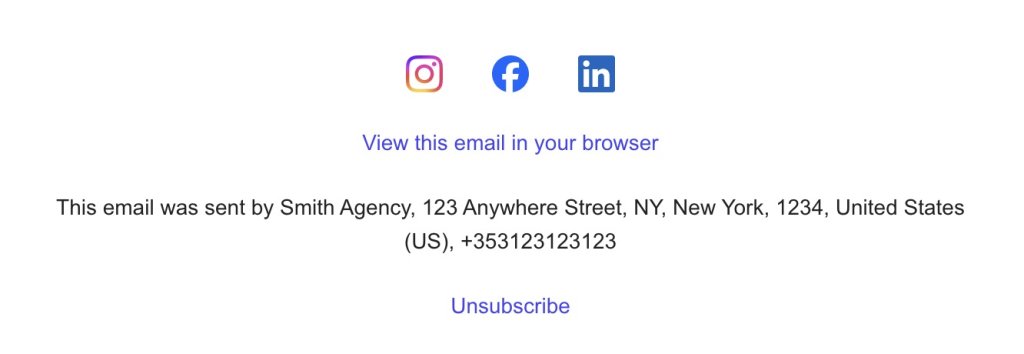
Add a clear unsubscribe link in every email footer. When people know they can leave anytime, they’re less likely to feel trapped and more likely to stick around. The ones who stay actually want to be there.
Test and monitor content changes
Planning to shift your email focus? Test it with part of your list first. Changing from tips to case studies? Try it with 20% of your list and see how they respond. Big changes without warning drive active subscribers away.
Unsubscribe rates: Quality beats quantity
A list of 10,000 subscribers looks great in your dashboard. But if only 500 actually open your emails? You’ve got 9,500 people hurting your deliverability and skewing your data.
Here’s what matters: the people who open, click, and actually care when you show up in their inbox. Those are your subscribers. The rest are just email addresses taking up space and tanking your deliverability.
Every unsubscribe tells you something.
- Low-engagement person finally leaves? → Your list just got healthier.
- Engaged subscriber bails after you tripled your send frequency? → That’s fixable feedback.
Your list size means nothing if people aren’t opening. Focus on the ones who actually want to hear from you.
Want to build a list of people who actually open your emails? SiteGround Email Marketing lets you segment by interest, track who’s engaged, and send relevant content that keeps the right people around while the wrong ones quietly show themselves out.
Not all unsubscribes are bad — but the right setup helps you keep the subscribers who matter. SiteGround Email Marketing comes with built-in double opt-in, easy one-click unsubscribe, and segmentation tools that help you send the right content to the right people from the start.
Improve Your Email Campaigns with SiteGround!
Want your emails to reach more people? Try SiteGround Email Marketing. With an average delivery rate of 98.8%, your emails will land in your subscribers' inboxes. 
Frequently asked questions about email unsubscribe rate
Most healthy email lists see unsubscribe rates between 0.2% and 0.5%. But context matters more than the raw number. A 1% rate might be fine if you just increased send frequency and your open rates are climbing. It’s a problem if engaged subscribers are leaving and your overall engagement is dropping. Look at the pattern, not just the percentage.
The 60:40 rule suggests that 60% of your email content should provide value (tips, insights, useful information) while 40% can be promotional (product pitches, sales, offers). The idea is to build trust and keep subscribers engaged before asking them to buy. Some audiences can handle more promotional content, others want less. Test what works for your list.
Yes. When low-engagement subscribers or wrong-fit audience members leave, your list gets healthier. These departures improve your sender reputation, raise your engagement rates, and give you clearer data about what’s working. The goal isn’t keeping everyone — it’s keeping the right people.
Check your unsubscribe after every campaign to spot immediate issues, then review the overall trend weekly or monthly. Daily checking leads to overreaction. You’ll see natural fluctuations that don’t mean anything. Look for patterns over time: sudden spikes, steady climbs, or changes that align with content shifts.
Don’t panic, but don’t ignore it. Compare the email that triggered the spike to your recent sends: look at the subject line, topic, tone, and what you asked subscribers to do. Check if you recently changed anything: frequency, design, content focus. If your email tool shows who unsubscribed, look at whether they were active subscribers or people who were already disengaged. A spike from inactive subscribers is much less concerning than a spike from your most engaged readers. If the cause is obvious, adjust for the next send. If not, watch the next two or three campaigns to see if the trend continues before making bigger changes.





Comments ( 0 )
Thanks! Your comment will be held for moderation and will be shortly published, if it is related to this blog article. Comments for support inquiries or issues will not be published, if you have such please report it through our official channels of communication.
Leave a comment
Thanks! Your comment will be held for moderation and will be shortly published, if it is related to this blog article. Comments for support inquiries or issues will not be published, if you have such please report it through our official channels of communication.