No website? Here's how to build your email list
-
- Why build an email list without a website first
- What you need to build your email list
- Step-by-step guide: How to build your email list without a website
- Best practices for growing your list
- How to build an email list without a website: Get started today
- Frequently asked questions about building an email list with no website
You want to build an email list but don’t have a website yet. Can you even do that?
Yes! And you can start today.
A lot of people put off email list building because they think the website has to come first. But building your list before your website actually makes sense. You’re validating that people care about what you’re doing. You’re getting feedback while you build. And when you launch, you’ve got people waiting to hear from you instead of starting from zero.
All you really need is a page with a sign-up form.
This guide shows you what to set up, how to do it quickly, and how to start growing your list right now: no multi-page website needed. Just one page.
Key takeaways:
- You can build an email list with just a sign-up page; no full website required
- Email lists are owned assets you control, unlike social media followers subject to algorithm changes and platform rules
- Building your list first validates demand for your business idea before you invest time and money in a full website
- The setup is straightforward: a sign-up page, an email platform, one opt-in offer, and one traffic source to start.
- Focus on one traffic channel initially (social media, personal network, or paid ads) before expanding to multiple sources
Why build an email list without a website first
Starting with your email list isn’t necessarily a workaround for not having a website. It can actually be the smarter move for a small business in the early stages.
Why? Below are four good reasons:
You own your audience
Email gives you ownership. You have subscribers’ contact information, can export it anytime, and reach them directly without permission.
Social media doesn’t work that way. Instagram followers, Facebook group members, TikTok fans: those all live on someone else’s platform. Algorithm changes have caused sharp drops in organic reach. As reported in Hootsuite Blog, for instance, one retail brand saw Facebook reach fall from 8% to less than 3% between 2022 and 2024. Your posts reach fewer people through no fault of your own.
Email solves this. When you send an email, it gets delivered to nearly everyone on your list. A good delivery rate is 98-99%. That means it reaches their email account, even if some land in promotions or spam folders. Compare that to social media where only 2-6% of your followers even see your post. With email, you’re at least in their account. With social media, the algorithm might not show your post at all.
Your list is also portable. Let’s say you’re using an email platform and it doubles its prices or shuts down tomorrow. You export your subscriber list and upload it to a different platform. Your 500 subscribers come with you. You still have their contact information, unlike with social media. If Instagram bans your account or TikTok shuts down? Your 10,000 followers are gone. You can’t export them, can’t contact them. They were never yours to begin with.
You validate demand as you grow
Every signup tells you someone’s interested, but email lets you validate what they’ll actually pay for.
Say you’re thinking about creating Instagram templates for coaches. You build a landing page offering “5 Free Instagram Post Templates” and collect 100 email addresses in two weeks.
You can send survey emails to your list: “I’m creating a template library. Would you rather have: (A) 50 ready-to-use posts, or (B) 20 customizable Canva templates?” You get 30 detailed responses explaining why they prefer one option.
Before launch, you email again: “Would you pay $29 for this?” 15 people say yes and ask for the link.
Classic direct marketing: trackable one-to-one communication with people who’ve already shown interest. Email responses are private, so you get honest feedback. You know exactly who responded and can follow up with specific questions. Everyone on your list took action to get there, unlike passive social followers who might just be scrolling.
You’re testing with people who’ve already raised their hand. That’s better validation than polls or comments from a general audience.
You get customers faster
With an email list, you can reach people now instead of waiting for traffic to find you. Email 50 people from your network about your landing page on Monday. By Friday, you have 15 subscribers. Send them your first email that week introducing what you’re building.
Compare that to launching a website and waiting for SEO to bring visitors. That takes 6-12 months. Or posting on social media and hoping the algorithm shows it to people. With email, you know exactly who’s interested and can message them directly whenever you’re ready to sell.
Lower stakes to test your idea
Building a full website before you know there’s demand means putting in real time and effort before you’ve heard a single “yes” from your audience. Starting with a simple sign-up page lets you test your idea first — and if it takes off, expanding to a full site is just the next natural step.
A sign-up page is quick to set up, and SiteGround Email Marketing starts free for the first 30 days. You can test your entire business idea at no cost and know within 30-60 days if people will actually pay for it.
Validate first, then invest in the website. Not the other way around.
What you need to build your email list
You don’t need much to get started. What you need:
- An email marketing platform
This is the tool that captures sign-ups, stores your contacts, and sends your emails. You can’t build a list without one.
What to look for: sign-up forms you can embed or share, basic automation (like welcome emails), list segmentation, and reliable deliverability.
SiteGround Email Marketing does all of this:
- Sign-up forms that integrate with WordPress and SiteGround’s Website Builder
- Built-in automation for welcome emails and sequences
- Groups and Custom Fields for segmentation based on subscriber data and sign-up source
- Deliverability backed by 20+ years of email hosting infrastructure: we’ve been sending and receiving emails long before we built the marketing platform
- A simple landing page with a sign-up form
Your landing page needs three things:
- A headline that says what you’re offering and who it’s for (“Get Instagram templates for coaches” or “Weekly marketing tips for freelancers”)
- 2-3 sentences explaining what they’ll get and why it’s valuable
- A signup form asking for their email (and optionally their name)
Landing pages come in many shapes, but they all share one goal: get the visitor to take one specific action. Here, that action is signing up. The SiteGround Website Builder is the quickest way to make that happen:
- Choose any website template from Website Builder (pick one you like the look of)
- Click “Add Section” and select the Subscribe block
- Edit the form: Add your headline, 2-3 benefit sentences, customize the button text
- Clean it up: Delete any other sections from that page you don’t need, and delete any extra pages from the template
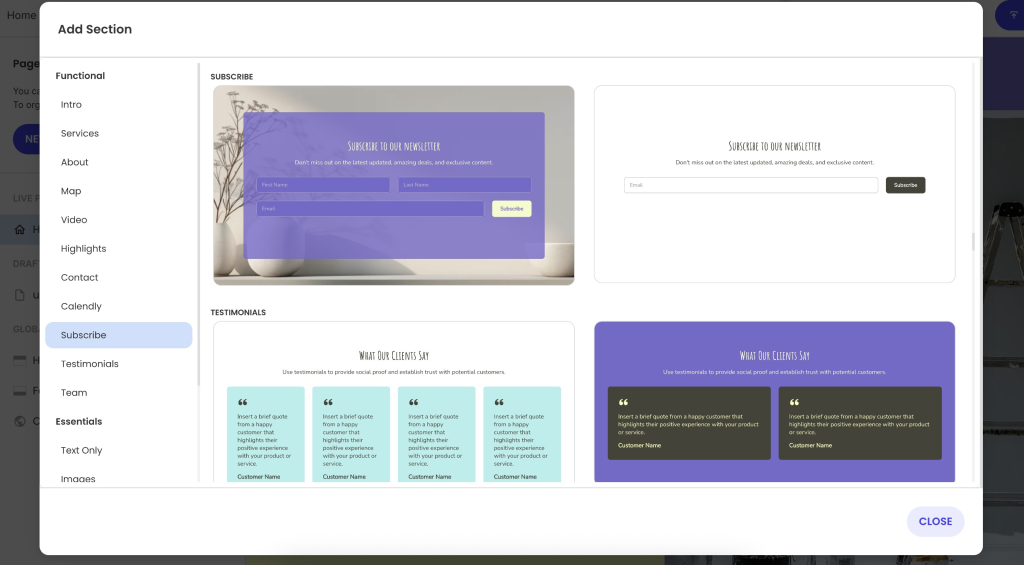
Now you’ve got a professional-looking signup page without designing from scratch or hiring anyone.
- A clear reason for people to sign up (lead magnet)
“Join my newsletter” doesn’t work. Too vague. People need to know exactly what they’re getting in exchange for their email address.
Your options:
A lead magnet: The specific thing you trade for an email address.
- “My 5-minute Instagram caption formula (because staring at a blank screen sucks)”
- “The spreadsheet I used to quit my job in 8 months”
- “How I pack a week in a carry-on without losing my mind: 23-item checklist”
Exclusive content: What they can’t get anywhere else.
- “Weekly updates on building my coaching business from zero to $5K/month — the messy, honest version”
- “New designs before anyone else sees them (and before I second-guess myself)”
- “All the mistakes I made so you can skip them”
A special offer: Early access or founder pricing.
- “Lock in $29/month forever: price goes to $49 next month”
- “Founding member discount: 50% off because you believed in this early”
- “Free 30-minute call, first 20 people only (then I’m closing it)”
- A specific call to action
Your sign-up button shouldn’t say “Subscribe” or “Submit.” Boring, and it doesn’t tell people what happens next.
Try instead:
- “Send me the 5-minute formula”
- “I need this spreadsheet”
- “Yeah, get me on the list”
- “I’m ready — count me in”
- “Show me the checklist”
Be specific about what they’re signing up for. According to Wisernotify, clear, specific CTAs can boost conversion rates by up to 161% compared to generic ones.
- One traffic source to start with
Your landing page won’t attract visitors on its own. It’s a single page with no SEO power. Unlike a full website that can eventually rank in search results, your landing page is invisible until you drive people to it.
Each channel takes time to learn. Pick one, test it for 30 days. Once you’re getting 10-20 signups regularly, add another.
- Your social media marketing: Post about it, add the link to your bio, share in stories
- Your personal network: Email friends, colleagues, past clients about what you’re building
- Guest blogging: Write for blogs your audience reads, mention your list in your bio
- Online communities: Join relevant groups, contribute value, share your sign-up link when appropriate
- Paid ads: If you have $100-200 to test, run a small Facebook or Instagram ad campaign
You can always add more traffic sources later. Right now, you just need one that works.
Step-by-step guide: How to build your email list without a website
| Step | What to do |
| 1. Choose your email marketing platform | Sign up for an email service that captures sign-ups, stores contacts, and sends emails |
| 2. Create your landing page | In the SiteGround Website Builder , pick a template, add an email form section, and edit it to include: A headline (what you’re offering + who it’s for) 2–3 sentences on what they get and whyA sign-up form (email required, name optional) |
| 3. Decide what you’re offering | Pick your opt-in incentive: lead magnet (checklist, template, guide), exclusive content (updates, early access), or special offer (founding member pricing, discount) Keep it specific |
| 4. Set up your welcome email | Create an email automation that sends a welcome message when someone subscribesIn your email, deliver what you promised, set expectations (what they’ll get, how often), brief intro of who you are |
| 5. Pick your starting traffic source | Choose ONE marketing channel to focus on: If you have social following → post about your landing page, add link to bio If you have email contacts or past clients → send them a direct email about what you’re building If you’re starting from zero → guest post on blogs, join online communities, or run small paid ads ($100-200) |
| 6. Get subscribers and email them | Share your landing page link in your chosen channel Email your list regularly (weekly or biweekly) Mix content: tips, updates, questions, storiesDon’t collect emails then disappear |
Best practices for growing your list
Once you’ve got the basics running, here’s how to improve and grow.
Make your opt-in offer irresistible
Specific beats generic every time. “The 3-Sentence Email That Got Me 10 Clients” beats “How to Get More Clients.”
Solve one clear problem quickly. People want a quick win, not a 50-page ebook they’ll never read.
If fewer than 10% of visitors are signing up, your offer isn’t compelling enough. Test a different angle or make the benefit clearer.
Quick tip: Use a double opt-in to protect your list quality.
When someone signs up, send a confirmation email asking them to verify their subscription before they’re added to your list. This extra step filters out fake emails, typos, and people who weren’t serious about subscribing. Your list grows slightly slower, but every subscriber is confirmed and engaged — which means better open rates and email deliverability long-term.
Keep your sign-up form simple
Ask for an email address at minimum. Adding a name is a nice touch, but every extra field you add means fewer completions. As a general rule, the shorter the form, the more people sign up.
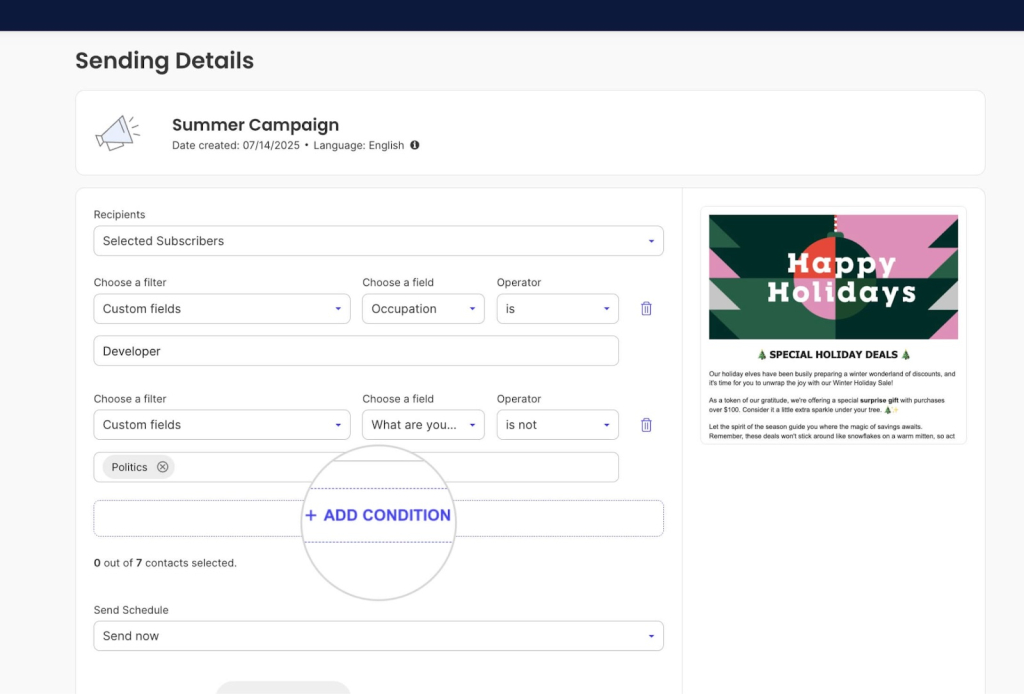
That said, if you plan to segment your list by role, company size, or another factor, asking upfront can save you work later. Just make sure each extra field has a clear purpose — if you’re not going to use the data, don’t ask for it.If you do need specific information, use SiteGround’s Custom Fields feature — but only add fields you’ll actively use to segment or personalize your emails.
Be clear about what subscribers get
Tell people what to expect upfront. On your landing page or in your welcome email, say something like: “One email every Tuesday morning. Real Instagram strategies I’ve tested.”
That’s clearer than “Join my newsletter” with no details about frequency or content.
Setting expectations upfront reduces unsubscribes later. Someone who knows they’re getting weekly emails won’t be surprised when weekly emails arrive.
Use multiple touchpoints
Remember when we said pick one channel to start? Once that’s bringing in 10-20 sign-ups regularly, it’s time to expand.
Don’t rely on one traffic source forever. Once you’ve got one working, add another.
Put your sign-up link everywhere it makes sense: social media bios, email signature, guest post author bios, podcast show notes, online community profiles, anywhere your target audience might see it.
Each touchpoint is another chance for the right person to find you.
Send valuable emails consistently
Don’t capture email addresses and go silent. Email at least every two weeks, preferably weekly when you’re building momentum.
Mix your content: share useful tips related to what they signed up for, give behind-the-scenes updates on what you’re building, ask questions to start conversations, tell personal stories that build connections.
People forget who you are if you disappear for months. Consistency builds trust.
Track what matters
Monitor these email marketing metrics:
- Sign-up conversion rate (new subscribers ÷ landing page visitors): Check Sessions in your Website Builder analytics and compare to new subscribers in Email Marketing. 10%+ is good. If you’re below 5%, your offer isn’t clear or valuable enough.
- Email open rates (subscribers who open ÷ emails delivered): Shows if your list is engaged and recognizes you. 20-30% is healthy; below 15% means your subject lines are weak or subscribers don’t remember signing up.
- Unsubscribe rate (people who opt out ÷ emails delivered): Shows if you’re keeping the right people. Under 2% is normal; above 5% means your content doesn’t match what they expected.
If your numbers are low, compare them against email marketing benchmarks first. Then test different email opt-in offers, subject lines, or check if your content matches what people signed up for.
Quick email list building checklist:
✅ Sign up for email marketing platform
✅ Create landing page with clear headline and sign-up form
✅ Decide on opt-in offer (what people get for subscribing)
✅ Write and schedule welcome email
✅ Set up call-to-action button text
✅ Pick one traffic source to focus on first
✅ Share landing page link in chosen channel
✅ Send first email to subscribers within 3 days
✅ Implement consistent email cadence (weekly or biweekly)
✅ Track sign-ups and opens to see what’s working
How to build an email list without a website: Get started today
The tech part is quick: pick a template in SiteGround Website Builder, add an email form section, delete anything else, and publish. You’ll have a simple sign-up page ready in under an hour.
The thinking part takes longer: what are you offering, who’s it for, what do you actually say. But you don’t need perfect answers to start. Launch with your best guess, get your first 20 subscribers, and adjust based on what they tell you.
Start building your landing page this week. Share it with ten people. Send your first email within three days of getting a sign-up. You’ll figure out the rest as you go.Ready to build your email list? SiteGround Email Marketing integrates directly with the SiteGround Website Builder so you can start collecting subscribers today.
Improve Your Email Campaigns with SiteGround!
Want your emails to reach more people? Try SiteGround Email Marketing. With an average delivery rate of 98.8%, your emails will land in your subscribers' inboxes. 
Frequently asked questions about building an email list with no website
Yes, to start. Use SiteGround Email Marketing and the Website Builder to create your landing page and collect emails. As your list grows, you’ll pay based on subscriber count.
500–1,000 engaged subscribers is a solid signal that there’s real demand. If people are opening your emails and you’re already making sales, you have enough to build on.
You know your business idea is worth pursuing when people take action. Create a landing page explaining your idea and see if 10%+ of visitors sign up. Email your subscribers asking what they’d actually pay for. If people engage, reply to your questions, and some buy when you make a pre-sale offer, you’ve validated demand worth building on.
The best lead magnets for building an email list are checklists, templates, email courses, or quizzes that give immediate value. Match the format to what you’re selling: launching a course? Offer a 5-day email mini-course. Selling templates? Give a free sample.
Email frequency depends on what you promised at sign-up and what you’re sharing. Weekly works if you’re building something and sharing progress updates. Every two weeks is fine if you’re sending longer, more valuable content. The key is consistency — whatever you promise, stick to it so people know when to expect you.
A landing page is a single page designed for one specific goal — capturing email sign-ups, promoting an event, selling a product. A website has multiple pages (home, about, blog, services) serving different purposes. For email list building, your landing page’s goal is getting people to subscribe.
It depends on your business type and goals, but email gives you more control. You own your email list and can reach subscribers directly — social followers are subject to algorithm changes and platform rules. For most small businesses validating an idea, start with email because you control the relationship. Use social media channels to drive people to your landing page.
You switch from a landing page to a full website when you’ve proven demand with sales, your list is 500-1,000+ subscribers, you need SEO traffic, or you’re selling multiple products.






Comments ( 0 )
Thanks! Your comment will be held for moderation and will be shortly published, if it is related to this blog article. Comments for support inquiries or issues will not be published, if you have such please report it through our official channels of communication.
Leave a comment
Thanks! Your comment will be held for moderation and will be shortly published, if it is related to this blog article. Comments for support inquiries or issues will not be published, if you have such please report it through our official channels of communication.