What Is a Good Email Open Rate? And How to Improve Yours

You spent two hours crafting the perfect email. You picked just the right image, wrote clever copy, triple-checked your call to action. You hit send to your 500 subscribers feeling pretty good about yourself.
Then you check the stats: 47 people opened it. Ouch.
Here’s the reality: if people aren’t opening your emails, all that time you spent writing them was basically wasted. Your brilliant content, your special offer, your helpful tips—none of it matters if it’s sitting unread in someone’s inbox.
Open rates tell you whether anyone’s actually paying attention before you worry about clicks, conversions, or any of that other stuff. And if you’re a small business owner or a freelancer who don’t have big marketing teams or fancy tools, understanding what makes people open emails (and what makes them hit delete) is crucial for your email marketing strategy.
So what actually makes someone open your email instead of scrolling past it? Let’s see.
Key takeaways:
- Aim for 15-25% open rates (25-35% is good, 35%+ is excellent). Track your trends over time rather than obsessing over hitting a specific number.
- Your subject line and sender name make or break your open rate. A compelling subject line can lift rates by 20-30%, while an unrecognizable sender name gets you deleted instantly.
- List quality beats list size. A 500-person engaged list will outperform a 10,000-person list of people who barely remember you. Segment by interests for 15-30% better results.
- Poor deliverability creates a vicious cycle. Emails in spam → lower opens → email providers think you’re spam → even more emails to spam. Keep your list clean to break the cycle.
- Simple changes show results fast. Better subject lines, smarter send times, and regular list cleaning can move your numbers within weeks—no fancy tools required.
What Is an Email Open Rate and Why Is It Important?
An email open rate measures what percentage of your delivered emails actually get opened. If you send 1,000 emails, 50 bounce back, and 250 people open your message, that’s a 26.3% open rate.
Why This Number Matters
When you’re running a business, you’ll track dozens of different email marketing metrics and KPIs (key performance indicators)—recruiter metrics, conversion rates, customer acquisition costs. Email open rate is one of the most important and easiest to understand because it tells you if anyone’s actually paying attention.
Here’s a reality check: you spent an hour writing that newsletter, picked the perfect image, made sure your offer was clear. But if only 50 people out of your 500-subscriber list opened it, that’s a 10% open rate. Something’s off—maybe your subject line didn’t grab attention, people don’t recognize your sender name, or your emails are treated as spam.
Open rates are your early warning system. When they’re decent, more people see your content, click through, and convert. When they’re low, you need to investigate.
The good news? Simple changes—like writing better email subject lines, sending at better times, or cleaning up your contact list—can move your numbers within a few weeks. SiteGround Email Marketing puts open rates front and center on your dashboard so you can track what’s working.
How to Calculate Email Open Rate
Email open rate is calculated by dividing unique opens by emails delivered, then multiplying by 100.
Don’t worry, the math is simple. Here’s the formula:
Open Rate = (Unique Opens ÷ Delivered Emails) × 100
Let’s break that down with real numbers. Say you send an email campaign to 1,000 subscribers:
- 50 emails bounce back (invalid addresses, full inboxes, etc.)
- 250 people open your email
- Your delivered emails: 1,000 – 50 = 950
- Your open rate: (250 ÷ 950) × 100 = 26.3%
But here’s where people sometimes get confused.
Unique Opens vs. Total Opens
Use unique opens in your calculation, not total opens.
- Unique opens count each person once, no matter how many times they open your email.
- Total opens count every single time anyone opens it.
Why that matters: if someone opens your email on Monday morning, then opens it again Wednesday to grab that discount code, that’s one unique open but two total opens. Unique opens give you a clearer picture of how many actual people engaged, not just how many times emails got clicked.
What “Delivered” Really Means
“Delivered” means your email successfully made it to someone’s inbox.
And keep in mind that “delivered” and “sent” aren’t the same thing. “Sent” just refers to the emails that left your server.
So if you send to 1,000 people but 50 bounce, you only delivered 950 emails. That’s why it’s important to always subtract bounces from the total emails sent before calculating your open rate.
Where to Find These Numbers
The good news is you don’t need to calculate this manually. With SiteGround Email Marketing, you’ll see your open rate displayed right on your campaign dashboard, usually within a few hours of sending. This email marketing platform automatically tracks opens, calculates the percentage, and shows you the breakdown.
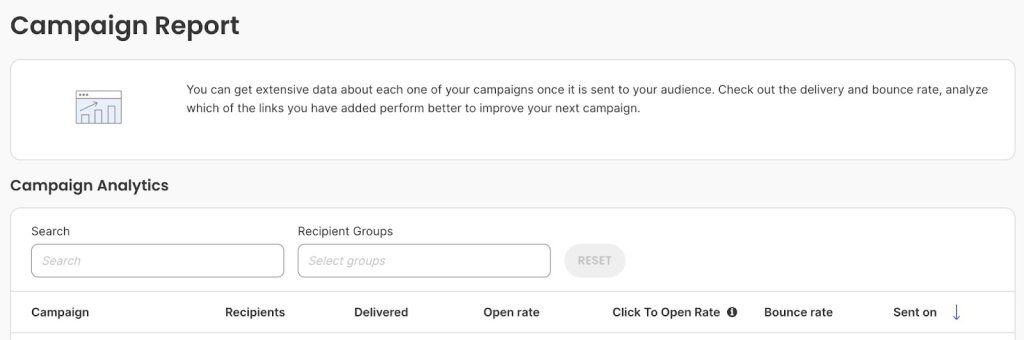
If you want to see the raw numbers behind the percentage, look for your campaign report or analytics section. You’ll typically find:
- Total sent
- Bounced emails
- Unique opens
- Total opens
- Open rate percentage
Now that you know how the math works, the next question is: what’s a good number to aim for? Let’s look at some email marketing benchmarks.
What is a Good Email Open Rate?
For most small businesses, an open rate between 15-25% is acceptable. If you’re hitting 25-35%, you’re doing well. Anything above 35% is excellent.
The industry average across all sectors is 36.5%, as reported by Smart Insights, but that number alone doesn’t tell you much. Context matters more than any single benchmark.
Compare against two things:
- Your own past email marketing performance – Are your rates improving or declining?
- Your industry – A nonprofit might see 40% open rates while an ecommerce business celebrates 25%
Of course, several other factors affect what counts as “good” for your specific situation—things like email type, list size, and how you manage your contacts. We’ll dig into all of those in the next section.
The key takeaway? Don’t obsess over hitting a specific number. Track your trends over time and compare yourself to similar businesses in your industry. If you’re consistently below 15%, that’s when you need to dig into what’s going wrong.
Factors That Affect Email Open Rates
Email open rates are primarily influenced by the following factors:
- Your subject line
- Sender name
- Industry and audience type
- Email list
- Email type
- Email deliverability
- Email content relevance
- Sending time
- Mobile optimization
- Privacy changes and tracking
Long story short: Your open rate doesn’t exist in a vacuum. Understanding these factors helps you diagnose problems and make targeted improvements.
Subject Line Quality
Your subject line is the first part of the email that recipients see, and it’s often the deciding factor. A well crafted subject line sparks curiosity or promises value. A generic one like “Newsletter #42” gets ignored immediately.
Let’s say that you’re a customer receiving an email newsletter on choosing an ad network. Would you open this email if the subject line did not reference the email content?
Why subject lines make or break your open rate:
- You’re competing with 50+ other messages sitting in someone’s inbox right now. The subject line is your one shot to grab attention before they scroll past. If it doesn’t immediately tell them why they should care, your open rate tanks—even if you spent hours writing amazing, engaging content inside.
- Mobile truncation kills unclear subject lines. A subject line perfect on your laptop (“Exclusive invitation to our annual customer appreciation event”) gets chopped off on mobile (“Exclusive invitation to our ann…”). Since over half of all emails get opened on phones, mobile users skip anything they can’t understand immediately.
Good subject lines can lift your open rates by 20-30% compared to generic ones, according to C2C Kloud. That makes this one of the biggest levers you can pull.
Sender Name Recognition
People open emails from senders they know. Seems obvious, right? But if your “From” name is generic, like “info@yourbusiness.com,” email recipients might skip it.
Recognition works two ways:
- Familiar sender names feel safe. “Sarah from The Coffee Shop” beats “noreply@coffeeshop.com” because people immediately recognize it’s that local place they love, not random marketing spam.
- Consistency builds recognition. If your emails come from “John at ABC Consulting” one week and “ABC Marketing Team” the next, people don’t connect the dots. They don’t recognize you, so they don’t open
This gets even more important because mailbox providers like Gmail, Outlook, and Yahoo are cracking down on spam. An unfamiliar sender name makes people nervous. They might mark your email as spam “just to be safe”—and that damages your reputation with email providers. Suddenly, your future emails start landing in spam folders for everyone, even the subscribers who’ve been happily reading your stuff for months.
Industry and Audience Type
Some industries naturally see higher open rates than others. But here’s what matters more than your industry: your specific audience.
B2B vs. B2C behaviors:
- B2B audiences (accountants, consultants, office managers) check email during work hours, usually Tuesday through Thursday mornings. They’re at their desks going through their inbox with coffee.
- B2C audiences (parents, hobbyists, online shoppers) check email in evenings or on weekends when they have time to browse and think about buying.
Why timing mismatch kills your open rate: Send promotional emails to busy parents at 10 AM on Tuesday? You’re hitting their inbox while they’re at work dealing with meetings. By the time they check personal email at home, your message is buried under 30 newer ones. That timing mismatch alone can cost you 10-20 points on your open rate.
Your subscribers might behave totally differently than broad industry averages, so pay attention to your own data.
Email List Quality, Size and Segmentation
Your email list is the collection of email addresses from people who’ve opted in (ideally through double opt-in) to receive your emails—whether that’s newsletters, promotions, product updates, or other content from your business. Building an email list is one of your most valuable marketing assets, and the quality of that list makes or breaks your open rates.
- Smaller, engaged lists beat massive, random ones every time. A 500-person list of actual customers who like your stuff will crush a 10,000-person list of people who vaguely remember visiting your website once. Why? Because engaged subscribers recognize your name, trust you, and actually want to read what you send. A bloated list full of people who don’t care just drags your numbers down and gets you marked as spam.
- Contact segmentation—grouping people by what they’re interested in—makes a massive difference. When you send specific emails to your target audiences, your open rates can jump 15-30% compared to blasting the same generic message to everyone. Think about it: if you’re in recruitment and you get an email specifically about high volume hiring, you’re way more likely to open it than some generic “business tips” email.
- List health matters too. Email addresses die all the time—people change jobs, abandon old accounts, lose interest. If you keep sending to addresses that never respond, email providers notice. But be careful not to inadvertently lose genuine contacts. If you think an email address might be outdated but you have other ways to reach them, use a voice call to update their information, or use email finder tools to confirm and update missing addresses before removing them completely.
Email Type
Not all emails are created equal, and understanding this saves you from unnecessary panic. The type of emails you send dramatically affects your open rate.
- Transactional emails (order confirmations, password resets) typically get 40-50% open rates because people need them.
- Promotional emails (newsletters, sales) average 15-25% because they’re competing for attention.
So don’t judge both types by the same standards. If your promotional newsletter gets a 22% open rate while your order confirmations hit 45%, that’s completely normal—not a sign something’s wrong. Track each type separately in your analytics so you’re comparing apples to apples, not getting discouraged because a sales email didn’t match your transactional email’s performance.
Email Deliverability
Email deliverability determines whether your emails actually reach your subscribers’ inboxes or get filtered into spam folders—and this directly impacts your open rates. If your email lands in spam, your open rate is essentially zero because most people never check their spam folders.
- Sender reputation acts like a credit score for email. Gmail, Outlook, and Yahoo use it to decide inbox or spam, building it from spam complaints, bounce rates, and your sending practices.
- Once your reputation drops, it affects all future emails. Send to a bad list and get spam complaints? Email providers start filtering everything you send to spam—even for subscribers who’ve been happily reading your emails for months.
And it compounds.
Poor deliverability → more spam → fewer opens and clicks → email providers think your emails suck → even more spam.
Breaking that cycle means fixing the root problems: clean your list, improve your content, fix your sending practices.
Email Content Relevance
One thing people often miss: the content inside your emails directly affects future open rates, not just today’s clicks.
- Irrelevant content destroys future open rates – If someone opens your email and finds generic tips or products they don’t care about, they’ll stop opening your future emails. You’ve trained them that your content isn’t worth their time.
- Relevant content builds trust over time – Send targeted emails (like high volume hiring info to recruiters) and people remember your emails are valuable. They’ll keep opening because you’ve proven you understand what they need.
- Today’s content shapes tomorrow’s open rates – Every email either builds or destroys trust. Segment your list and send relevant content to each group, or watch your open rates decline as more people learn to ignore you.
Sending Time and Frequency
When and how often you hit send directly affects whether people actually see and open your emails.
- Timing affects visibility. Send at 3 AM? Your email is buried under 20 messages by the time your audience wakes up and checks their phone. They might not even scroll down far enough to see it. Send during lunch break or right after work when they’re actually in “check email” mode? Your message is sitting right at the top of their inbox. That timing alone can swing your open rate 10+ percentage points.
- Frequency affects recognition. Send emails every single day? People get tired of seeing your name and start auto-deleting without even reading. Your open rates drop because you’ve trained them to ignore you. Send once every three months? They forget who you are. Your name shows up and they think “Wait, who’s this? Did I sign up for this?” and delete it assuming it’s spam.
Most small businesses do well with 1-3 emails per week. You’re staying top-of-mind without being annoying. But the “right” frequency really depends on what you’re selling. A daily deals site? Daily emails make sense—that’s the whole point.
A B2B consultant sharing industry insights? Maybe one solid newsletter every two weeks is perfect. And timing matters especially during events and holidays—like knowing what the best time to send Black Friday emails is during peak shopping season when competition for inbox attention is fierce.
Mobile Optimization
Around 55% of emails are opened on mobile devices, according to Growth-Onomics. This affects both how people decide to open your email and whether they’ll open future emails from you.
How it affects open rates:
- Subject lines get truncated – Mobile shows only 30-40 characters, so if the key hook is at the end, mobile users never see it
- Preview text matters more – Badly formatted preview text or HTML code makes your email look unprofessional right in their inbox
Most modern email tools like SiteGround Email Marketing automatically optimize for mobile, but always send yourself a test on your phone before sending to your list. Check that your subject line isn’t getting cut off and your preview text looks clean.
Privacy Changes and Tracking Accuracy
Here’s a factor that’s different from the others—it doesn’t affect whether people open your emails, but it affects the numbers you see in your dashboard.
Since September 2021, Apple’s Mail Privacy Protection automatically pre-loads email images. Your analytics counts this as an “open” even if the person never looked at the email. If half your subscribers use Apple Mail (iPhones, iPads, Macs), your open rates might look 10-20 points higher than reality.
Does this make open rates useless? No, you just need to interpret them differently:
- Focus on trends, not exact numbers – If your open rate drops from 35% to 25%, something definitely changed
- A/B testing still works – If one subject line gets 40% and another gets 28%, the first one legitimately performed better
- Use click-through rate as validation – No privacy feature can fake an actual click, so if people are clicking, they’re definitely reading
Track your patterns month-over-month instead of obsessing over specific percentages.
How to Improve Your Email Open Rates
Let’s take a look at some tactics that work for small businesses and freelancers who need tangible results without a big marketing team.
Here are 7 tactics that work for small businesses and freelancers who need results without a big marketing team:
- Write subject lines that get opened
- Clean your email list regularly
- Segment your list for relevance
- Personalize beyond “Hi [First Name]”
- Stay out of spam folders
- Send emails at
- Test everything with A/B testing
Let’s break down each tactic:
1. Write Subject Lines That Get Opened
Your subject line determines whether someone opens your email or scrolls past it. Skip generic phrases like “Newsletter #42” or “Monthly Update.” Instead, be specific about what’s inside.
Good subject lines are:
- Clear and specific: “Your order ships tomorrow” beats “Shipping update”
- Short: Under 50 characters, so mobile users see the full line
- Relevant: Match what’s actually in the email
- Conversational: Write like you’re texting a friend, not sending a press release
Test different approaches. Try asking a question, creating curiosity, or leading with value. With SiteGround Email Marketing’s AI Email Writer, you can generate multiple subject line options and pick the strongest one.
2. Clean Your Email List Regularly
Sending emails to dead addresses hurts your open rates and sender reputation. Clean your list every quarter by removing subscribers who haven’t opened any emails in 6+ months.
Make it easy for people to unsubscribe. Yes, really. It’s better to lose uninterested subscribers than have them mark you as spam, which damages your deliverability for everyone else.
Look for:
- Bounced email addresses (remove immediately)
- Inactive subscribers (no opens in 6 months)
- Role-based addresses like “info@” or “admin@” (these rarely get opened)
Most people see open rate improvements within 2-3 campaigns after cleaning.
3. Segment Your List for Relevance
Send different emails to different groups. A new subscriber needs different content than someone who’s been a customer for two years.
Simple segmentation options:
- Campaign interactions: Use the Analytics page to group contacts by who opened, clicked, or didn’t engage with past campaigns
- Lead source: Assign different groups based on where people signed up—blog form, checkout, event, etc.
- Custom groups: Create groups like “New Customers,” “Repeat Buyers,” or “Newsletter Subscribers” and assign contacts manually
- Interest-based groups: Track who clicks on specific topics (like cake content if you’re a bakery) and create targeted groups
For example, if you run a bakery, check your Analytics after sending a campaign about cakes. Assign everyone who clicked to a “Cake Lovers” group, then send future cake promotions just to them instead of your entire list. Relevant emails get opened.
4. Stay Out of Spam Folders
Landing in spam kills your open rate instantly. Here’s how to avoid it:
- Watch your frequency: Most small businesses do well with 1-3 emails per week. More than that, and people tune out or mark you as spam.
- Use a recognizable sender name: “Sarah from The Coffee Shop” performs better than “noreply@coffeeshop.com”
- Avoid spam trigger words: “Act now,” “Limited time,” “Click here,” especially in all caps with multiple exclamation points
- Get permission: Only email people who’ve actually signed up. Bought lists tank your open rates and damage your reputation.
5. Send Emails at the Right Time
There’s no universal “best time,” but you can find what works for your audience. Check your past email marketing campaign reports to see when your open rates peak.
General patterns:
- B2B emails: Tuesday-Thursday, 9-11 AM works for many
- B2C emails: Evenings and weekends often perform better
- Your specific audience: Test and track your own data
Most email platforms (including SiteGround’s) let you schedule sends, so you can write emails when convenient and send them when your audience is most likely to engage.
6. Test Everything with A/B Testing
What works for other businesses might not work for yours. A/B testing lets you find out what your specific audience responds to.
Start simple:
- Test two subject lines with the same email content
- Send version A to 10-20% of your list, version B to another 10-20%
- Wait 2-4 hours and compare open rates
- Send the winning version to the remaining subscribers
Try testing:
- Subject line style (question vs. statement)
- Sender name (personal name vs. company name)
- Send time (morning vs. evening)
- Email length (short vs. detailed)
Change one variable at a time so you know what made the difference.
QUICK TIP: Troubleshooting Open Rate Problems
- Sudden drop (10%+ overnight)? Your emails might be landing in spam. Send tests to Gmail, Outlook, and Yahoo to check. Verify your sender authentication is set up correctly.
- Gradual decline over months? List fatigue. Try a re-engagement email campaign: “We’ve missed you—still interested?” Remove subscribers who don’t respond.
- Consistently below 10%? Your list quality needs work. Remove inactive contacts, test completely different subject line approaches, and verify your sender name is recognizable.
- Rate seems suspiciously high (55%+)? Likely inflated by Apple Mail Privacy Protection. Focus on click-through rate for true engagement instead.
The fix: Track your open rates weekly. Small problems are easier to fix than big ones.
Ready to See Your Open Rate Improve?
Еmail marketing isn’t rocket science, but it does require paying attention. You don’t need a marketing degree or a massive budget to see real improvements in your open rates.
Start with one or two changes from this guide. Maybe clean up your contact list this week. Test a new subject line style next week. Check your send times the week after that. Small tweaks add up, and you’ll see the difference in your dashboard within a few campaigns.
If you’re just getting started with email marketing (or you’re tired of your current tool making things complicated), SiteGround Email Marketing gives you everything you need without the overwhelm. Easy segmentation, automation that actually makes sense, and built-in AI for content writing—all designed for people who have a business to run and don’t want to spend all day figuring out email software.







Comments ( 0 )
Thanks! Your comment will be held for moderation and will be shortly published, if it is related to this blog article. Comments for support inquiries or issues will not be published, if you have such please report it through our official channels of communication.
Leave a comment
Thanks! Your comment will be held for moderation and will be shortly published, if it is related to this blog article. Comments for support inquiries or issues will not be published, if you have such please report it through our official channels of communication.