5 Email Marketing Trends for 2026 + Action Plan
Most businesses are losing money on email marketing—not because they’re bad at it, but because they’re building on rented infrastructure that works against them.
You’ve got hosting from one vendor, email service from another, and a website on a third platform. So when something breaks, you’re stuck playing referee between three support teams while your campaigns collect dust in spam folders.
Sound familiar?
Five trends are reshaping email marketing in 2026, and they all come down to one thing—owning your infrastructure instead of renting it. When you control the foundation, everything else falls into place: deliverability improves, automation works, and growth happens.
This isn’t another prediction article. This is what to build, in what order, and why it matters when you’re ready to scale.
Let’s get into it.
Key takeaways:
- Own your infrastructure – Build on one integrated platform (hosting + website + email) instead of piecing together multiple vendors.
- Fix deliverability first – Set up authentication and clean your list before anything else. Proper setup gets 95-99% inbox placement.
- Automate the basics – Welcome and cart abandonment emails get 42% open rates vs. 25% for bulk sends.
- Track revenue, not opens – Apple killed open rate accuracy. Focus on clicks, conversions, and revenue per email instead.
- Mobile is non-negotiable – 55% of emails open on mobile. Use 60% text, 40% images, and test on real devices.
. - Newsletters build trust – Send 2-3 value emails per promotion. Customers need 7+ touchpoints before buying.
What Is Email Infrastructure And Why It Matters
Email infrastructure is the technical system that sends and delivers your emails: mail servers, authentication protocols (SPF, DKIM, DMARC), your hosting environment, and the website where people subscribe. These components work together to determine whether your messages land in inboxes or spam folders.
In 2026, this matters more than ever because:
- Privacy laws keep tightening.
- Authentication requirements are stricter.
- Email deliverability standards are higher.
- Platform algorithms change without warning.
If your business built its email marketing on scattered tools—hosting from one vendor, email service from another, website on a third platform—you’re likely hitting walls. When something breaks, you’re stuck coordinating between three different support teams while your email marketing campaigns sit in spam folders.
The alternative is simpler: everything on one platform. When your hosting, website, and email service run together—like SiteGround Email Marketing —authentication happens automatically, server performance supports deliverability, and signup forms connect directly to your lists without fragile plugins.
You’re not piecing together a system—you’re working with one that’s built to function as a whole.
This foundation—ownership, integration, reliability—is what makes it possible to take advantage of what’s actually changing in email marketing right now.
5 Email Marketing Trends to Watch in 2026
Now that you understand why infrastructure matters, let’s look at what’s actually changing in email marketing—and more importantly, how to use these trends without getting overwhelmed.
- Privacy-first data collection
- Automated lifecycle campaigns
- AI-driven personalization
- Mobile-first emails
- Newsletters for engagement and retention
1. Privacy-First Data Collection
📌 Quick Take: Privacy-first data collection means asking subscribers directly what they want through preference centers and surveys, rather than tracking them across the web. When you let people tell you their preferences, you send more relevant emails that get opened and clicked—while building trust and meeting stricter privacy requirements.
This matters now because the old ways of tracking are disappearing. Third-party cookies are going away, browsers are adding stronger privacy protections, and Apple’s Mail Privacy Protection has made open rates less reliable. It pre-loads images for privacy, which inflates open rates and makes them less accurate for measuring real engagement. As a result, businesses are shifting toward “zero-party data”—information customers willingly share with you through these tools.
What This Means for You
Stop guessing what subscribers want. Ask them directly. A preference center is a simple page where people choose their interests, email frequency, and content types—you can collect this information by creating custom fields when new subscribers sign up. When subscribers tell you what they want, you stop sending irrelevant emails that get ignored or marked as spam.
This privacy-first approach improves results. When you respect boundaries and send only what people asked for, open rates climb and unsubscribes drop.
Hint: Add a preference center link to your email footer. Ask three simple questions about content preferences, like:
- How often do you want to hear from us? (weekly, monthly, or major announcements only)
- What topics interest you? (tips, case studies, product updates, special offers)
- What best describes you? (small business owner, freelancer, agency)
2. Automated Lifecycle Campaigns
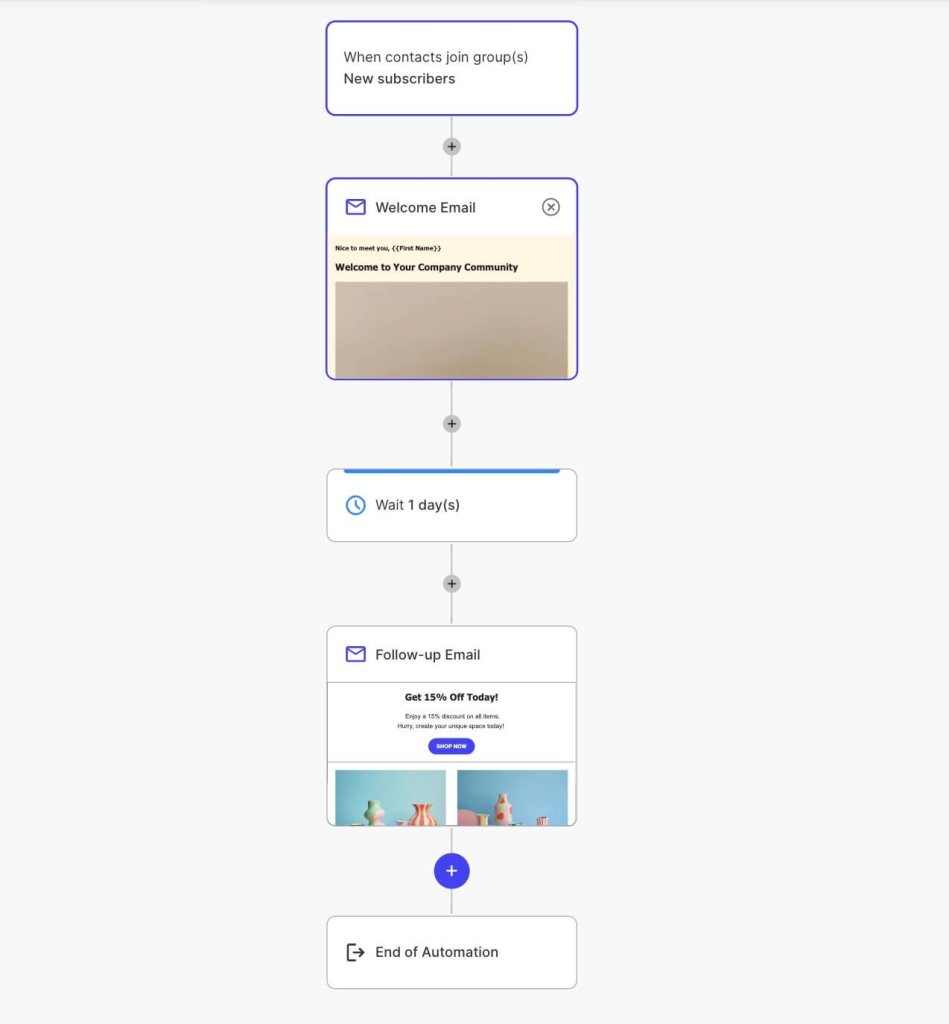
📌 Quick Take: Lifecycle automation sends targeted emails triggered by customer actions—like welcome sequences for new subscribers or abandoned cart reminders. These automated emails achieve 42% open rates compared to 25% for bulk campaigns because they’re timely, relevant, and behavior-based.
Lifecycle automation sends targeted emails at specific stages of the email customer journey. These automated emails consistently achieve 42.1% open rates, as shared by Genesys.
What This Means for You
Creating email automation isn’t advanced anymore—it’s baseline. If you’re manually sending every campaign, you’re spending hours on work that could run automatically while generating better results.
The 5 T’s of email marketing explain why automation works:
- Targeting – reaching the right audience with relevant messages
- Timing – sending at the right moment based on behavior or triggers
- Testing – experimenting to find what works best for your target audience
- Trust – building reliability through consistent email delivery and authentication
- Tracking – measuring results to improve performance over time
Automated campaigns nail all five by targeting based on behavior and sending at triggered moments.
3. AI-Driven Personalization
📌 Quick Take: AI-powered email tools now handle content creation, subject line generation, and image creation—saving hours on campaign production. For businesses getting started, AI content and image generators deliver immediate value. Advanced features like predictive targeting come later as you scale.
Artificial Intelligence for personalized emails goes beyond inserting someone’s first name. The technology now handles everything from content creation to predicting customer behavior. That said, not all AI features are equally useful when you’re getting started.
What This Means for You
The most practical AI tools for small businesses are content and image generators. Instead of staring at a blank screen, AI drafts email copy, generates subject line variations, and creates images tailored to your campaigns. This is where you’ll see immediate time savings. SiteGround Email Marketing AI features handle both—the AI Assistant generates email content and email subject lines, while the AI Image Generator creates visuals, so you can launch campaigns faster without sacrificing quality.
As you scale, more advanced AI features become relevant:
- Send-time optimization learns when each subscriber typically opens emails and schedules delivery accordingly.
- Predictive targeting identifies churn risk, suggests next-best offers, and finds high-value customer segments.
- Automated A/B testing runs variations and picks winners without manual analysis.
With that in mind, if you’re getting started or in growth mode, you don’t need predictive churn modeling yet. You need help writing emails consistently and creating visuals that don’t look generic. That’s where AI delivers immediate value without overwhelming you with complexity.
SiteGround Email Marketing is built for scaling businesses—offering the smart features you’ll actually use like content generation, image creation, scheduled campaign sending, and basic personalization. You get practical tools that help you plan ahead and grow, not enterprise-level predictive analytics you’re not ready to implement.
Start here:
- Use AI to draft your next three email campaigns.
- Edit the output to match your voice, but let AI handle the first draft and image suggestions.
Send scheduled campaigns ahead of time to stop scrambling at launch.
4. Mobile-First Email Still Rules
📌 Quick Take: With 55% of emails opened on mobile devices, mobile optimization isn’t optional. The 60/40 rule (60% text, 40% images) helps deliverability and accessibility, while single-column email layouts, large buttons (44×44 pixels minimum), and readable email fonts make emails easy to engage with on small screens.
Let’s be real: mobile optimization isn’t some fresh trend we’re unveiling. But it’s the reality most marketers are still ignoring. Here’s the stat that should make you nervous: 55% of emails are opened on mobile devices, according to Growth-Onomics, and emails that don’t display properly get deleted or ignored immediately.
When your message is hard to read on a phone—tiny text, broken layouts, buttons too small to tap—people don’t struggle through it. They just move on and you’re losing email engagement.
If you’re still designing emails on your desktop and assuming they’ll “probably look fine” on mobile, you might be sending half your list straight to the trash folder.
What This Means for You
What is the 60/40 rule? Aim for 60% text and 40% images in your email design. This ratio matters for three reasons: spam filters flag image-heavy emails, screen readers can’t read text embedded in images, and most email clients block images by default. If your entire message is one big image, recipients see a blank rectangle.
That said, the ideal ratio depends on your audience—some respond better to 80/20 text-heavy emails. Test what works for your specific subscribers and adjust from there.
Email accessibility means designing emails that everyone can read and interact with, regardless of how they access them. Alt text for images means subscribers see descriptions even when images are blocked. Clear heading hierarchy helps people scan quickly—exactly how mobile users actually read. Readable fonts and proper contrast? They’re not just for visually impaired subscribers. They make your emails easier to read for everyone squinting at their phone in bright sunlight or scrolling before bed.
Your mobile-first design checklist:
- Single-column layouts stack cleanly on narrow screens instead of breaking across multiple columns
- Above-the-fold content puts your main message and call to action where people see it without scrolling
- Tappable buttons sized at least 44×44 pixels—not tiny text links that require precision tapping
- Font size of 14-16 pixels minimum, so people don’t need to zoom and pinch
- High contrast between text and background makes reading easier in bright sunlight or low light
SiteGround Email Marketing templates handle mobile optimization automatically—single-column layouts, properly sized buttons, and accessible fonts are built in, so your emails work on mobile from the start.
Mobile-first email marketing action steps:
1. Open every email you send on your own phone before it goes out.
2. Tap the buttons.
3. Try to read the text in different lighting.
If you struggle, your subscribers will too. Most email platforms show mobile previews in their editors, but nothing beats testing on a real device where your audience will actually read it.
5. Newsletters to Encourage Engagement and Retention
📌 Quick Take: Newsletters work as retention engines when you send 2-3 value-focused emails for every promotional one. This approach builds trust through the Rule of 7—customers need 7+ touchpoints before buying. Consistent, helpful newsletters keep you top of mind without being pushy.
Email newsletters are having a moment—but not the promotional blast kind. In 2026, successful businesses will treat newsletters as retention engines and relationship builders, not just another communication channel to push sales messages. The shift is toward content-driven emails that mix education, community, and value with occasional soft offers.
What This Means for You
The best newsletters don’t feel like marketing. They feel like hearing from someone you trust who happens to have useful insights. This approach works because of the Rule of 7 in email marketing: customers typically need seven or more touchpoints with your brand before they purchase. Newsletters create those touchpoints naturally without being pushy.
The 2-3 to 1 ratio: Send 2-3 value-focused emails for every promotional one. “Value” is anything subscribers can genuinely use, whether they buy from you or not, such as:
- Tips that solve specific problems
- Case study examples showing real results
- Industry insights with your take
- Behind-the-scenes looks at how you work
For example, a web design agency might share design trends, website performance tips, and client case studies, then occasionally mention their services. An ecommerce store could send styling guides, product care instructions, and customer spotlights between sales announcements. You’re staying present without constantly asking for the sale.
For small businesses, consistency beats frequency. A monthly newsletter you actually send matters more than a weekly one you abandon after three issues because you can’t keep up. Pick a schedule you can maintain—weekly, bi-weekly, monthly—and stick to it. Your audience learns when to expect you.
Start simple: Pick one topic you know well. Commit to one email per month. Focus on teaching something genuinely useful. Keep promotional messages to a single line at the bottom. Once you’ve got that rhythm, you can expand frequency or experiment with different content types.
Each newsletter maintains your presence and builds trust. When subscribers are ready to buy, you’re already top of mind because you’ve been helpful for months—not because you sent another discount code.
What These Trends Mean for Your Email Strategy
Understanding the latest trends is one thing. Knowing what to actually do with them is another. Here’s your action plan—what to prioritize, what metrics actually matter, and how to implement without getting overwhelmed.
Step 1: Fix Email Deliverability First
None of the trends matter if your emails don’t reach inboxes. Emails land in spam for predictable reasons:
- Poor authentication;
- Dirty email lists;
- Bad sender reputation.
Set up authentication (SPF, DKIM, DMARC). These protocols verify you’re actually who you say you are—think of them as digital signatures that prove your emails aren’t forged. Email providers check these before deciding inbox or spam. Properly authenticated emails build sender reputation, which directly impacts deliverability.
Clean your email list. Remove hard bounces immediately—they’re invalid addresses that damage your reputation. Clean out inactive subscribers who haven’t opened in 6+ months. A smaller, engaged list outperforms a large, inactive one every time.
Choose a reliable web hosting provider. Slow servers hurt the sender reputation. Slow servers hurt sender reputation, and shared hosting with spammers can get your IP address flagged by email providers. This is where integrated infrastructure makes a difference.
SiteGround Email Marketing handles authentication configuration automatically and provides email-optimized hosting, eliminating both the technical barriers and the reputation risks of pieced-together systems. Businesses with clean lists and proper authentication achieve the best inbox placement rates.
Step 2: Track the Right Email Marketing Metrics
Open rates aren’t as reliable as they used to be. Remember Apple’s Mail Privacy Protection we mentioned earlier? In 2026, smart marketers will focus on email marketing metrics that actually indicate interest and action.
Focus on the right email marketing benchmarks:
- Click-through rate (industry average: 3-5%) – If you’re below 2%, review your calls-to-action and make sure they’re clear and relevant to your content. Above 3% means your audience is engaged.
- Conversion rate – This varies by industry, but if clicks aren’t turning into actions (purchases, signups, downloads), your landing pages or offers need work, not your emails.
- Revenue per email – Track what each campaign generates. If it’s trending down, test different offers or segments more precisely to match content with subscriber interests.
- Cart recovery rate for ecommerce – A good abandoned cart sequence recovers 10-15% of lost sales. Below that? Test your timing, messaging, or add social proof to address objections.
- Customer lifetime value (LTV) from email subscribers – Compare subscribers who came from email versus other marketing channels. If email subscribers have lower LTV, you might be attracting the wrong audience or not nurturing them properly.
Track real engagement signals, not vanity metrics. Revenue metrics beat open rates every time—your leadership cares about ROI, customer acquisition cost, and lifetime value.
Get A Free Email Metrics Cheat Sheet Master 7 key email marketing metrics and improve your campaign performance. Perfect for quick reference!
Google reCAPTCHA used. Privacy Policy and Terms of Service apply
Your Email Trends Action Plan
Trying to implement all five trends at once is how projects stall. Here’s your realistic six-month step-by-step guide:
| Timeline | Focus | What to Do |
| Month 1: Foundation | Get the basics right | Import your contacts and remove invalid addresses Create your first signup form Send a test campaign to yourself to check deliverability |
| Month 2: Core Automation | Launch your first sequence | Launch welcome email sequence (3 emails over 7-10 days) Set triggers for different signup sources Add delays between emails (2-3 days, then 5-7 days) Test the automation with yourself first |
| Month 3: Regular Content | Start consistent communication | Start monthly newsletter (2-3 value emails to 1 promotional) Use custom fields to capture subscriber preferences at signup Schedule campaigns ahead instead of sending immediately |
| Quarter 2: Optimize | Scale what’s working | Scale what’s working Create additional automation sequences for different subscriber types Use SiteGround AI Assistant to draft campaign variations Refine your contact segments Test different subject lines and send times |
Most businesses see measurable results by Month 3—improved open rates from preference data and revenue from automated sequences.
The Bigger Picture for Email Trends
The future is omnichannel, but email stays at the center. While social platforms change algorithms and ad costs climb, email remains the one channel where you actually own the relationship. You control your list. You decide when to reach out. No platform can change the rules overnight and tank your reach.
This is why owned infrastructure matters more in 2026 than ever before. When your hosting, website, and email service work together on one platform, you’re not dependent on multiple vendors or vulnerable to one platform’s policy changes.
The businesses winning in 2026 aren’t chasing every new feature—they’re building on foundations they control.
Ready to build your email marketing on infrastructure you actually own? SiteGround’s complete toolkit—Hosting, Website Builder, and Email Marketing—works as one integrated system, so you’re not piecing together solutions from different vendors.





Comments ( 0 )
Thanks! Your comment will be held for moderation and will be shortly published, if it is related to this blog article. Comments for support inquiries or issues will not be published, if you have such please report it through our official channels of communication.
Leave a comment
Thanks! Your comment will be held for moderation and will be shortly published, if it is related to this blog article. Comments for support inquiries or issues will not be published, if you have such please report it through our official channels of communication.