Email list cleaning explained: When, why, and how
If your emails aren’t performing the way you’d expect, your list might be the reason. Invalid email addresses, contacts who’ve gone quiet, people who never really meant to sign up — they all quietly chip away at your email deliverability and your results.
This guide helps you figure out what’s actually going on with your list, and what to do about it.
Key takeaways:
- A dirty email list costs you money, damages your sender reputation, and makes your data unreliable
- Email addresses go stale at a rate of 22-30% per year — list cleaning isn’t a one-time fix
- Low open rates and click-to-open rates aren’t always a content problem — your list might be the culprit
- Hard bounces should be removed immediately; soft bounces need a threshold before you act
- Double opt-in is the simplest way to keep bad contacts off your list from the start
What is email list cleaning?
Email list cleaning, also called email list hygiene or email scrubbing, is the process of going through the email list you’ve built and removing addresses that shouldn’t be there. Think of it like cleaning out your closet: you’re not getting rid of everything, just the stuff that’s taking up space and serving no purpose.
That includes invalid or misspelled addresses that never deliver, contacts who haven’t engaged in a long time, duplicates, and spam traps.
Done regularly, it keeps your sender reputation intact, improves your email deliverability, and means your stats actually reflect how your emails are performing; not how much dead weight is dragging them down.
The real cost of a dirty email list
A dirty email list hurts you in three ways:
- Inflates your costs
- Damages your sender reputation
- Skews your data so you can’t tell what’s actually working
Start with the money. Most email platforms charge by the number of contacts you have. So if a chunk of your list is made up of people who will never open your emails, you’re paying for them anyway and getting nothing back. And lists go stale faster than you’d think. Roughly 22-30% of email addresses become invalid every year as people change jobs, abandon old accounts, or simply move on, according to Bulk Email Checker.
Then there’s what it does to your reputation. Every bounce, every ignored email, every spam complaint sends a signal to inbox providers like Gmail and Outlook. Too many of those signals and they start marking your emails as unwanted: treating them as spam, even for email subscribers who actually want to hear from you. In the worst case, you can end up blacklisted. That means ISPs have flagged your domain or IP as a spam sender, and your emails get blocked before they even reach anyone’s inbox.
And if your list is full of people who never engage, your numbers lie to you. Low email open rates and click-to-open rates aren’t always a content problem. They’re often a sign your list is full of disengaged or irrelevant contacts.
How to tell if you need to perform email cleaning
You should definitely clean your email list when your deliverability starts slipping, your email engagement drops without a clear reason, or your email provider flags your account. But sometimes the signs are subtler than that, or even nonexistent, because the damage is building quietly in the background.
So you know what email list cleaning is and why it matters. But how do you know if your list actually needs it right now? These are the signals worth looking for.
Your email bounce rate is climbing
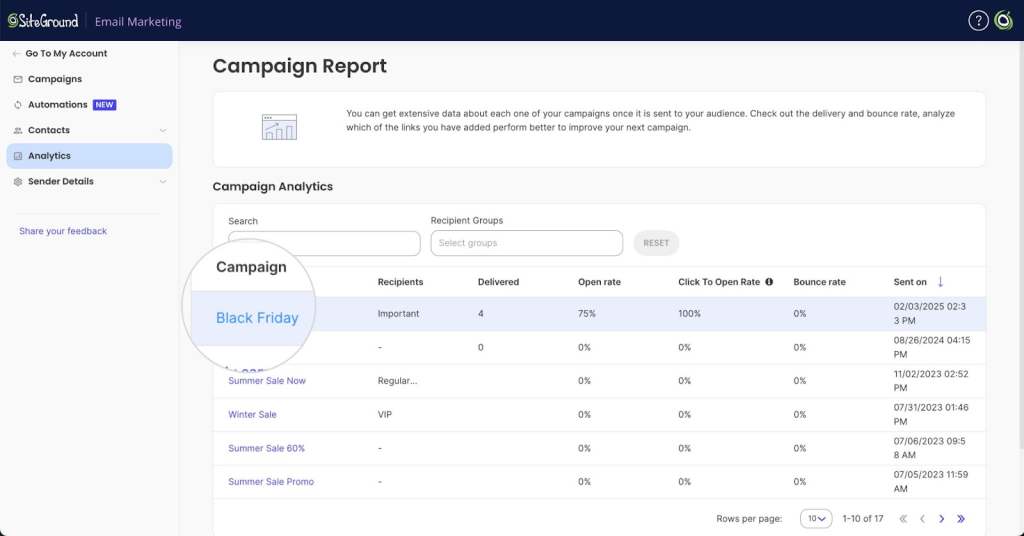
Your email bounce rate is the percentage of emails in a campaign that were rejected by the recipient’s mail server. A bounce here and there is normal. But if your bounce rate is consistently above 2%, your list has a problem. Hard bounces (emails sent to addresses that don’t exist) are the ones to watch most closely. They’re a direct signal to inbox providers that your list isn’t well maintained, and they add up fast.
SiteGround Email Marketing automatically suppresses hard-bounced contacts so they don’t keep affecting your deliverability. To keep an eye on how things are going, you can check your bounce rate and other campaign performance analysis in your email campaign reports.
Your open and click-to-open rates are trending down
If your open rate or click-to-open rate has been trending down without an obvious reason, disengaged contacts are likely dragging the numbers. These are people who are still on your list but haven’t opened or clicked anything in months, sometimes years.
Say you ran a Black Friday campaign and picked up 200 new subscribers. A few months later, most of them have gone quiet, but they’re still on your list, still counted in your totals, and still pulling your averages down every time you hit send.
Your ESP (email service provider) sent you a warning
Most email marketing platforms will flag your account if your bounce rate or spam complaint rate crosses a threshold. If you’ve had a warning, don’t ignore it. It means the problem is already affecting your sending ability.
You imported an email database and never cleaned it
Imported lists are high risk. Whether it came from an old CRM, a spreadsheet, or another platform, you have no way of knowing how stale it is or how those contacts were collected.
Say you switched email platforms and brought your entire contact list with you. Some of those email addresses could be years old, collected through a form you no longer use, or from a campaign people barely remember signing up for. Sending to that list without cleaning it first is one of the fastest ways to damage your sender reputation.
You’ve just never done it
If you’ve been sending emails for a year or more and never removed anyone, your list almost certainly has dead weight. It doesn’t mean something is visibly wrong, it just means the problem is building quietly in the background.
Regardless of which situation sounds familiar, the fix follows the same logic: identify what’s dragging your list down, then remove it.
These signals don’t just tell you something’s wrong. Each one points to a different kind of problem and a different fix.
How to clean your email list in four steps
Once you’ve identified what’s dragging your list down, the fix is more straightforward than it sounds.
#1. Remove hard bounces
Hard bounces need to go immediately. Every time you send to an address that doesn’t exist, you’re signaling to inbox providers that your list isn’t looked after and that signal sticks.
Pro tip: Remove hard bounces immediately; never let them sit
SiteGround Email Marketing handles this automatically. When an email hard bounces, the contact is moved to a suppressed list and won’t receive future email campaigns. That means your sender reputation is protected without you having to manually track down and delete problem addresses.
Improve Your Email Campaigns with SiteGround!
Want your emails to reach more people? Try SiteGround Email Marketing. With an average delivery rate of 98.8%, your emails will land in your subscribers' inboxes. 
#2. Handle soft bounces
Soft bounces are temporary: a full inbox or the recipient’s mail server being briefly down. One soft bounce isn’t a reason to remove someone. But if the same address keeps bouncing, it’s a sign something more permanent is going on.
Best practice: set a threshold before removing
A good rule of thumb is three consecutive soft bounces. If an address has failed to deliver three times in a row, treat it like a hard bounce and remove it.
#3. Cut or re-engage disengaged subscribers
Inactive subscribers are people who haven’t opened or clicked anything in six months or more. They are worth a second look before you remove them. A short re-engagement email can tell you quickly who’s still interested and who’s just taking up space. Anyone who doesn’t respond is safe to remove.
#4. Scrub imported or old lists
Imported and old lists need extra scrutiny. You don’t always know how the contacts were collected, how long ago, or whether they ever consented to hear from you.
Quick tip: what to look for when reviewing an old or inherited list
Go through the list for obvious red flags: addresses with typos, generic role-based addresses like info@ or admin@, contacts with no engagement history, and anyone added more than two years ago without a recent interaction. When in doubt, leave them out.
Keep a clean email list going forward
A clean email list isn’t a one-time project. It’s what keeps your emails reaching the right people, your stats telling the truth, and your sender reputation intact.
It also doesn’t have to be a big deal. Know what to look for, deal with the warning signs before they snowball, and set up a few habits that mostly run themselves. The simplest one: enable double opt-in. It means every new contact has confirmed they want to hear from you, which cuts out a big chunk of the problem before it starts.
If you’re on SiteGround Email Marketing, a chunk of that is already taken care of: hard bounces are suppressed automatically and you’re not left guessing where your email deliverability stands. The rest is a quarterly check and a bit of common sense.
Frequently asked questions about email list cleaning
Start by removing hard bounces, then cut contacts who haven’t engaged in six months or more. Check for duplicates, typos, and any addresses that look like bot signups. If you’re on SiteGround Email Marketing, hard bounces are suppressed automatically — the rest is a periodic manual review.
A light review every quarter is enough for most senders. If you’re seeing a spike in bounces, a drop in engagement, or a warning from your ESP, don’t wait. Clean it straight away.
Most email platforms have basic list management built in. SiteGround Email Marketing automatically suppresses hard bounces and flags deliverability issues, so you’re not starting from scratch.
It depends entirely on the quality of the list. A thousand engaged, opted-in subscribers who regularly open and click is worth far more than ten thousand contacts who haven’t interacted in years. List size is a vanity metric. Engagement and deliverability are what actually drive results.







Comments ( 0 )
Thanks! Your comment will be held for moderation and will be shortly published, if it is related to this blog article. Comments for support inquiries or issues will not be published, if you have such please report it through our official channels of communication.
Leave a comment
Thanks! Your comment will be held for moderation and will be shortly published, if it is related to this blog article. Comments for support inquiries or issues will not be published, if you have such please report it through our official channels of communication.