Email Format Guide: How to Get the Response You Need
You’ve probably googled “what is the format of an email” at least once—especially if you’re running a business without a full marketing team.
Not because you’ve never written an email before. But because you’re stuck writing one right now and can’t figure out how to structure it. Should the offer go first in your promotional email, or does it need context? Does a customer survey need the same format as a product announcement? What about that message to your team—how formal should it be?
Most people use the same structure for every email. A quick yes/no question gets the same treatment as a detailed project update. An urgent request looks identical to a casual check-in.
Then you wonder why people aren’t responding.
Email format isn’t about following rigid rules or sounding corporate. It’s about structuring your message so people actually read it and know what to do next. Different goals need different formats—and once you match them correctly, everything changes.
Key takeaways:
- Email format should match your goal – a yes/no question needs different structure than a feedback request or project update
- Keep emails under 125 words and subject lines under 50 characters for higher response rates
- Lead with your request first, then add context – don’t bury what you need in paragraph three
- Stick to one clear call to action per email – multiple requests split attention and kill responses
- Include specific deadlines to create urgency – “by Thursday” gets action, “when you can” gets ignored
What is Email Format
Email format is the structure of an email message, from subject line to signature. It’s the framework that holds your content together and helps your recipient quickly understand what you need and what action to take.
Different goals need different formats. A promotional email announcing a sale needs different structure than a welcome email to new subscribers. A product launch announcement differs from a weekly newsletter, just as a cold outreach to prospects differs from a re-engagement email to inactive customers. Whether you’re running marketing campaigns or handling business communications, matching your format to your goal gets better results.
Why Email Format Matters
Format directly affects whether people open, read, and respond to your emails because people make split-second decisions about which emails deserve their attention.
Every part of the email affects results in different ways:
- Short email subject lines tend to get opened more.
- Emails with a single clear email call to action get more responses than emails asking for three different things.
- Even the length of your email, where you place key information, and how you break up paragraphs—all of it impacts results.
The numbers back this up. According to Mailmeteor, emails under 125 words get response rates around 50% higher than longer ones. Subject lines under 50 characters outperform wordy ones, as reported by Truelist.
Tracking the right email marketing metrics (open rates, click rates, and response time) helps you understand which formats work best for your audience. But you need to measure the right things.
The problem? Most people use the same email format for everything. They write every email the same way, whether they’re scheduling a quick call, pitching a new client, or following up on a complex project. Same structure, same length, same approach.
That’s like using a sledgehammer for every job. Sometimes you need a scalpel.
Your format should change based on what you’re trying to accomplish. Match the structure to the goal, and you’ll see the difference in your inbox.
The Parts of an Email
Every email has the same basic building blocks. How you use them determines whether your message gets read and acted on.
Here’s what a complete professional email format looks like, then we’ll focus on the parts that make the biggest difference in your response rates.
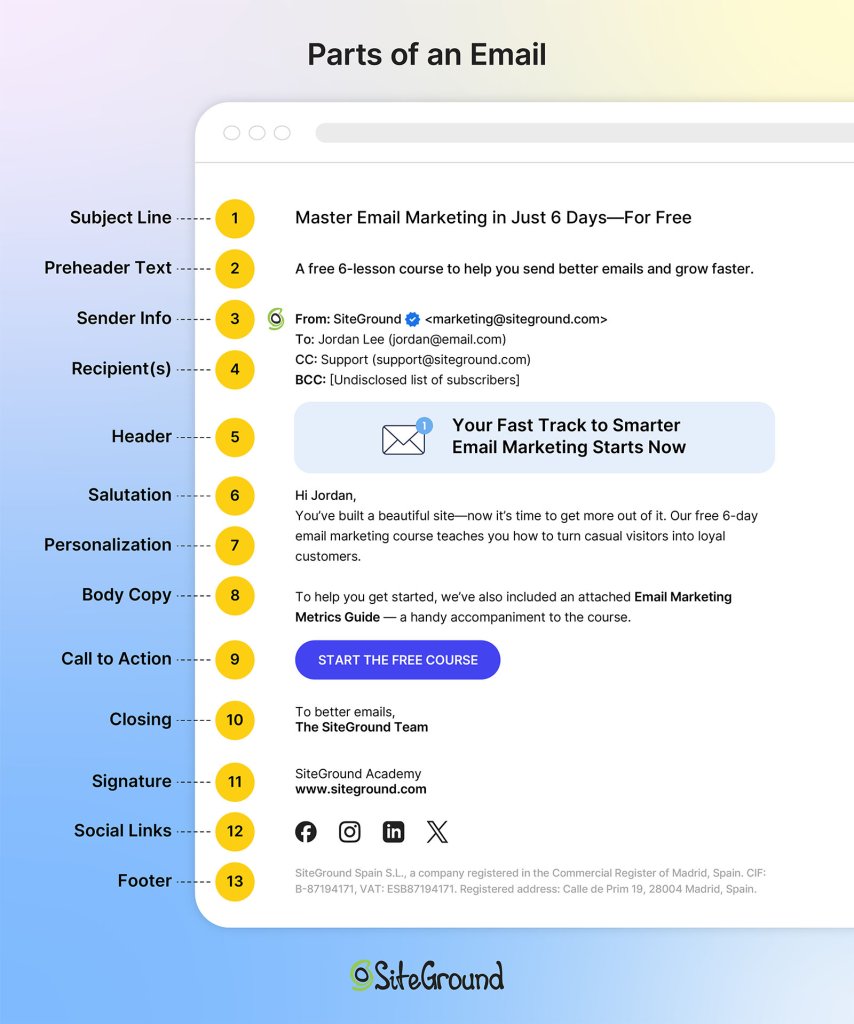
Email Subject Line
This determines if your email gets opened. People scan their inbox in seconds, deciding what deserves attention based almost entirely on subject lines.
Keep it short—under 50 characters works best. Be specific about what’s inside. Avoid vague lines like “Quick question” or “Following up.”
Something like “Your free trial expires Friday” or “New feature you requested is live” tells them exactly what’s inside before they even click.
Opening Line
This keeps them reading past the first sentence. If your opening doesn’t hook them immediately, they’ll skim or abandon the email.
Get to the point in the first sentence. Skip pleasantries unless you have an established relationship. State why you’re writing or what you need.
Compare “Your account now includes bulk scheduling” to “I hope this email finds you well. I wanted to reach out about something that might interest you.” The first one gets to the point.
Email Body
This is where you convey your actual message. The email body should give context, provide necessary details, and make your case without rambling.
- Keep short paragraphs—2-3 sentences max. Use line breaks between ideas.
- When listing multiple items, use bullet points to make them scannable.
- Front-load important information since people skim.
- Cut anything that doesn’t directly support your purpose.
- For a product announcement, lead with what changed, then explain the benefit, then include the call-to-action. Don’t bury the news in paragraph three.
Call to Action
This tells them what to do next. Without a clear call to action (CTA), people won’t take action—whether that’s clicking a link, making a purchase, replying to your message, or registering for an event.
Make it specific and easy to act on. One CTA per email usually works best. Make it obvious wherever you place it—sometimes that’s right after your opening line, sometimes at the end. Use direct language.
“Download your free guide here” works better than “Feel free to check it out when you have time.”
Email Signature
The best email signatures provide credibility and contact information. Your professional email signature confirms who you are and gives recipients other ways to reach you if needed.
Include your full name, job title, company name, and phone number. Keep it clean—no inspirational quotes or walls of text.
A simple format works: Sarah Chen, Marketing Director, Acme Corp, sarah@acmecorp.com, (555) 123-4567.
For email marketing campaigns, your approach is different. Sign off with your company or team name, skip the detailed contact info in your signature, and save that for your email footer instead. Marketing emails focus on driving action—your footer handles the legal requirements and contact details.
Each email part serves a specific function. When they work together with the right format for your goal, you get results. But there’s one more thing to address before we get to examples.
Formal vs Casual Emails
The one question people always ask is: should this be formal or casual?
The level of formality depends on your relationship with the recipient.
Formal emails are for first-time outreach or high-stakes communications—reaching out to potential clients you’ve never met, cold pitching prospects, or formal business proposals. Use formal greetings (“Dear Ms. Rodriguez”), complete sentences with no contractions, and formal closings (“Best regards” or “Sincerely”). The tone is respectful and professional.
Casual emails work for regular customer communications, ongoing relationships, or your email subscriber list. You can use “Hi [Name],” write with contractions, keep it conversational, and sign off with “Thanks” or your team name. The tone is friendly but still professional—you’re building rapport, not writing a legal document.
Both follow the same structural principles: clear subject line, concise body, single call-to-action. The formality changes based on familiarity; the formatting effectiveness doesn’t.
Email Structure Best Practices + Email Format Examples
Whether you’re coordinating with your team, reaching out to prospects, or communicating with customers, the same formatting principles apply. Here are email format examples for the most common scenarios—internal and external. Think of these as templates you can adapt, not rigid rules to follow exactly.
# 1: Get a Yes/No Answer
Keep it to 3-5 sentences with a clear question.
Example:
| Subject: Quick question about your subscription
Hi Sarah, We’re updating our email preferences. Do you want to keep receiving our weekly newsletter, or would you prefer monthly digests instead? Just reply “weekly” or “monthly” and we’ll update your account. Thanks, |
Short emails with binary choices get decided fast. Your recipient doesn’t need to think hard, gather information, or switch between tasks. They can answer in seconds and move on.
# 2: Schedule a Meeting
Aim for 50-75 words and include two specific time options.
Example:
| Subject: 15-minute demo of our new features?
Hi Marcus, I’d love to show you the new automation features we just launched—they could save you hours each week on campaign setup. Would either of these work for a quick demo? Tuesday, Dec 17 at 2 PM If neither fits, let me know what does. Best, |
Two specific options are easier to respond to than “when are you free?” You’ve already done the work of checking your calendar, so they can just pick one instead of hunting through their schedule.
# 3: Follow Up After No Response
Write 75-100 words and reference your original message.
Example:
| Subject: Following up – free trial
Hi James, I reached out last week about our 14-day free trial. Wanted to check if you’re still interested in testing out the platform, or if now’s not the right time? If you’d like to get started, here’s your signup link: [link] No pressure if it’s not a fit right now. Best, |
Follow-up emails need context about what you’re following up on. Reference your previous message briefly, then make it easy for them to respond by repeating your request or offering new options.
# 4: Get Feedback
Write 100-150 words and ask specific questions about what you need.
Example:
| Subject: How are we doing? 2-minute survey
Hi Priya, We’d love to hear your thoughts on your experience with us so far. Quick 2-minute survey with three questions: 1. How satisfied are you with our product? (1-10) Take the survey: [link] As a thank you, everyone who completes it gets early access to our new template library. Thanks, |
General requests for “feedback” lead to vague responses or silence. Specific questions guide people to exactly what you need, so they know how to help.
For more detailed strategies on gathering customer insights, check out our guide on survey emails.
# 5: Move Deal Forward
Structure it around 60-80 words with one clear next step.
Example:
| Subject: Ready to upgrade your account?
Hi David, Based on our call yesterday, the Pro plan sounds perfect for your team size and email volume. I can upgrade your account today and you’ll have access to all the advanced features immediately. Should I go ahead and process the upgrade? Best, |
Deals stall when the next step isn’t obvious. One clear action removes all guesswork and keeps momentum going.
# 6: Share Info (No Response Needed)
Use short paragraphs or bullets, and add “FYI” (For Your Information) in the subject line to signal no response is needed.
Example:
| Subject: FYI – System maintenance this weekend
Hi team, Quick heads up: we’re doing system maintenance this Saturday from 2-4 AM EST. Your campaigns won’t be affected, but you won’t be able to log in during that window. Everything will be back to normal by 4 AM. No action needed from you. Thanks, |
“FYI” tells people immediately that no response is needed. They can read it, note the information, and move on without inbox guilt.
Email Format Mistakes That Kill Responses
Even when you understand proper email format, certain mistakes will kill your response rates. Looking at email marketing benchmarks across thousands of campaigns, here are the most common mistakes—and how to fix them.
Asking for Multiple Things at Once
Asking for three things in one email splits your recipient’s attention. Should they download the guide, register for the webinar, or reply to your question? Should they approve the budget, schedule the call, or review the document? When everything feels urgent, nothing gets done.
Stick to one action per email. If you need multiple things, send separate emails or clearly prioritize what matters most, and tell them exactly which action to take first.
Writing Vague Subject Lines
“Checking in” and “Quick question” tell your recipient nothing. They can’t prioritize your email against 50 others, so it sits unread.
Write subject lines that preview the content: “Your free trial expires Friday” or “New scheduling feature now live” for customer emails. “Design review needed by Friday” or “Budget approval for Q1 campaign” for internal requests.
Specific subject lines get opened because people know whether it’s urgent and relevant. Vague ones get skipped.
Sending Emails Without Deadlines
When you don’t include a timeframe, your email has no urgency. “Let me know your thoughts” could mean today or next month, so it gets pushed to the bottom of the list. Add a clear deadline: “Can you review this by Thursday?” or “I need your input before our Monday meeting.” Deadlines create action. Without them, your email becomes a “someday” task that never gets done.
Writing Long Emails That Bury Your Request
Nobody wants to scroll through six paragraphs to find out what you actually need. Long emails signal “this will take time,” so people save them for later—and later never comes.
Lead with your request first: “Claim your 20% discount” or “Register for the webinar” for customer emails. “Can you approve this budget?” or “Need your feedback by Thursday” for internal requests. Then add context if necessary.
If your email doesn’t fit on one screen without scrolling, it’s too long. Break complex topics into shorter messages, use bullet points, or link to a document for full details. Front-loading your ask respects your recipient’s time.
Start Using the Right Email Format Today
Getting email format right is half the battle. The other half? Having tools that support your customer outreach without adding complexity.
SiteGround Email Marketing comes with ready-made email templates designed for different goals—whether you’re announcing a product launch, sharing an update, or asking for action. You can customize these templates to match your brand, or build your own from scratch if you need something specific. Either way, you’re working with formats that are already structured to get responses, not starting with a blank page every time.
If you’re tired of hitting send and hearing nothing back, it’s time to match your format to your goal and use tools that make that easier.
Improve Your Email Campaigns with SiteGround!
Want your emails to reach more people? Try SiteGround Email Marketing. With an average delivery rate of 98.8%, your emails will land in your subscribers' inboxes. 






Comments ( 0 )
Thanks! Your comment will be held for moderation and will be shortly published, if it is related to this blog article. Comments for support inquiries or issues will not be published, if you have such please report it through our official channels of communication.
Leave a comment
Thanks! Your comment will be held for moderation and will be shortly published, if it is related to this blog article. Comments for support inquiries or issues will not be published, if you have such please report it through our official channels of communication.