How to read your email click to open rate (and act on it)

You hit send. Opens roll in. Clicks? Not so much.
Before you scrap your whole email marketing campaign, there’s one metric worth checking first: your click-to-open rate (CTOR). Open rate tells you who showed up, CTR tells you who clicked out of everyone you emailed, but neither one tells you whether your copy, images, CTA, and layout are actually working. CTOR filters out everything upstream: deliverability, subject lines, send time, and looks only at what happened inside your email.
Key takeaways:
- CTOR = clicks divided by opens. It tells you whether your copy, images, CTA, and layout are doing their job.
- If your opens are fine but clicks are low, your subject line isn’t the problem — something inside the email is.
- A “good” CTOR ranges from 6% to 30% depending on the source. Build your own baseline instead.
- Too many CTAs, too many images, too many goals — pick one of each and stick to it.
- Low CTOR points to your content. Low opens point to your subject line. Now you know where to look.
What is email click-to-open rate (CTOR)?
Click-to-open rate measures how many people who opened your email actually clicked something inside it. While email open rate tells you how many people showed up, CTOR tells you whether the content was worth their time.
The formula is straightforward:
(Clicks / opens) × 100 = CTOR
So if 200 people opened your email and 40 clicked a link, your CTOR is 20%.
One number, one answer: did the people who read your email care enough to act? Clicks are where email starts turning into revenue. A higher CTOR means more of your openers are taking action. And more action means better email marketing ROI.
CTOR vs. other email metrics
Low clicks: is it the subject line, the content of the email, or just a bad send day? Before you can answer that, you need to know what each email marketing metric is actually measuring. They measure different things, and knowing which one to look at saves you a lot of time going in the wrong direction.
| Metric | Formula | What it measures | What it tells you |
| Open rate | (number of opens / number of delivered emails) x 100 | How many people opened your email | Whether your subject line, sender name, and send time are working |
| CTR | (clicks / delivered emails) x 100 | How many people clicked out of everyone you delivered to | The overall performance of your email marketing campaign |
| CTOR | (clicks / opens) x 100 | How many openers clicked | Whether your content, email design, and CTA earned the click |
Open rate sets the stage: it tells you whether your email got noticed at all. Click through rate (CTR) gives you the big picture. CTOR zooms in on what happened after the open, which makes it the more useful metric when you’re trying to figure out what inside your email isn’t working.
What’s a good CTOR?
Depends on who you ask. Benchmarks vary widely across industries anywhere from 6% to 30% — and that gap isn’t a typo. Industry, audience size, email type, and how often you send all pull the number in different directions. A transactional email to an engaged list will naturally outperform a promotional blast to cold contacts.
Rather than chasing a universal benchmark, track your own. Run a few campaigns, record your CTOR for each email type, and let that become your baseline. A 12% CTOR that’s climbing tells you more than hitting someone else’s average once.
Keep in mind: Open counts aren’t always accurate. Apple’s Mail Privacy Protection pre-loads tracking pixels on iOS devices, which can inflate your open numbers without anyone actually reading your email. Since CTOR is calculated from opens, inflated open counts can push your CTOR down, even if your content is performing well. It’s one more reason to measure against your own historical data rather than industry benchmarks — a sudden dip in CTOR is more meaningful when you know what your normal looks like.
A low CTOR? Start here.
A low CTOR is a signal, not just a bad number. What you do with it depends on what your other email marketing metrics are doing.
- Opens are healthy, CTOR is low: the email isn’t earning the click. Look at your content, CTA, email layout, and images.
- Both opens and CTOR are low: the email isn’t getting opened in the first place. Start with your subject line, sender name, and send time.
- Opens are low, CTOR is high: your content is working, but not enough people are seeing it. Check your deliverability, list health, and subject line.
- Both are healthy: keep testing. Don’t touch what’s working.
The most common scenario for small business senders is the first one: decent email open rates, disappointing clicks. The email got opened, it just didn’t give anyone a reason to click. And that’s exactly what the next section is about.
Your CTOR is low. Here are the parts of your email to look at.
If your opens are healthy but clicks aren’t coming, here are the parts of your email most likely to cost you the click.
Email copy
Your subject line made a promise. Does your email body deliver on it? A mismatch between the two is one of the fastest ways to lose a click. Readers feel misled and move on.
Keep the copy short and leave just enough out to make clicking feel worth it. A little curiosity goes a long way. Pick one marketing goal per email, stick to it, and personalize where you can. Not sure how to phrase it? SiteGround Email Marketing comes with a built-in AI Email Writer to help you draft focused, on-point copy. The strategy is still yours, but the words don’t have to be a struggle.You can also segment contacts directly from your campaign analytics. If someone clicked your last email, you can pull them into a separate group and follow up with something more targeted. A second touch that speaks to what they already showed interest in is a lot harder to ignore. Sending more relevant content to a tighter and engaged audience means more of the people who open will actually click. And that’s exactly what CTOR measures.
Images
Images work best when they’re specific to the message: a product shot, a before/after, a screenshot that backs up what the copy is saying. A generic stock photo of a smiling person at a laptop adds nothing and takes up space.
As a rule of thumb, one to three images per email is plenty for most campaigns. More than that and you’re competing with your own content for attention and risking the spam folder before anyone even sees it.
And we’re not done with AI yet. SiteGround Email Marketing also has a built-in AI Image Generator, so you can create visuals that actually match your message instead of settling for another stock photo of a handshake.
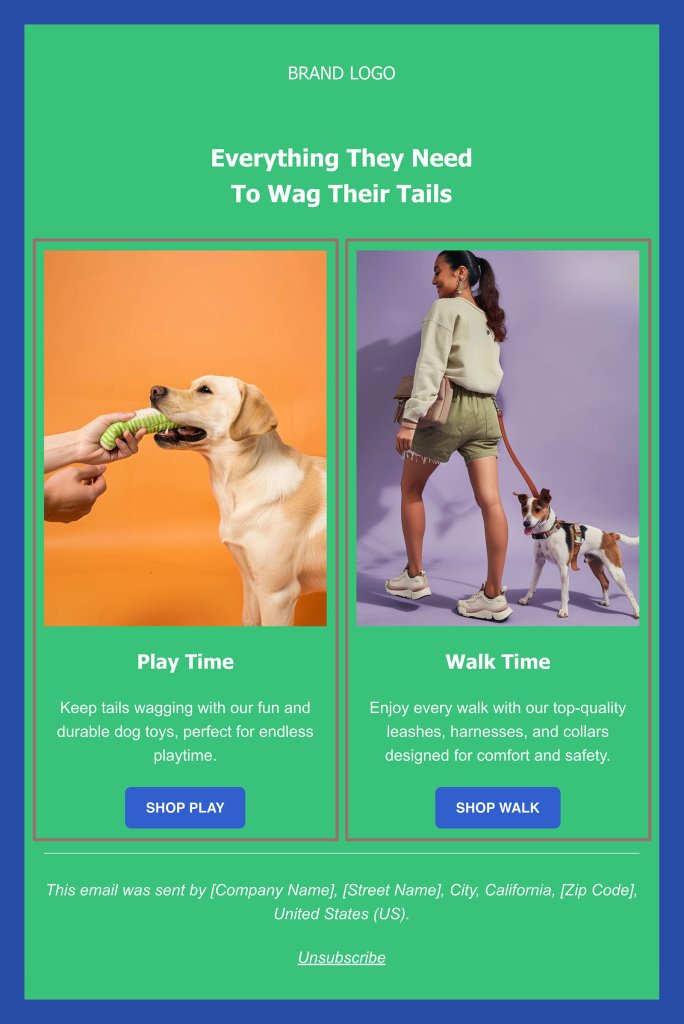
Always check how your email renders on mobile before hitting send, and don’t skip the alt text. Email accessibility is a legal requirement in many countries, and alt text is a core part of that. SiteGround Email Marketing prompts you to add it every time you upload an image, so it’s hard to miss.
Call to action
One email, one CTA. The more options you give people, the less likely they are to pick any of them.
Place your primary email CTA above the fold so it’s visible without scrolling, use a button color that stands out from the rest of the email, and write copy that tells readers exactly what they’re getting. “Get my guide” lands better than “Submit” every time. A little urgency or curiosity in the button text doesn’t hurt either.
A CTA that’s clear, specific, and easy to find is often the difference between a CTOR you’re proud of and one that makes you scratch your head.
Email layout
Most of your subscribers are reading on their phones, so design for mobile first and treat desktop as secondary. That means single-column layouts over multi-column, large enough font sizes to read without zooming, and a CTA button big enough to tap with a thumb.
Keep the layout simple and the path to the CTA short. The more a reader has to scroll through blocks of content before they reach it, the less likely they are to get there. Put your most important content and your CTA early, and don’t bury either under decorative sections. This matters more than ever now that email clients are summarizing email messages with AI. If your key point and CTA aren’t near the top, they may not make it into the summary at all.
If you’re starting from scratch, SiteGround Email Marketing offers a range of professional templates you can customize with a no-code builder and a built-in AI assistant — so you’re not making layout decisions from a blank page. A well-structured email doesn’t just look good; it removes every excuse not to click.
Use CTOR to fix the right thing
CTOR won’t fix your emails for you, but it will stop you from fixing the wrong thing. Track it alongside your open rate, build your own baseline, and the next time a campaign underperforms, you’ll know exactly where to start.
Improve Your Email Campaigns with SiteGround!
Want your emails to reach more people? Try SiteGround Email Marketing. With an average delivery rate of 98.8%, your emails will land in your subscribers' inboxes. 
Frequently asked questions about email CTOR
CTR divides clicks by emails delivered, CTOR divides by emails opened. CTR shows overall campaign performance; CTOR tells you whether the email’s content was worth clicking.
Read it alongside your open rate. Healthy opens but low CTOR means the problem is inside your email. Both low means focus on getting opens first. It tells you which part of the marketing funnel to fix so you’re not changing things at random.
CTR is the percentage of recipients who clicked a link out of the total emails delivered — regardless of whether they opened it or not. On the other hand, CTOR only counts clicks from people who actually opened, which is what makes it a more precise measure of how your content is performing.
Industry averages typically sit between 20% and 40%, but they vary by industry, list size, and email type. Your own historical average is a more reliable benchmark than any industry number.
An email marketing benchmark is a reference point for measuring your email performance, either against industry averages or your own historical data. Your own baseline tends to be more useful since it reflects your specific audience and email type.






Comments ( 0 )
Thanks! Your comment will be held for moderation and will be shortly published, if it is related to this blog article. Comments for support inquiries or issues will not be published, if you have such please report it through our official channels of communication.
Leave a comment
Thanks! Your comment will be held for moderation and will be shortly published, if it is related to this blog article. Comments for support inquiries or issues will not be published, if you have such please report it through our official channels of communication.