Email CTR vs CTOR: Yes, they're different

You send an email, check your stats, and see “CTR: 2.3%.” Then you Google “good email CTR” and find articles saying 10% is average. Cue the panic.
Turns out, that article is talking about CTOR, not CTR. They sound the same. They’re not. One divides clicks by emails opened, the other by emails delivered. Completely different numbers.
Your email platform probably shows both (maybe labeled clearly, maybe not). So you’re comparing your 2% to someone else’s 10%, wondering why your email campaigns are bombing, when really you’re just looking at different email marketing metrics.
This guide explains what each one measures and which to track. Whether you’re a small business owner, blogger, or solopreneur, you’ll learn what your numbers actually mean when you’re running a smaller list, not a 50,000-subscriber operation.
Key takeaways:
- CTR and CTOR measure different things – CTR divides clicks by emails delivered, CTOR divides by emails opened. They’re not interchangeable.
- Benchmarks depend on context – Industry averages come from various list sizes, business stages, and audiences. What matters is your own trend line, not matching someone else’s number.
- Small lists have volatile numbers – Your 300-person list will fluctuate more than a 50,000-person list. Compare yourself to your own baseline, not industry averages.
- Different metrics answer different questions – Use CTR for deliverability troubleshooting, CTOR for content testing, both together for campaign success.
- Track trends, not snapshots – A sudden 50% drop signals a problem. Steady 2% over six months with consistent conversions means you’re fine.
Understanding email click through rate (CTR)
Email click-through rate, or CTR, is an email marketing metric that measures the percentage of recipients who clicked a link in your email out of the total number of delivered emails.
Say you sent 500 emails, 480 got delivered (the rest bounced), and 12 people clicked a link. Your CTR is 2.5%. That’s it.
CTR tells you how well your entire email: subject line, preview text, content, email call to actions (CTAs), worked together to get people to click. If your CTR tanks, something broke in the chain between “email lands in inbox” and “person clicks link.”
How to calculate click through rate
The CTR formula looks like this:
CTR = (Total clicks / Emails delivered) × 100
Notice it says “delivered,” not “sent.” If you sent 500 emails but 20 bounced, you calculate based on 480. Why? Because the 20 people who never got your email can’t click anything. Including them makes your CTR look artificially low.
Most email platforms show you delivered numbers automatically, so you don’t have to do the math yourself. With SiteGround Email Marketing, for example, you’ll see both sent and delivered right in your email campaign stats.
Still, knowing the difference matters when you’re comparing your stats to benchmarks or trying to figure out why your numbers look off.
Unique clicks vs total clicks
Some platforms let you choose between unique clicks (one person clicked once) and total clicks (one person clicked three times = three clicks). For CTR, use unique clicks. You want to know how many people engaged, not how many times your most enthusiastic subscriber clicked around.
Here’s an example:
- Emails delivered: 800
- Unique clicks: 24
- CTR: (24 / 800) × 100 = 3%
That 3% means 3% of people who received your email clicked something in it.
CTR vs click to open rate (CTOR): What’s the difference?
Different email platforms use these terms to mean different things. So let’s clarify them once and for all.
- CTR (Click Through Rate) divides clicks by emails delivered. We just covered this one.
- CTOR (Click to Open Rate) divides clicks by emails opened. So if 100 people opened your email and 10 clicked, your CTOR is 10%. This number measures how your content performed once people opened. It tells you if your subject line set the right expectation and if your content delivered on that promise.
With SiteGround Email Marketing, CTOR is the metric you’ll see on your dashboard right away.
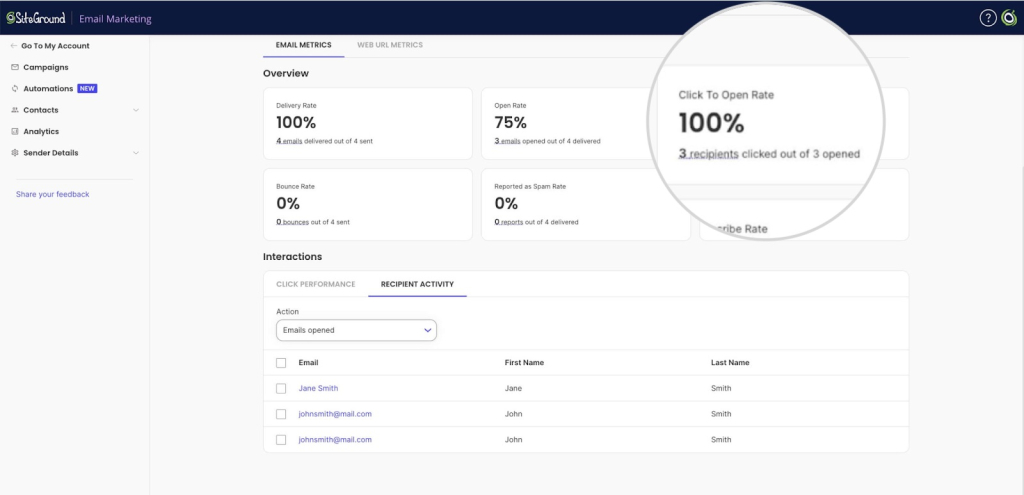
Why all the confusion? Email service providers each built their dashboards independently, picked their own labels, and never got together to standardize anything. Some platforms show both CTR and CTOR but don’t make it obvious which is which. Click rate as a standalone metric is confusing and inconsistently defined across platforms, so it’s easier to stick with these two clearer measurements.
So when someone says “our average click rate is 15%,” you can’t assume they’re talking about the same metric you’re tracking. Fun, right?
Which number should you actually care about?
Depends what you’re trying to figure out.
| What you’re doing | Which metric to track | Why |
| Troubleshooting email deliverability | CTR | A sudden drop might mean your emails are landing in spam or your list quality tanked. CTOR won’t show you this, as it only counts people who opened. |
| Testing email content | CTOR | You want to know if your copy, layout, or call to action actually worked once people were reading. CTR mixes in too many other variables. |
| Measuring overall email campaign success | Both CTR and CTOR, plus conversions | CTR shows reach. CTOR shows email engagement. Conversions show whether any of it led to actual results. |
What’s a good email CTR?
The internet will tell you the average click through rates are around 2-5%, depending on your industry. For CTOR, benchmarks hover around 10-15%.
Take those numbers with a huge grain of salt.
Those averages depend on a lot of factors: your industry, list size, business stage, how engaged your subscribers are, what you’re asking them to do. A SaaS company sending product updates to 50,000 active users will have different numbers than a freelance designer sending portfolio updates to 300 past clients. That doesn’t mean one is doing it wrong.
That said, you still want some baseline to work from.
- What’s a good CTR? For most small businesses, anywhere from 1-3% is solid. If you’re hitting 4-5%, you’re doing great.
- What’s a good CTOR? Aim for 8-12%. If you’re consistently above 15%, your content is really connecting with people who open.
What actually matters is your own trend line. Did your CTR drop from 3% to 1% in the last month? That’s worth investigating. Sitting steady at 2% for six months while your conversions stay consistent? You’re fine. Email marketing benchmarks can give you a starting point, but your own pattern over time tells you more than any industry average.
Keep in mind that small lists naturally have more volatile numbers. One campaign might hit 5% CTR because your most engaged ten people clicked. The next drops to 1.5% because those same people were busy that week. With a 50,000-person list, individual behavior gets smoothed out. With a 300-person list, every person counts.
The red flags when reviewing CTR and CTOR
More important than hitting a specific number: watching for these warning signs in your own data:
- Sudden drops in either CTR or CTOR (more than 50% decline in a week or two)
- High CTR but low CTOR (lots of people opening your emails, but few clicking once they read—means your content or call to action isn’t working)
- Low CTR but high CTOR (this is actually fine: means fewer people opened, but the ones who did were engaged. Keep in mind that open rates can be unreliable anyway due to privacy features like Apple’s Mail Privacy Protection)
- High clicks but no conversions (your email worked, but something’s broken on your landing page: check load speed, clarity, and whether the offer matches what you promised)
- Steady decline over months (gradual drop over 3+ months means something shifted: list quality, content relevance, or frequency)
Track your own averages over time. If your normal CTR is 2.5% and you suddenly hit 0.8%, that’s your signal to investigate. If your normal is 1% and you’re at 0.9%, you’re probably fine.
And remember: CTR doesn’t exist in a vacuum. Look at it alongside other performance metrics like:
- Email open rate: If nobody opens, CTR will tank no matter how good your content is
- Conversions: Clicks mean nothing if they don’t lead to sales, signups, or whatever you’re after
- Unsubscribe rate: Spiking unsubscribes + dropping CTR = your content stopped matching what people want
- Bounce rate: High bounces kill your CTR because fewer emails get delivered
The goal isn’t hitting some magical industry number. It’s understanding what’s normal for your list and noticing when something changes.
How to improve your email click-through rate
Get more people to click by making it obvious what you want them to do and matching your content to what they actually signed up for. The tactics:
- Write subject lines that set up the click. Your subject line shouldn’t just get the open: it should prime people for what’s inside. If your subject says ‘5 email tips’ but your email immediately pitches your course without the tips, they’ll bounce. Match the subject to the action you want.
- One clear call to action per email. Multiple CTAs split attention. Pick one thing you want people to do and make that the focus. If you need to include secondary links, make them visually smaller or put them at the bottom.
- Make links obvious and clickable. Underline them. Use button styling. Don’t hide links in walls of text. People should be able to scan your email and immediately see where to click.
- Optimize for mobile. 55% of emails are opened on mobile devices, according to Growth-Onomics. If your links are too small to tap, your font is too tiny to read, or your email layout breaks on mobile, your CTR will suffer. Test on your own phone before sending.
- Test timing and frequency. Sending too often burns people out. Sending too rarely makes them forget who you are. Test different days and times to see when your target audience actually engages. Track your CTR across sends to find your sweet spot.
- Match content to what people signed up for. If someone joined your list for freelance writing tips and you start sending them AI tool promotions, they’ll stop clicking (or unsubscribe). Stay consistent with what you promised when they opted in.
Your click-through rate needs context, not comparison
Whether you’re a small business owner, blogger, or solopreneur, chances are you’re managing customer emails, social media, your website, and a dozen other things at once. The last thing you need is to stress about whether your 2.1% CTR means your email marketing is failing.
It doesn’t. Track your own trends. Watch for sudden changes. Adjust when something actually breaks — not just because your number doesn’t match some article’s benchmark.The good news? You don’t need fancy tools or a marketing degree to track this stuff. SiteGround Email Marketing shows you CTOR right in your dashboard, so you can see exactly how your content performs once people open. No guessing which metric you’re looking at, no cross-referencing three different reports. Just clean data that tells you what’s working.
Improve Your Email Campaigns with SiteGround!
Want your emails to reach more people? Try SiteGround Email Marketing. With an average delivery rate of 98.8%, your emails will land in your subscribers' inboxes. 
Frequently asked questions about email CTR
5% CTR means that 5% of people who received your email clicked a link. For most small businesses, that’s solid performance.
Bot clicks inflate CTR when email security tools automatically click links to check for malware before your subscriber even sees the email. You’ll spot them if clicks spike but conversions don’t, or if clicks happen seconds after sending.
Mobile versus desktop open location affects which metric matters more because people are less likely to click on mobile (smaller screen, harder to tap). A 10% CTOR on mobile is more impressive than on desktop. Check where your audience opens before judging your numbers.
The 30/30/50 rule is a cold outreach formula: 30% of your email on the problem, 30% on the solution, 50% on the call to action. The idea is to focus most of your content on getting them to click. If you’re emailing people who opted into your list, you don’t need this — they already know you.







Comments ( 0 )
Thanks! Your comment will be held for moderation and will be shortly published, if it is related to this blog article. Comments for support inquiries or issues will not be published, if you have such please report it through our official channels of communication.
Leave a comment
Thanks! Your comment will be held for moderation and will be shortly published, if it is related to this blog article. Comments for support inquiries or issues will not be published, if you have such please report it through our official channels of communication.