10 ways to get more leads from your email signup forms
-
- The 10 forms covered in this guide:
- Use more specific offers on your forms to get higher‑intent leads
- Catch the leads who were ready to buy, but couldn’t
- Build your email list with webinars, challenges, and email courses
- Ask the right questions and your list segments itself
- A few things to keep in mind
- Consent and privacy: a quick note
- Capture leads beyond your website
- How to know if your forms are working
- If you’re a small business asking “how do I get leads?”, start with these 3 forms
- Email lead generation: Frequently asked questions
On paper, growing an email list sounds simple. In practice, you add a signup form, check your stats, and still see only a handful of new subscribers each month.
That’s because, people rarely hand over their email address without getting something useful in return.
In this guide, we’ll look at 10 practical ways to make your signup forms attract more subscribers: from improving what they offer to placing them where visitors are most likely to act. Along the way, you’ll also see how small tweaks can help you attract subscribers who are genuinely interested in what you sell.
Key takeaways:
- Use forms not just to “get subscribers,” but to capture leads with clear buying signals.
- Add one or two custom fields so you know what each person wants and how to follow up.
- Connect forms to simple automations so every signup receives relevant emails instead of one generic sequence.
The 10 forms covered in this guide:
- Welcome discount form: for visitors close to buying
- Lead magnet form: for people researching a problem
- Back-in-stock notification: for products that sell out
- Price drop alert: for price-sensitive shoppers
- Waitlist form: for launches and fully booked services
- Webinar or event registration: for topic-specific audiences
- Challenge or course signup: for people who need structured help
- Interest-based form: so subscribers self-select what they care about
- Frequency preference form: so people choose how often they hear from you
- Forms for specific roles or audiences: for businesses with different customer types
Use more specific offers on your forms to get higher‑intent leads
Sometimes the only thing standing between you and more leads is what you offer on your signup forms. A “join our newsletter” call to action is too broad to attract qualified subscribers. The people who sign up for it are curious at best, not motivated. The ones who are actually close to buying need something more specific to stop and hand over their email.
Here are two form types that attract people who are already leaning toward action.
1. Lead with a welcome discount code
Best for: ecommerce, services, coaches
The job: “I’m interested in buying, but I need a small push to commit.”
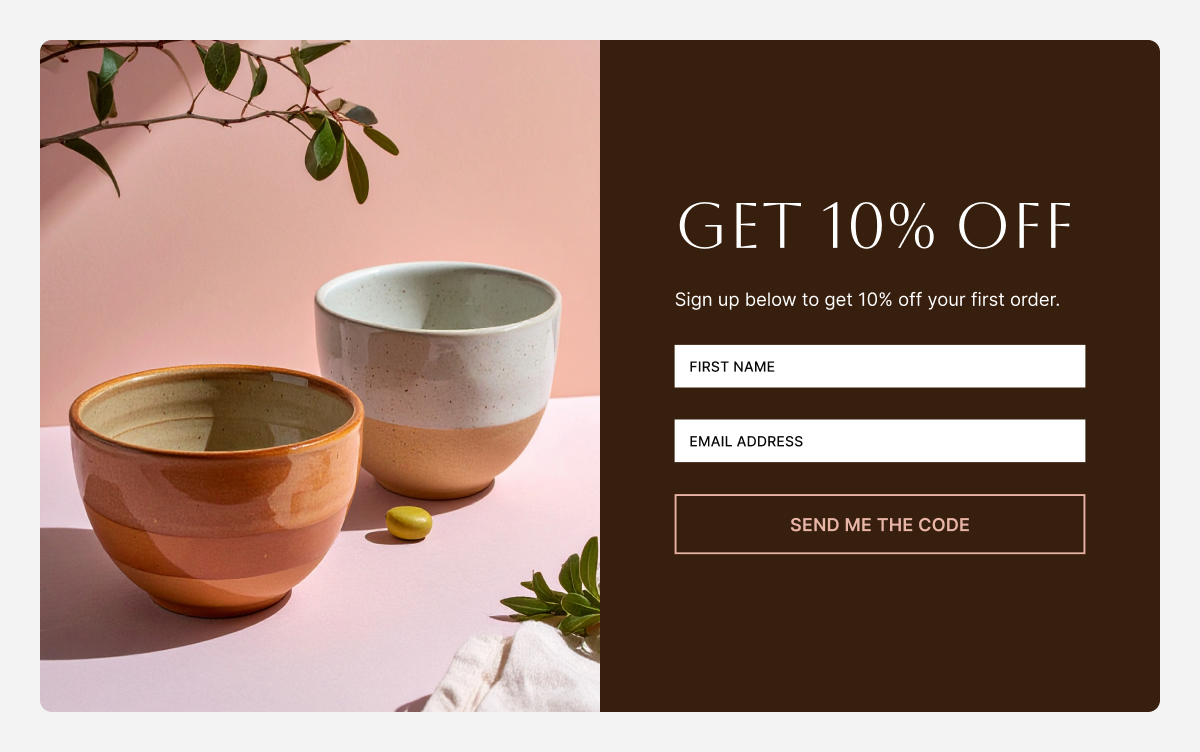
This is the most straightforward value exchange: someone is considering a purchase, and you offer a discount in exchange for their email. You get a subscriber who has already shown buying intent, and they get a reason to act now instead of “someday.”
What makes it work
- The visitor gets tangible value (10% off, free shipping, a bonus session, or a free sample).
- You get a lead who is actively browsing your product or service and is likely to be interested in future emails and offers.
- The email you send next has a clear purpose: “Here’s your discount code, here’s how to use it.”
If you sell services, this can be “X% off your first session,” “free audit,” or “bonus 30‑minute consultation” instead of a product discount.
Where to place it
- Product or service pages, where purchase intent is highest.
- Your homepage, for new visitors who are just discovering you.
What to ask for
- Email (essential)
- First name (optional but recommended, for personalizing subject lines and intros)
,
What to send next (simple 3‑email flow)
- Email 1: Discount + how to use it
- Email 2: Social proof (reviews, before/after, testimonials) for that category.
- Email 3: Reminder before the discount expires, with one clear call to action. (if applicable)
2. Add a lead magnet for people actively looking for a solution
Best for: almost any business
The job: “I have a problem and I want a resource that helps me solve it right now.”
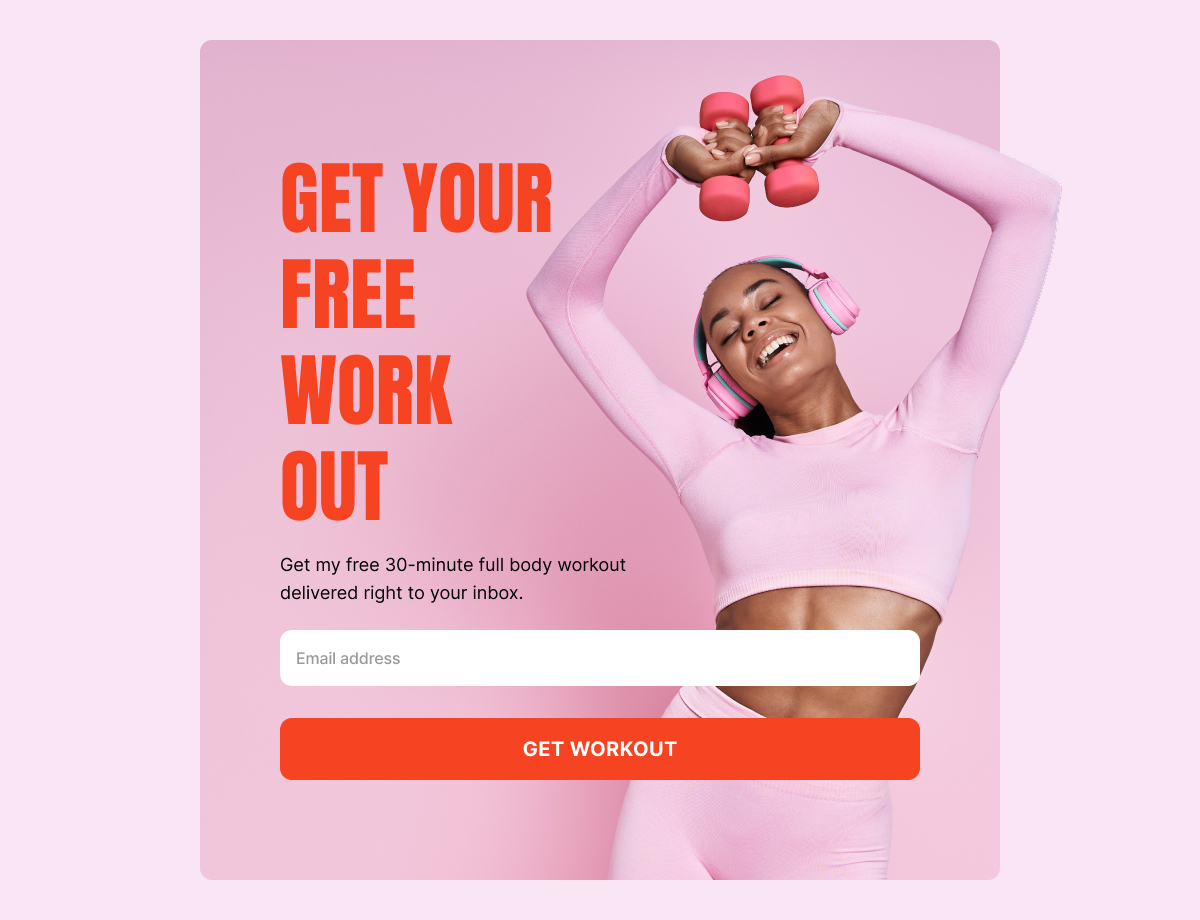
A lead magnet is a small, focused resource you give away so people are willing to give you their email and keep hearing from you. It might be a checklist, a short guide, a mini‑course, or a simple tool that helps them solve one specific, annoying problem without much effort.
Good lead magnet ideas
- Checklists (people love checking things off).
- Templates (saves them from starting from scratch).
- Mini‑courses delivered by email (spreads the value over time).
- Calculators that give a personalized result.
If you sell services: a website budget planner, or a “5 questions to ask before hiring a [type of service]” resource works well in place of product‑focused magnets.
Why this is a lead, not just a subscriber
- They’re telling you exactly what problem they’re trying to solve.
- They’re open to learning from you, which makes later offers feel natural.
- Their behavior (what they download, what they click) helps you decide what to send next.
Where to place it
- Blog posts on related topics (“Want the full checklist? Get it here.”).
- Resource or academy pages.
- Landing pages you share on social media.
What to ask for
- Email and first name.
- One short, multiple‑choice question like “What’s your biggest challenge right now?”
What to send next
- Email 1: Deliver the resource and show them how to use it quickly.
- Email 2: A story or case study that matches the challenge they selected.
- Email 3: A soft offer (free consult, audit, discovery call, or product recommendation) that helps them go further.
Catch the leads who were ready to buy, but couldn’t
Some visitors don’t need convincing. They’ve already decided they want what you sell. The only thing stopping them is timing: the product is out of stock, the price is out of reach right now, or you haven’t launched yet.
Back in stock and price drop alerts are features many ecommerce platforms offer natively but usually on higher-tier plans. If you’re on a leaner setup, both can be replicated manually with a signup form and a targeted email when the moment comes. Less automated, but it works.
3. Use forms for “back in stock” notifications
Best for: ecommerce
The job: “I want this specific product and I don’t want to miss it when it’s available.”
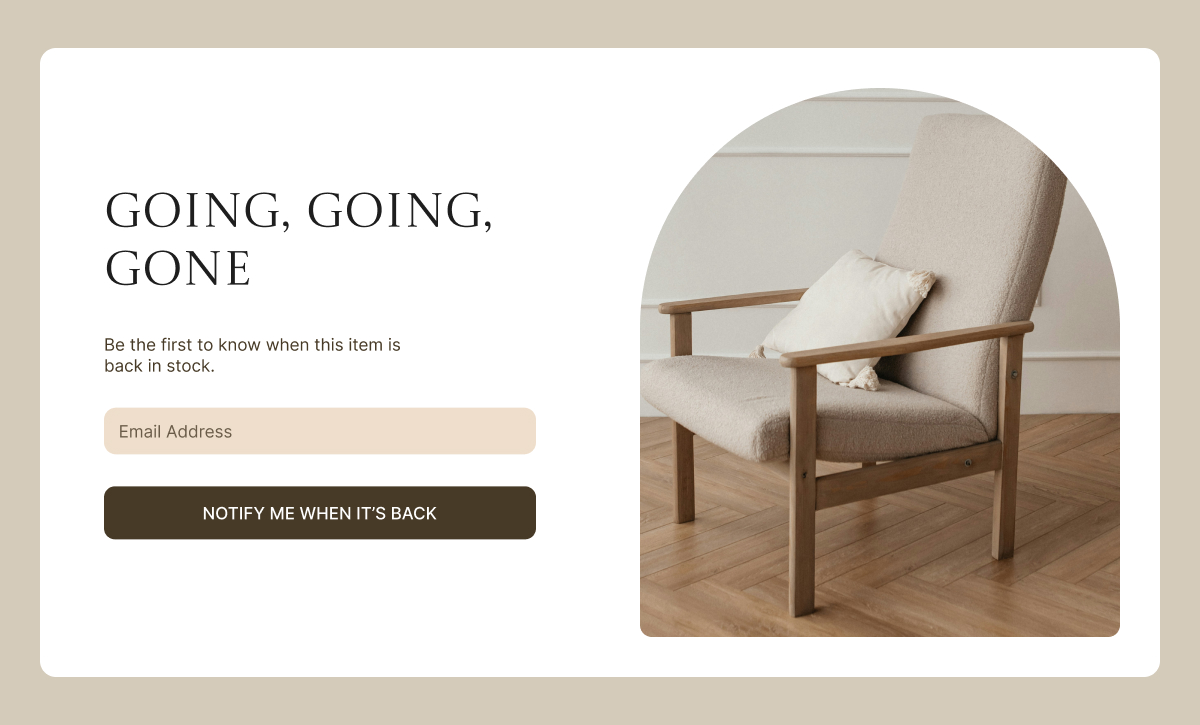
A back-in-stock form on sold‑out product pages turns a missed sale into a queue of ready‑to‑purchase customers for when inventory returns.
If your shop platform doesn’t have built‑in back‑in‑stock alerts, you can still collect these leads with a basic form connected to your email tool. It won’t update stock automatically, but it will give you a list of people to notify the moment you restock.
How to set it up
- Add a simple form on out‑of‑stock product pages asking for an email to be notified when it’s back.
- Assign subscribers to a dedicated Group like “Back‑in‑stock: Product X”. Groups act like tags you can use to send targeted emails or trigger automations later.
- When you restock, send a focused email to everyone who signed up for that item.
Pro tip: Include a small checkbox like “Also tell me about similar products.” Everyone who checks it becomes a lead for recommendations in that category, not just that one product.
If you sell services instead of products, you can adapt the same idea as a waitlist for fully booked services or upcoming new events (see the waitlist section below).
With SiteGround Email Marketing, you can create custom forms, assign Groups when someone signs up, and trigger automated email sequences from those groups, all without much effort.
4. Use forms for price drop alerts
Best for: ecommerce, services, learning platforms
The job: “I want this, but not at this price. Let me know when I can afford it.”
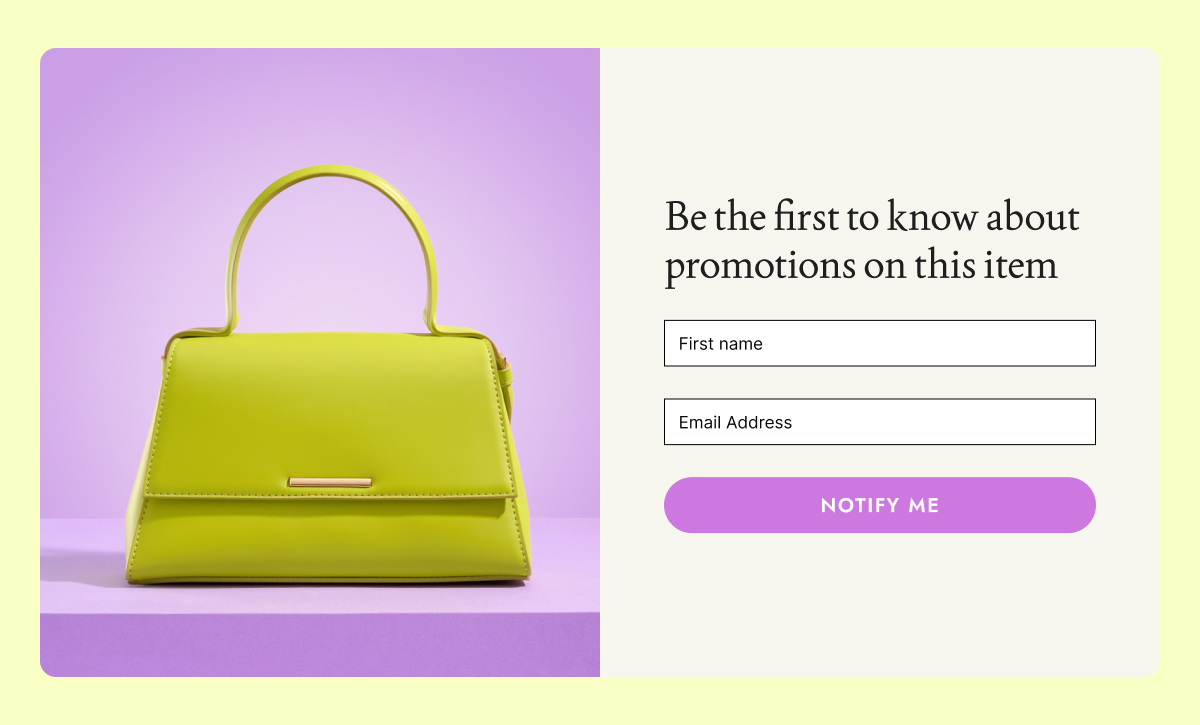
A price drop alert form captures price‑sensitive leads who would otherwise leave and forget about you. They’re interested, they just need the right timing or a better deal. Even without a built‑in price‑drop feature in your shop, you can let visitors leave their email and later email that group specifically when you run a promotion.
This works especially well for
- Higher‑priced items where people need time to decide.
- Seasonal businesses (outdoor furniture, winter gear).
- Products that regularly go on promotion.
- Courses or programs with occasional sales.
For services, think “Notify me when there’s an early‑bird price.”
What to send next
- An email when the price changes or a promotion starts, highlighting the new price clearly.
- A reminder before the promotion ends.
5. Use waitlist forms to build demand before launch
Best for: ecommerce, courses, creators, services, events, restaurants
The job: “I want to be first when this becomes available.”
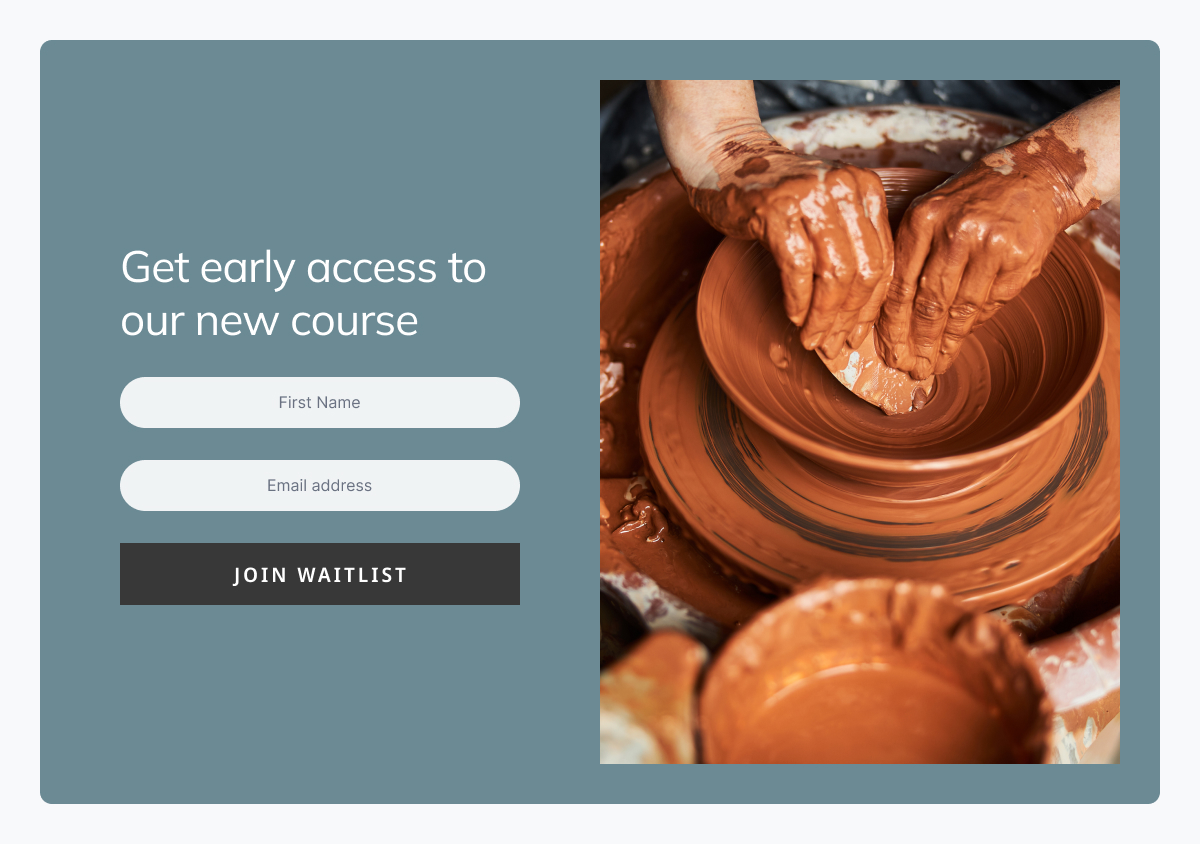
Waitlist forms let you start marketing something before it’s ready and build an audience around it early. Instead of starting from zero on launch day, you launch to a group of people who already asked to hear from you.
This is especially powerful for service‑based businesses: think of an upcoming workshop, a new program, a seasonal offering, or next seasonal menu.
What to ask for
- Email (essential).
- First name (optional).
- One simple question like “What excites you most about this?” or “What describes you best?” to shape your launch messaging.
What to send before launch
- A welcome email explaining what they joined and when to expect news.
- A launch day email with a clear offer, plus a reminder email near the end of the launch window.
Build your email list with webinars, challenges, and email courses
Not every lead is ready to buy today. Some need to learn, compare options, or get to know you first. Forms connected to content and events help you group people by interest so you can follow up with emails that make sense for where they are.
6. Webinar or event registration forms
Best for: education, services, ecommerce, creators, B2B
The job: “I want to attend this event and learn about this topic.”
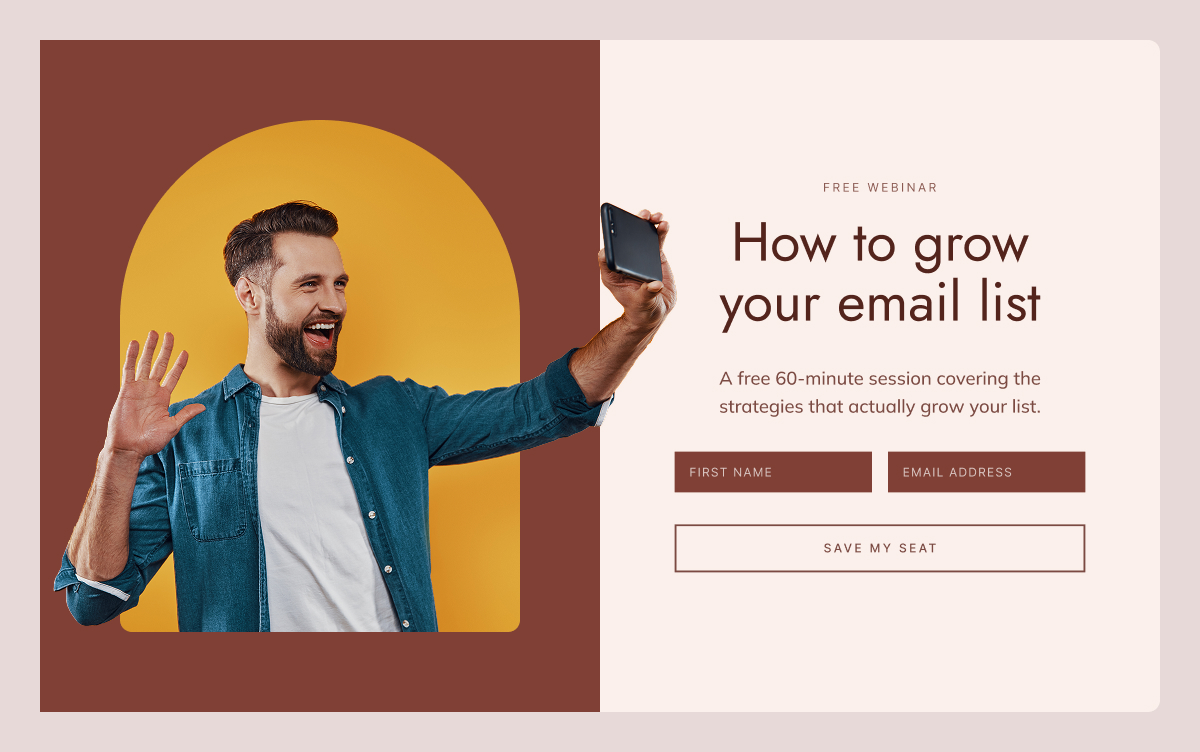
An event registration form lets you promote a specific topic while collecting an audience that’s explicitly interested in it. Everyone who signs up for a webinar or event about topic X is essentially telling you “I care about X.”
What to include
- Email and name.
- Optional: “What question do you hope we cover?” or “What’s your main goal with this?”
What to send
- Confirmation email
- Reminder emails before the event.
- A “thank you + replay” email after, with a call to action.
- A short sequence with related content and a relevant offer.
7. Challenge or course registration forms
Best for: education, coaching, wellness, creators, services
The job: “I want structured help making progress on this goal.”
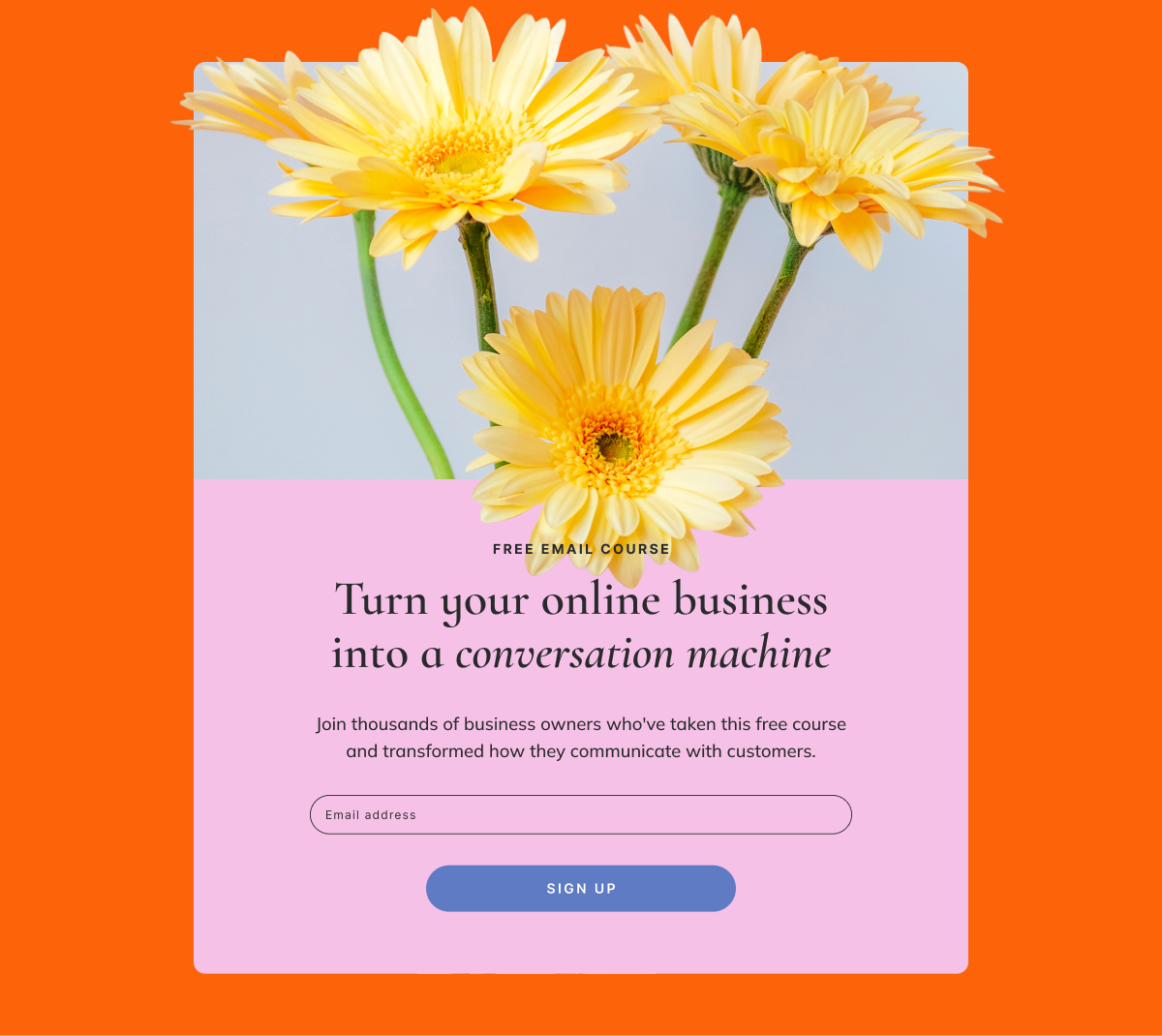
Challenges and email courses are a way to keep people engaged over several days or weeks. Instead of a one‑time download, they sign up for a series of emails that move them step by step toward a result. This can be very easy to create if you repurpose content you already have.
These work especially well for
- Habit‑building goals (fitness, productivity, learning, wellness).
- Complex topics that benefit from step‑by‑step guidance.
- Warming people up before a bigger, paid offer.
What to send next
- A welcome email setting expectations (how long, how often, what they’ll achieve).
- A series of short, actionable lessons or prompts.
- A final email summarizing progress and offering the next step (paid program, service, product).
Ask the right questions and your list segments itself
Most businesses wait until someone unsubscribes to wonder what went wrong. A better approach is to find out what people want at the moment they sign up and use that to send emails they actually want to open.
A small number of well‑chosen custom fields can transform a generic list into clear segments you can sell to more effectively.
8. The interest‑based signup form
Best for: ecommerce, content, services
The job: “I want to hear about things that matter to me, not everything you sell.”
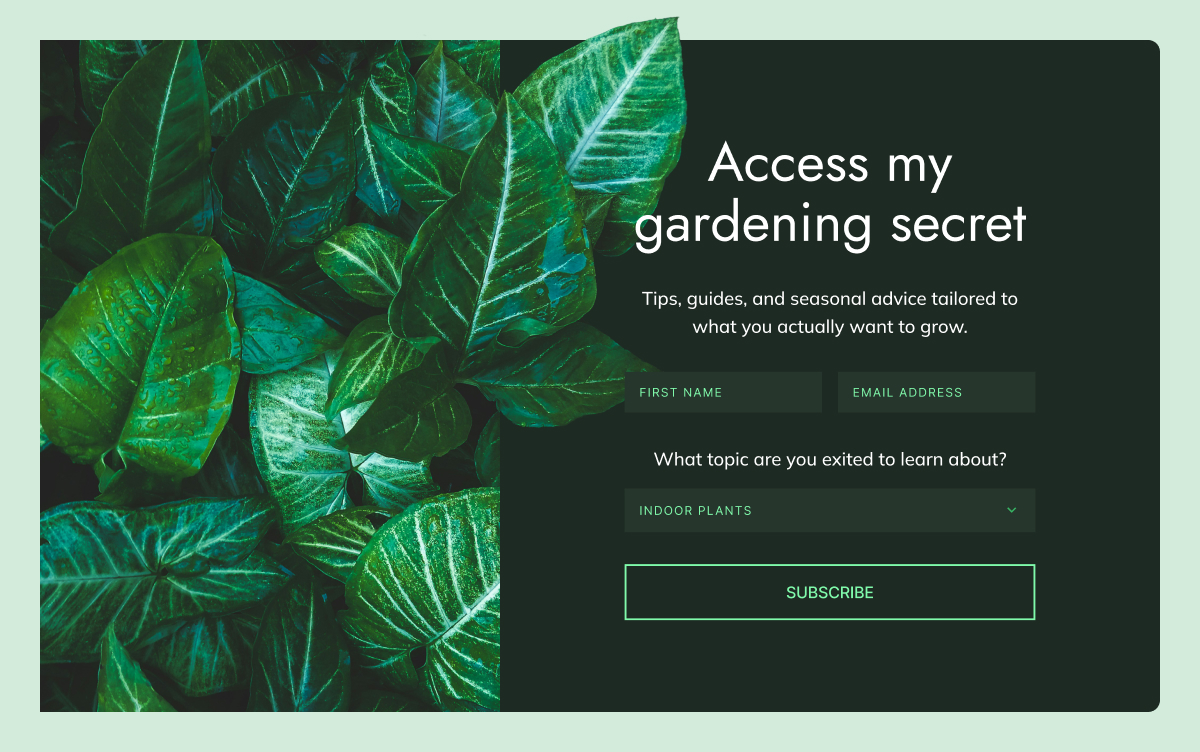
Interest‑based signup forms help you understand what new subscribers care about right at the moment they join. Instead of putting everyone into the same newsletter, you ask one simple question and use the answer to decide what content they receive.
Examples
- Content business: “What topics interest you?”
- Ecommerce: “Which product categories should we keep you updated on?”
- Services or coaching: “What’s your primary goal?”
How this creates better leads
- You send emails that match their interests, so engagement stays high.
- When you make an offer related to that interest, it feels natural.
- You avoid blasting everyone with everything, which reduces unsubscribes.
9. The frequency preference form
Best for: any business that sends regular emails
The job: “I want to stay connected but not overwhelmed.”
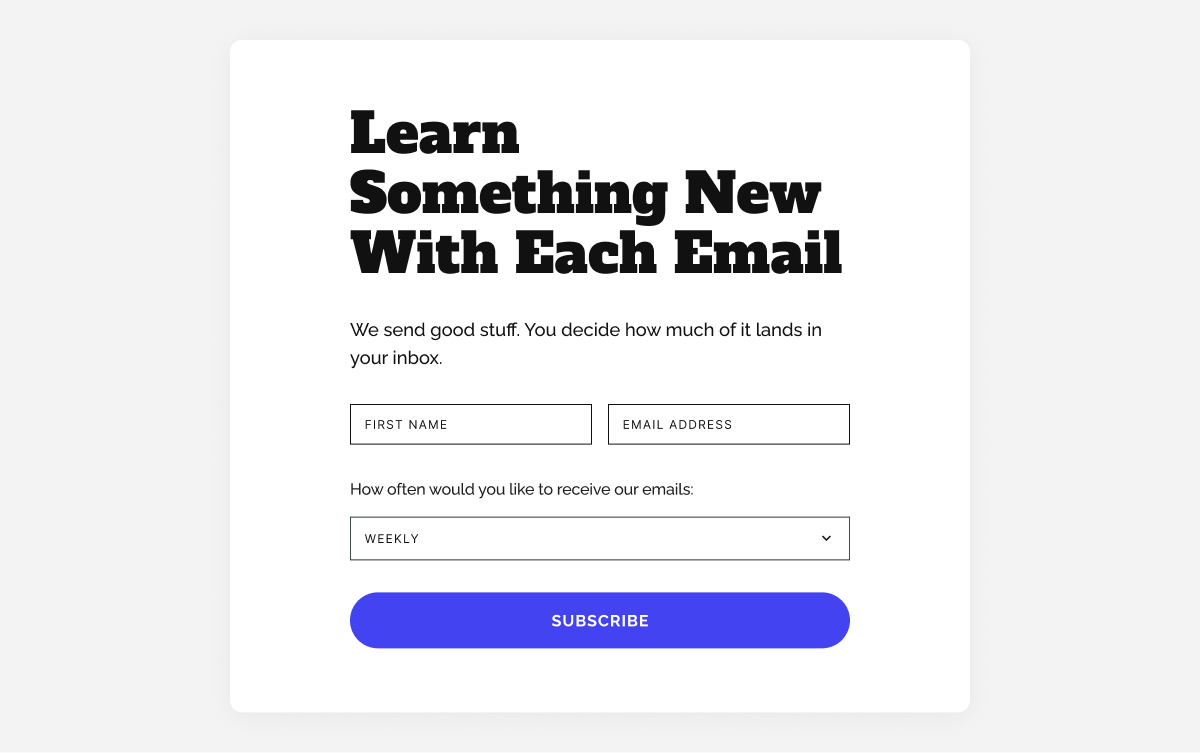
Frequency preference forms set expectations about how often you’ll email. By letting people choose their cadence at signup, you make it easier to stay in their inbox longer — crucial if you want time to turn leads into customers.
Options to offer
- Weekly digest.
- Monthly roundup.
- Only big announcements.
- “Everything” for people who want it all.
10. Forms for specific roles or audiences
Best for: products and services that serve different types of customers
The job: “I want content that’s relevant to my situation.”
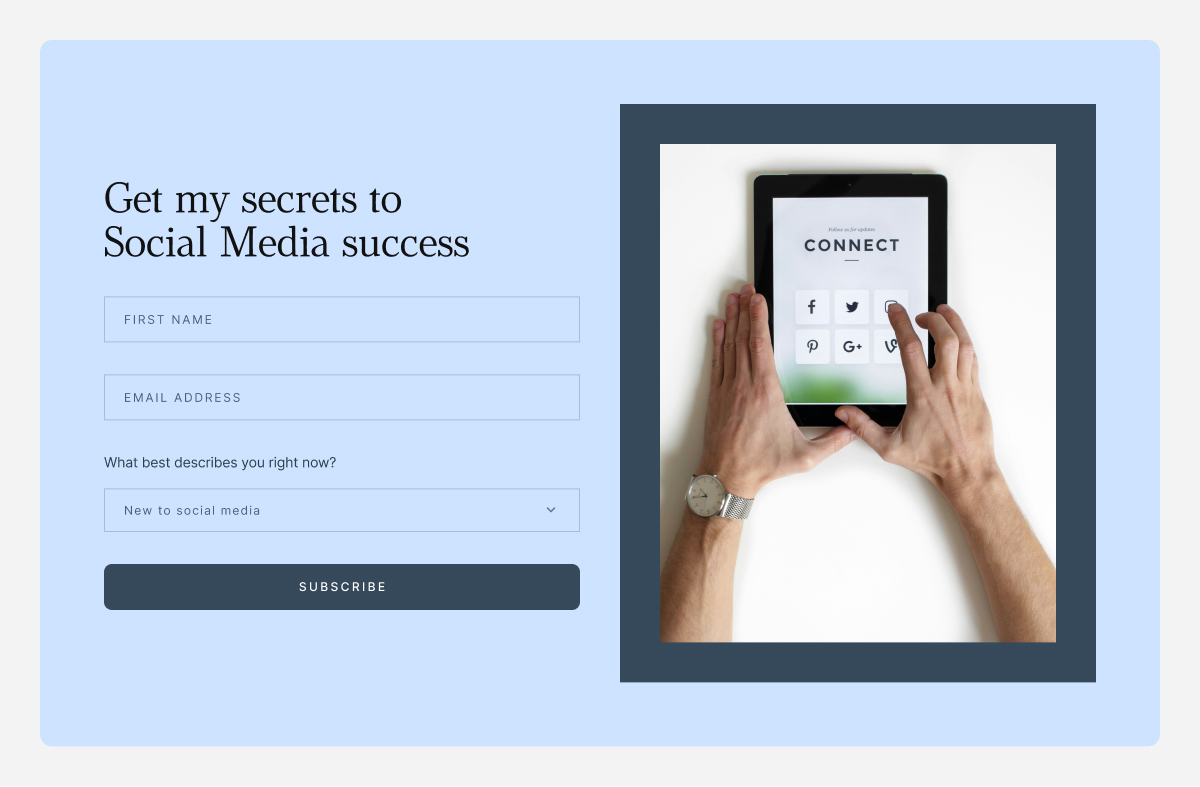
Unlike interest‑based forms that focus on what someone wants to hear about, role‑based fields focus on who they are. When the same product or content can serve very different customer types, this helps you adjust the message for each one. A quick role question at signup lets you send people into a version of your emails that fits their situation from the very first message.
How to implement
- Add a dropdown to your signup form.
- Keep it to 3–4 options so it doesn’t feel like a survey.
- Use the answer to trigger different welcome emails or recommend different products.
A form that asks “What best describes you?” with options like “New business,” “Growing business,” and “Established business” lets you send very different emails and offers to each segment.
A few things to keep in mind
No matter which forms you use, a few small choices can make the difference between “more contacts” and “more and better leads.”
Keep forms simple
The research is clear: simpler forms convert better, especially on mobile. If you’re not going to use a field in your emails or segmentation, don’t ask for it.
- Start with 1–2 fields (email + one more).
- Add a third only if you know exactly how you’ll use it.
Match the form to the intent
A homepage visitor, a blog reader, and a product page browser are in different mindsets. Your form copy and offer should reflect that.
- High intent (product pages, pricing): Direct offers work best. “Get 10% off your first order.”
- Medium intent (blog, resources): Value‑focused offers work. “Get the complete checklist.”
- Low intent (homepage, general browsing): Curiosity‑driven offers work. “See what our subscribers get every week.”
Make every field earn its place
Each form field should have a job:
- First name → personalize subject lines or intros.
- Location → send localized offers or event invites.
- Interest/role → send different content and offers.
If you’re collecting data but never using it to segment, personalize, or trigger automations, it’s just friction.
Consent and privacy: a quick note
Whatever forms you use, make sure each one includes a clear opt‑in and a link to your privacy policy. If you have customers or subscribers in the EU, UK, or other regions with data protection laws, people need to actively agree to receive marketing emails from you — a pre‑ticked checkbox isn’t enough. When in doubt, check the rules that apply in your region, and always make it easy for people to unsubscribe.
Capture leads beyond your website
The forms above all live on your website, but many small businesses also connect with customers on Instagram, Facebook, or in person. A few ways to bring those leads into the same system:
- Link to a dedicated landing page with your lead magnet or signup form from your Instagram or Facebook bio.
- Use a QR code at events, in your packaging, or on printed materials that takes people directly to a form.
Once someone signs up through any of these routes, you can group them by source so you know where they came from.
How to know if your forms are working
Setting up forms is only half the job. Here are a few numbers worth tracking:
- Form conversion rate: A well‑placed form with a strong offer should convert 2–5% of visitors on a typical page. If yours is well below 1%, it’s worth testing a different offer or placement.
- Welcome email open rate: The first email in any automated flow typically gets the highest open rate — often 40–60% for warm leads. If yours is much lower, the form may be attracting the wrong audience, or the offer isn’t delivering what people expected.
- Click‑through rate on follow‑up emails: For a targeted, interest‑based flow, a click rate of 3–5% is a reasonable benchmark. Below that, consider whether the content matches what subscribers actually signed up for.
These are rough guides, not hard rules. What matters more is your own trend over time: are conversions improving as you test different offers and placements?
If you’re a small business asking “how do I get leads?”, start with these 3 forms
You don’t need to implement everything in this guide at once. If you’re a small business with limited time, three well‑chosen forms will take you further than eight half‑built ones.
- A welcome discount or “first‑order” offer on your product or pricing pages — for people who are already close to buying.
- One strong, problem‑solving lead magnet on your most visited blog post or resource page — for people who are researching but not yet ready.
- A simple interest‑based custom field on your main newsletter form — so every new contact lands in the right segment from day one.
SiteGround Email Marketing lets you build forms, collect the details you care about, and automatically place subscribers into the right Groups. From there, each Group can follow its own automated journey, with emails that match what those people signed up for.
Email lead generation: Frequently asked questions
An email signup form is a small form on your website or social media where people can type in their email address to join your mailing list or newsletter. When someone fills it in and clicks submit, they give you permission to send them emails about your business.
First, a visitor sees the form and a short explanation of what they will get if they sign up, such as weekly tips, special offers, or a free resource. Next, they fill in their details and click submit, after which their information is saved to your list. Often, they are then shown a confirmation message or receive a welcome email that tells them what to expect.
An email signup form is for ongoing marketing: “Add me to your list so I can get your updates, tips, and offers.” A contact form is for one-off messages: “I have a question or need help,” usually sent directly to your inbox or support.
To use email signup forms to generate leads, you want them to attract people who are likely to become customers, not just anyone. You do this by connecting the form to an offer that matches what you sell, like a free mini-consultation, a short guide, or a checklist closely tied to your main service or product. You can also ask one or two simple questions on the form that tell you what they are interested in, so you know how to follow up. Once they join, you send emails that match the problem or goal they told you about, which makes them more likely to buy later.
Replace “Subscribe to our newsletter” with something clear and useful. You can offer a short checklist, a cheat sheet, a template, a mini‑guide, a discount, a free sample, or a mini‑course delivered by email. The key is that your offer solves a real problem your ideal customer feels right now and naturally points toward what you sell.
Email address is essential, first name is useful for personalisation, and you might add one simple question that helps you understand their situation or interest. Every extra field adds friction and lowers completion rates, so only ask for more information if you will actively use it in your emails or sales process.
A lead magnet is a free, valuable resource you give in exchange for someone’s email address. Its job is to attract the right people, give them a quick win, and show them that you understand their problem.
Strong lead magnets for small businesses tend to be simple and focused rather than long and complex. A clear checklist, a one‑page cheat sheet, a short step‑by‑step guide, or a set of templates and scripts can work extremely well. In some cases, a quiz, a short video training, a free trial, a mini‑audit, or a small discount on a first order is a better fit. The best ideas are always tightly aligned with the main problem your product or service solves.
A lead magnet does not have to be a PDF at all. It can be a short email course, a video lesson, a private audio, access to a resource library, a small tool or calculator, or even a brief one‑to‑one consultation.
To build an email list from scratch, start by creating one strong lead magnet that matches what you sell and speaks to a real problem your ideal customers have. Set up a simple signup form or a dedicated signup page, connect it to your email tool, and clearly explain who the list is for, what people will get, and how often you email. Share that signup link wherever people already interact with you, including social profiles, posts, direct messages, your email signature, invoices, booking pages, and in‑person with a QR code. Then send a short welcome sequence and keep emailing on a consistent schedule so subscribers remember you and start to trust you.
Good placement helps more visitors see and use your forms. Your homepage is a strong starting point, especially near your main message or after you explain what you do. Blog posts and articles are powerful spots too, both inside the content and at the end of the page, because readers there are already engaged. A dedicated “Subscribe” or “Free resources” page gives you a link you can share anywhere.
The time it takes to grow an email list depends on your visibility and how attractive your offer is. When you are starting from a small audience, it can take several months to reach your first hundred or few hundred subscribers, and that is completely normal. Established lists often grow steadily by a few percent each month, while also losing some people to unsubscribes and inactive addresses. For most small businesses, a smaller list of engaged subscribers who actually want what you sell is far more valuable than a large, unresponsive list.






Comments ( 0 )
Thanks! Your comment will be held for moderation and will be shortly published, if it is related to this blog article. Comments for support inquiries or issues will not be published, if you have such please report it through our official channels of communication.
Leave a comment
Thanks! Your comment will be held for moderation and will be shortly published, if it is related to this blog article. Comments for support inquiries or issues will not be published, if you have such please report it through our official channels of communication.