Small business local SEO: ranking without a physical storefront
Most local SEO guides start with the same advice: add your address, claim your listing, show up on the map. Great advice, if you have a map-worthy address. But contractors, consultants, mobile service providers, and home service businesses play by different rules. Ranking locally without a physical storefront is entirely achievable, it just requires a smarter approach. This guide covers exactly that: from setting up your Google Business Profile correctly, to building service area pages that rank in cities you’ve never set foot in.
Key takeaways:
- Local SEO still works without a storefront — but service-area businesses need a different local SEO strategy to prove geographic relevance.
- Your Google Business Profile is critical — set it up as a service-area business, hide your address, and define realistic service regions.
- Consistent citations (NAP) build trust — clean up any conflicting addresses and keep your business details aligned everywhere.
- Create dedicated, high-quality service area pages for each location you target — avoid duplicate or “copy-paste” content.
- Reviews are essential trust signals — build a simple system to request and respond to them consistently.
- Track performance and stay consistent — effective local SEO compounds over time, and early effort gives you a competitive edge.
What is local SEO — and why does it work differently if you have no storefront?
Local search engine optimization (SEO) is the process of optimizing your online presence so your business shows up when people search for services in a specific location. Think “plumber in San Jose” or “mobile dog groomer near me.” These searches have clear local intent, and the local businesses that appear at the top of search engine results get the calls.
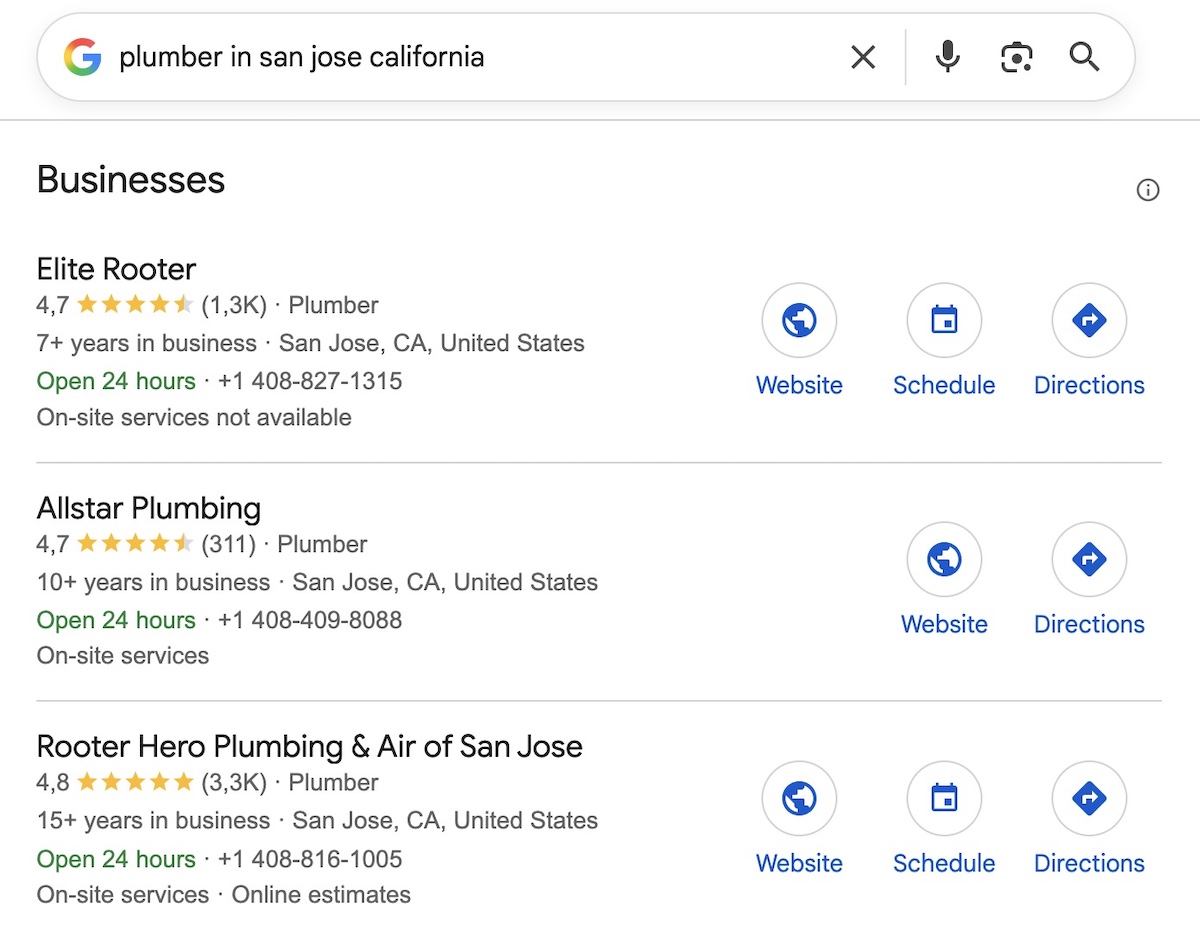
Businesses that serve customers at their location rather than from a fixed address are known as service-area businesses, or SABs. Think plumbers, consultants, mobile cleaners, or personal trainers.
For a small business with a physical address, the setup is fairly straightforward: your location is a built-in ranking signal. But for a service-area business, it’s a different challenge. You need to rank in local areas where you have no physical presence, which means working a little harder to prove to search engines, and to potential customers, that you genuinely serve those areas.
That’s the gap this guide fills.
Why local SEO matters for service-area businesses
If you’re on the fence about whether this is worth your time, consider this: 80% of US consumers search for local businesses weekly, and 76% visit or contact a business within 24 hours of searching for something nearby. These aren’t people browsing. These are people who are likely already at the bottom of the marketing funnel and ready to hire.
That reach is growing too. AI tools like ChatGPT and Google’s AI Overviews are increasingly surfacing local business recommendations, drawing from the same signals as traditional local search: your GBP, your reviews, your citations, and your website content. Getting your foundation right today means building local visibility across both.
And guess what? The majority of your SAB competitors aren’t investing in local SEO properly. 58% of businesses still haven’t optimized for local search at all. That’s not a threat; it’s an incredible small business marketing opportunity. Getting in early and doing it right means you’re not fighting uphill; you’re stepping into a lane most of your competition has left wide open, and the wind is at your back.
How to do local SEO as a service-area business: a step-by-step guide
1. Set up your Google Business Profile as a service-area business
Your Google Business Profile (GBP) is the single most important local SEO asset you have. For SABs specifically, getting this part of your SEO strategy right from the start saves a lot of headaches later.
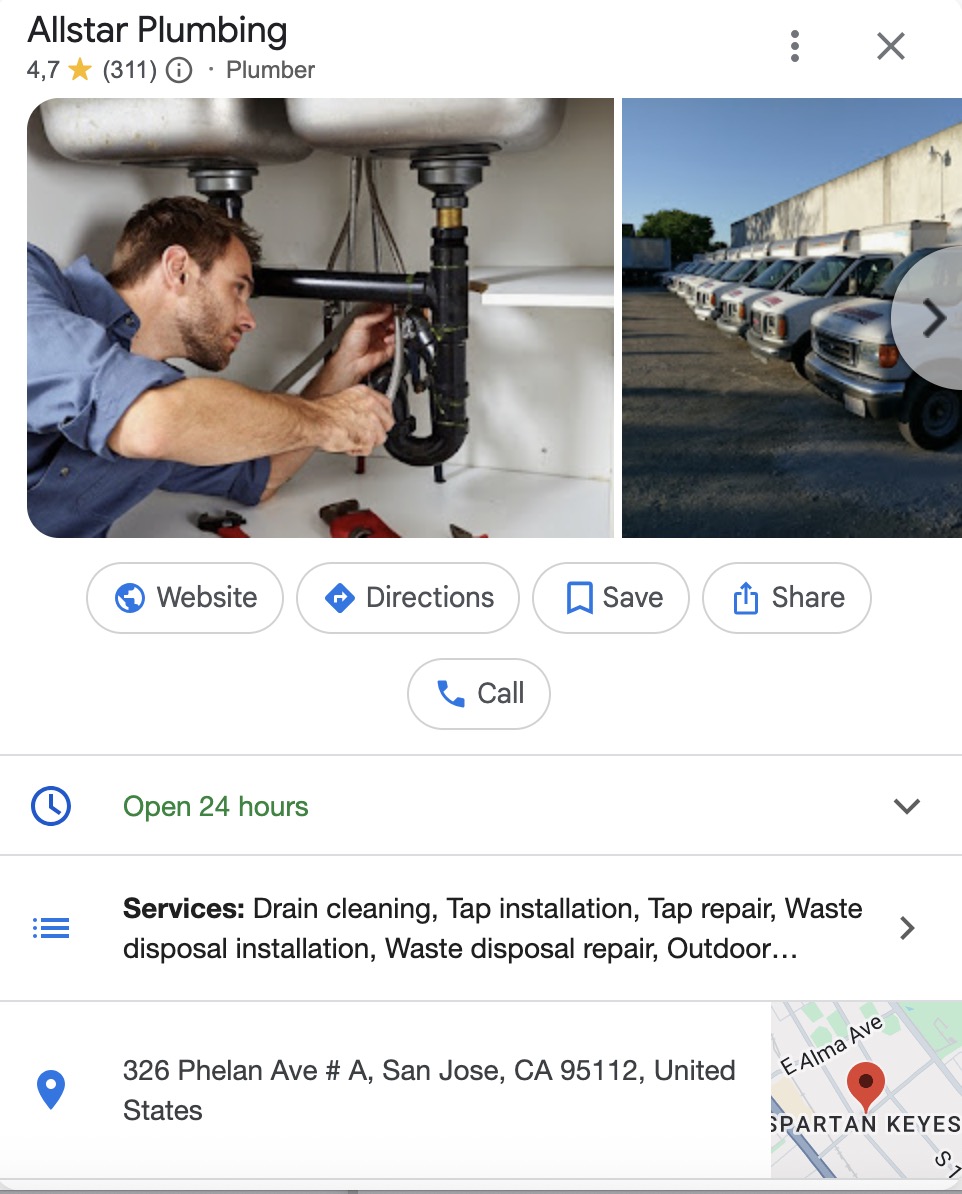
How SAB profiles differ from storefront profiles
A standard GBP displays a physical address that shows up on Google Maps. But, of course, as a service-area business, you don’t display a public address. Instead, you define the regions, cities, or zip codes you serve. This is a key distinction that many SAB owners miss, but getting it right from the start makes everything else easier.
Setting up your GBP step by step
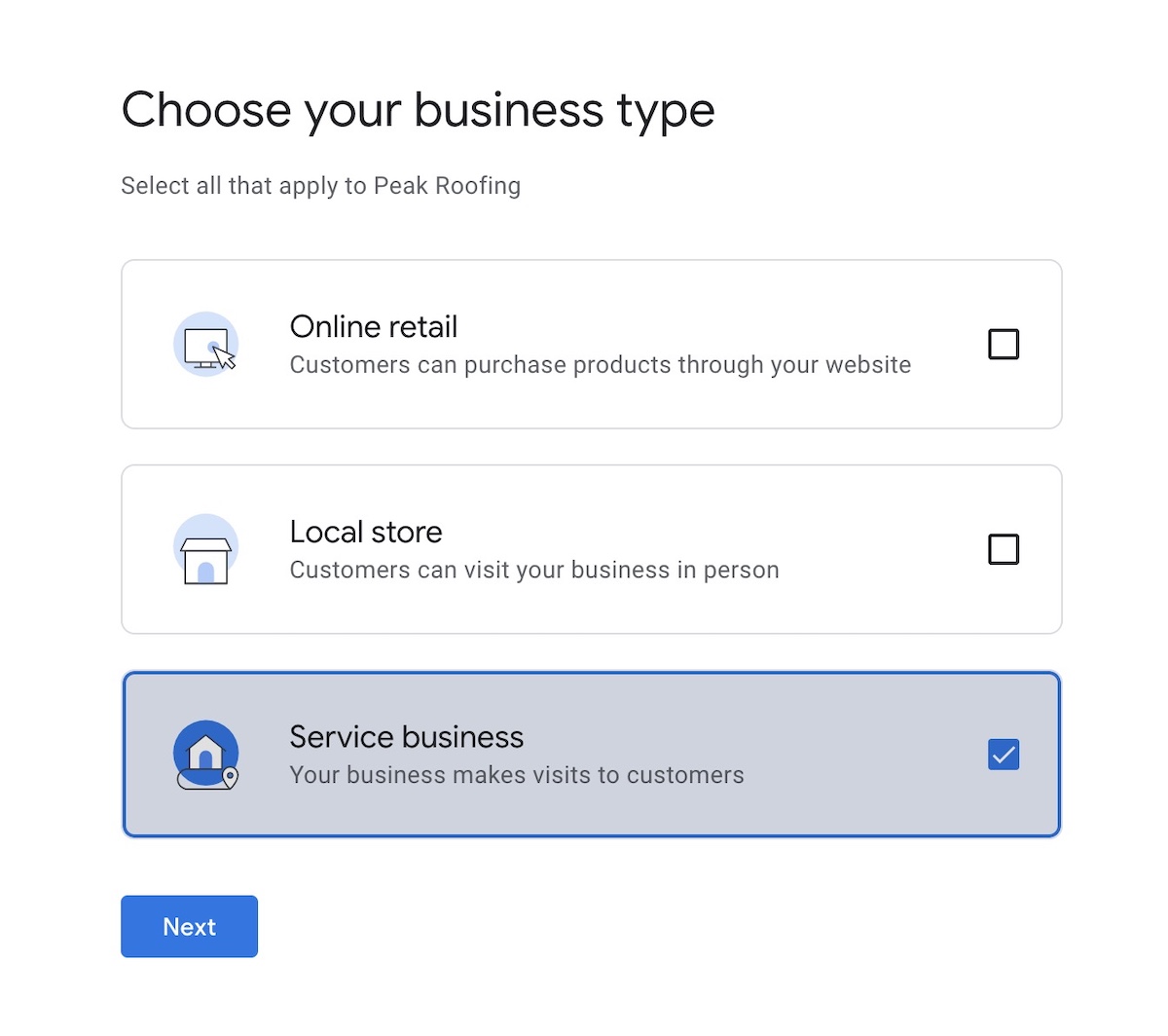
- Go to Google Business Profile and create or claim your listing
- When prompted, select that you are a service business, and that you make visits to customers (this marks you as an SAB)
- Hide your address so it doesn’t display publicly
- Define your service areas by city, region, or zip code. Be specific, but realistic — a one-person operation probably shouldn’t be claiming an entire state
- Choose your primary and secondary categories carefully, as these directly influence which searches you appear in
- Add your services and high-quality photos, along with a business description using local keywords, and written in natural language that includes the services you offer and the local areas you serve (so not just your business name and a generic tagline)
- Enable messaging and aim to post once a week. GBP posts are short updates (offers, service highlights, seasonal promotions, tips) that appear on your profile in local search results and signal to Google that your listing is active
Build your online foundation with SiteGround
Google Business Profile optimization works best when it points to a fast, professional website. SiteGround’s Website Builder gives service-area businesses an SEO-ready foundation — no technical experience needed.
2. Get found in more places: citations and NAP consistency
A citation is any online mention of your business name, address, and phone number (collectively known as NAP). Consistency across these mentions is a ranking signal. Inconsistencies confuse search engines and can tank trust.
Understand the SAB address challenge
For a small business with a fixed address, keeping NAP consistent is relatively straightforward. For SABs, it’s more complicated. You may not have a public address at all, or your address situation may have changed over time — and both scenarios create inconsistencies that are worth getting ahead of. The first step is deciding what your address situation actually is.
Choose your address situation
- Home address: Not recommended to display publicly, but if it’s already out there, focus on cleaning it up rather than leaving mismatched data behind
- Virtual office: A legitimate option that gives you a real, displayable address in your target market, though it comes with a monthly cost
- PO Box: Not accepted by Google as a valid business address, so avoid using this as your primary listing
Fix a home address that’s already listed
It’s a citation headache, and a security concern. A less-than-satisfied customer could come and TP your house. Or a happy one might send you flowers. Anything is possible, but not everything is welcome.
Here’s how to sort it: go to your GBP dashboard, edit your business information, and — importantly — uncheck the address display option so it no longer shows publicly. Then run a citation audit to update any online directories where the address already appeared, which brings us to the next point.
Audit and clean up your citations
Tools like BrightLocal, Whitespark, and Moz Local can scan the web for existing mentions of your business and flag inconsistencies. Priority directories to be listed in include Google, Yelp, Bing Places, Apple Maps, and any industry-specific platforms relevant to your trade.
Beyond the major platforms, local directories (city-specific business listings, local chamber of commerce directories, and neighbourhood-specific sites) are worth pursuing too. They carry less individual weight than Google or Yelp, but collectively local directories reinforce your relevance in a specific area.
3. Build service area pages that rank
Your GBP tells Google where you operate, but it’s your website that provides the content signals Google (and increasingly AI) needs to actually rank you for location-based searches. Without a physical address, dedicated service area pages are how you build that geographic relevance. A good way to do this is to create one page per city or region you serve.
Picture it in practice
Take a roofing company serving five towns outside Chicago. They might have a service page called “Roof repair in Naperville” living at mysite.net/locations/naperville, another for Schaumburg, another for Aurora, and so on. Each page targets that specific location and is written as if a local homeowner landed on it directly from a search (because hopefully they will!).
In terms of website structure, most SABs keep it simple with a dedicated locations section:
mysite.net/locations/
mysite.net/locations/naperville/
mysite.net/locations/schaumburg/
mysite.net/locations/aurora/
The parent /locations/ page acts as a hub that links out to each individual location page, helping search engines and AI crawl and understand the full geographic scope of your business. If you offer meaningfully different local services across areas, you can go one level deeper (mysite.net/roof-repair/naperville/), but for most small SABs the simpler structure works well.
Structure each page for search
While the specifics will vary by business, most service area pages follow a similar structure and visual hierarchy:
- Locally targeted heading: Include the city or region name — “Roof repair in Naperville, IL” not just “Roof repair”
- Local intro: A short opening paragraph that speaks directly to local customers, referencing the location naturally, and highlighting the unique selling proposition
- Services offered: What you provide in that specific area, with any locally relevant context
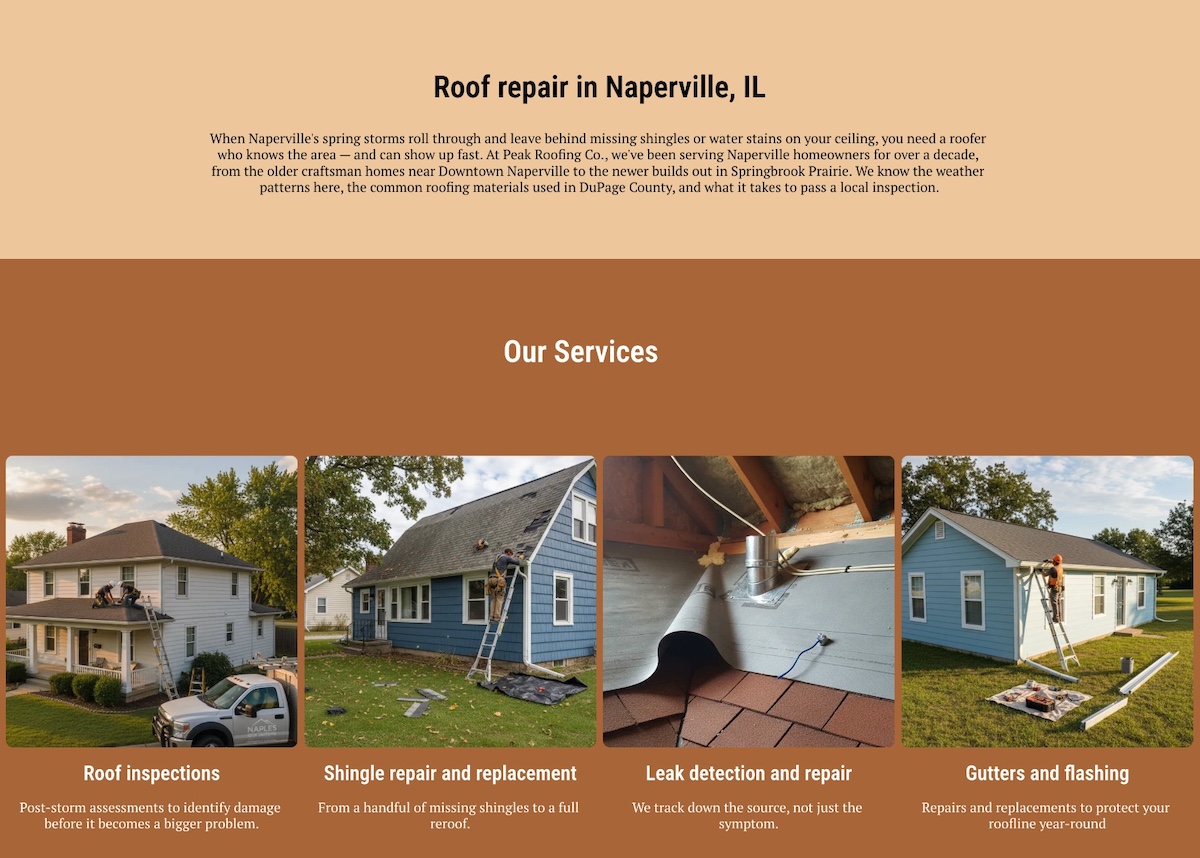
- Trust signals: A review from a customer in that location, or a note about a recent project nearby
- Keywords and search language: Incorporate local keywords, such as a city name, naturally into your copy and write conversationally to match how people search — phrases like “roof repair near me” or “best plumber in Naperville.” Avoid forcing keywords in awkwardly; Google is good at detecting over-optimization
- Clear call to action: Something location-specific works best, like “Get a free quote for your Naperville home”

Avoid thin and duplicate content
This is where most SABs trip up. If you’re serving ten cities and each page says the same thing with only the city name swapped out, search engines will likely treat those pages as thin or duplicate content, which can actively hurt your rankings. Each page needs a genuine reason to exist: a local detail, a relevant example, a neighborhood-specific reference.
Link internally between service area pages
Link between your service area pages to help search engines understand the geographic scope of your business and to pass authority across the service locations. A simple “we also serve [nearby city]” link at the bottom of each page goes a long way.
Keep in mind general SEO best practices
Service area pages still need to follow general SEO best practices to perform their best when it comes to local SEO. That means writing a unique meta title and description for each page, making sure your site loads fast and optimized for mobile, and keeping your page structure clean and crawlable. For a full rundown of the basics, SiteGround’s SEO checklist is a good place to start.
Create your service area pages with SiteGround
SiteGround Website Builder makes it easy to structure your location pages exactly the way you need them — no coding required. Every page is automatically mobile-responsive and fast, with built-in SEO tools to help you optimize as you go.
Get started with SiteGround Website Builder >>
4. Generate and manage reviews systematically
For a service-area business, reviews can seem secondary, but in reality, they’re often the first trust signal a potential customer encounters. Without a shopfront, foot traffic, or a physical presence, online reviews become your most visible proof of credibility.
Here’s how to build a strong library of positive reviews for your small business:
Build a simple follow-up sequence
The best time to request a review is immediately after job completion, when the customer’s satisfaction is at its peak — waiting a week is waiting too long.
An easy way to handle this: if you collected the customer’s email during the service, add them to a follow-up email automation sequence as soon as the job is done. Keep that first email short, personal, encourage customers to share their feedback, and include a direct link to your Google review page.
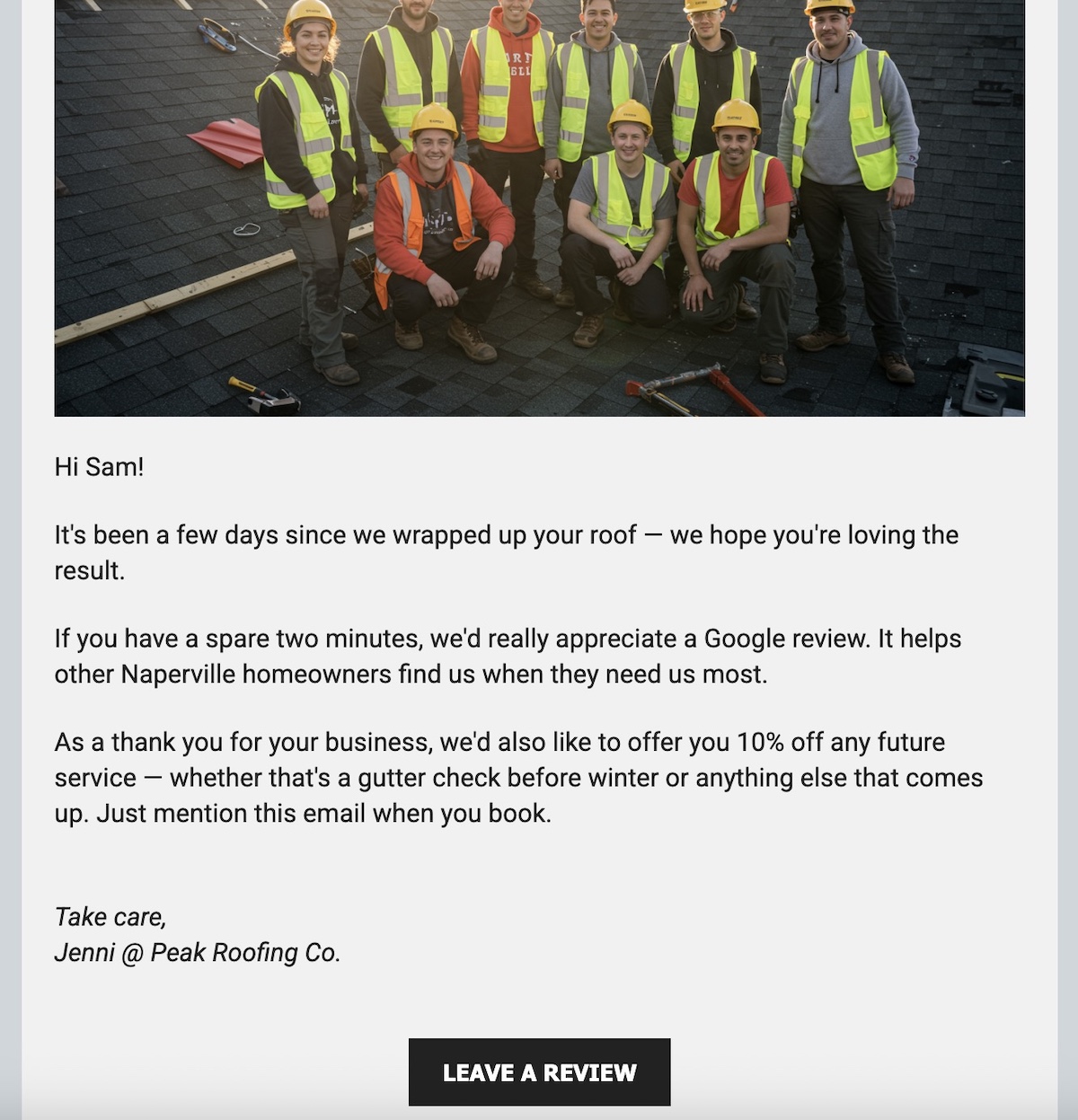
Not familiar with setting up email automation? Don’t worry: getting started with post-job email sequences couldn’t be easier with SiteGround Email Marketing. No technical experience is needed — and if you’re already using SiteGround Website Builder, you can manage your website, your email list, and your automations all in one place.
Prioritize the right platforms
Focus on Google first, since Google reviews have the most direct impact on local rankings. Then build presence on industry-specific platforms relevant to your trade, such as Houzz or Angi for home services or Thumbtack for general service businesses.
Respond to every review
Responding to online reviews — both positive and negative — signals to Google that your profile is active, and signals to potential local customers that you’re professional and engaged. According to BrightLocal, 88% of consumers say they are more likely to use a business that responds to all its reviews.
5. Measure what’s working
Tracking the right metrics is the only way to know whether your local SEO efforts are paying off. Here’s what to continually monitor and where to find it.
Key metrics to monitor
- Google Search Console: Filter for local queries to see which location-based search terms are driving impressions and clicks to your site
- GBP Insights: Track calls, direction requests, and website clicks directly from your profile — these are strong indicators of real-world intent
- Service area page traffic: Monitor organic traffic to individual location pages in GA4 to see which areas are gaining traction
Realistic timelines
Most service-area businesses start to see early movement within 60 to 90 days of optimizing their GBP and building out citations. Meaningful results (such as consistent local pack appearances, steady inbound leads) typically take 3 to 6 months. Local SEO (like all SEO) compounds over time, so the earlier you start, the better your baseline becomes.
Your local SEO checklist
This all sounds good in practice, but now it’s time for the rubber to meet the road. Use the below checklist as your reference point once you’ve finished reading.
Google Business Profile
- Set up or claimed as a service-area business
- Address hidden from public display
- Service areas defined accurately
- Categories, services, photos, and description complete
- Posting cadence established
Citations and NAP
- Consistent business name, phone, and address across all directories
- Listed on Google, Yelp, Bing Places, Apple Maps
- Existing citation inconsistencies audited and cleaned up
- Avoid using a PO Box as your primary address
Service area pages
- Dedicated page created for each key city or region
- Each page has unique, locally relevant content
- “Near me” language included naturally
- Service area pages linked to each other internally
Reviews
- Post-job review request process in place
- Follow-up sequence set up (text or email within 24 to 48 hours)
- Responding to all reviews consistently
- Listed on relevant industry platforms beyond Google
Tracking
- Google Search Console set up and filtering for local queries
- GBP Insights being checked regularly
- GA4 tracking service area page performance
Take your local SEO further
The thing about local SEO is that it rewards consistency over cleverness. But you don’t need to do everything at once. Start with your GBP, get your citations in order, build out your first few service area pages, and put a review system in place. Then track what’s working and build from there.
The businesses that win at local search aren’t always the biggest or the best-funded. They’re the ones that show up consistently, in the right places, with the right information. For service-area businesses, that’s entirely achievable — and, good news for you, most of your competitors haven’t figured it out yet.
Everything in this guide — your service area pages, your GBP, your review follow-up sequences — works better when it’s anchored to a fast, well-structured website. Local SEO is one of the highest-impact channels in your broader website marketing strategy, and unlike paid ads, it compounds over time.
SiteGround’s Website Builder gives you an easy-to-create foundation for this: SEO-ready, mobile-responsive, and connected to SiteGround Email Marketing so you can manage your entire local presence in one place. No developer required.
Local SEO FAQs
Local SEO is the practice of optimizing your online presence to appear in local search results when potential customers look for businesses or services in a specific area. For small local businesses, it typically involves optimizing your Google Business Profile, building consistent citations, generating reviews, and creating locally targeted website content.
Costs vary widely depending on whether you do it yourself or hire help. DIY local SEO can cost very little beyond your time, especially in the early stages. Hiring a freelancer or agency typically ranges from a few hundred to several thousand dollars per month depending on the scope of work and competitiveness of your market.
Yes, particularly having a local SEO strategy. Unlike paid advertising, which stops the moment you stop spending, local SEO helps build visibility that compounds over time. For service-area businesses with limited marketing budgets, it’s one of the highest-return investments available.
Technically you can rank with just a GBP listing, but a website significantly increases your chances — especially for competitive searches. Service area pages, in particular, require a website to exist. A fast, well-structured site also strengthens your overall local authority.
Build a dedicated service area page for that city on your website, ensure your GBP service areas include that location, gather reviews that mention the area, and build citations that reference your service coverage. Over time, these signals combine to establish relevance in that market.
It’s already starting to. AI tools like ChatGPT and Google’s AI Overviews are being used to find and recommend local businesses, and they tend to pull from businesses with strong GBP profiles, consistent citations, and a healthy review base. Essentially the same things that drive traditional local rankings. If you want to go deeper on how AI is changing SEO more broadly, we’ve got you covered.






Comments ( 0 )
Thanks! Your comment will be held for moderation and will be shortly published, if it is related to this blog article. Comments for support inquiries or issues will not be published, if you have such please report it through our official channels of communication.
Leave a comment
Thanks! Your comment will be held for moderation and will be shortly published, if it is related to this blog article. Comments for support inquiries or issues will not be published, if you have such please report it through our official channels of communication.