2026 SEO checklist: Get found on Google and AI search engines
You open Google, search for your own business, and an AI chatbot is busy recommending your competitor. Not cool.
Search has changed, and if your SEO strategy hasn’t (or if you simply don’t have one), you’re probably feeling it. The good news is you don’t need a marketing degree, an agency retainer, or a lot of time to catch up. You just need an SEO checklist and the willingness to work through it.
That’s exactly what this is. A practical, jargon-free guide and SEO Checklist to getting found in 2026 on Google and on AI search engines like ChatGPT, Perplexity, Google AI Overviews, and so on. Work through the checklist at the end and you’ll have covered more ground than most of your competitors.
Key takeaways:
- You don’t need two SEO strategies. One well-structured, authoritative content and technical SEO approach works for both Google and AI search engines.
- Rankings alone aren’t enough anymore. Zero-click searches and AI summaries mean visibility and citations matter just as much as position.
- Structure is as important as substance. Clear headers, Q&A formatting, structured data, and quotable statements increase both rankings and AI citations.
- E-E-A-T is non-negotiable. Demonstrating real experience, expertise, authority, and trust is now a core ranking factor — not a bonus.
- Consistency beats complexity. A focused 90-day plan, steady content publishing, and monthly tracking will outperform sporadic bursts of effort.
Understanding the 2026 search landscape
Before you dive into the SEO checklist, it helps to understand why SEO looks the way it does right now. The landscape has shifted more in the past two years than in the previous ten, and knowing what’s changed will help you make smarter decisions with your time and budget.
Traditional Google search vs. AI search engines
Most people still think of search engine optimization as “showing up on Google.” And that’s still true: Google processes billions of searches every day, and ranking well there matters enormously. But it’s no longer the only game in town.
AI-powered search engines have entered the chat, and your customers are using them. Here’s a quick breakdown:
- Google AI Overviews are the AI-generated summaries that now appear at the very top of many Google search results pages. They pull information from multiple sources and present a synthesized answer, often before the user ever sees a traditional blue link.
- ChatGPT is increasingly used as a search tool, especially for questions like “what’s the best accountant for a small business in [city]?” or “how do I create an ecommerce website?” Users ask conversational questions and expect direct, authoritative answers.
- Perplexity is a dedicated AI search engine that cites its sources directly in the answer. It’s growing fast, particularly among tech-savvy users who want depth over speed.
And these AI-powered search engines aren’t alone — Microsoft Copilot, Claude, and Meta AI are all increasingly being used the same way. The good news is that optimizing for one largely means optimizing for all of them.
Also worth nothing: optimizing for SEO and AI search are more similar than different. Both reward well-structured, authoritative, clearly written content. You won’t need to build two separate strategies but rather just one smart integrated approach covers both. And that’s what we’re tackling today.
What’s changed in SEO in 2026
Let’s talk about what’s actually different this year, because some of it is significant.
- Rankings no longer equal traffic. Zero-click searches (where a user finds their answer directly on the results page without clicking through) now account for nearly 60% of all Google searches. That means even if you rank #1 (congrats by the way), a large portion of searchers may never visit your site. It also means that visibility in featured snippets, AI Overviews, and knowledge panels is now just as important as your ranking position.
- Keywords are out; search intent is in. Google (and AI engines) have become very good at understanding what someone means, not just what they typed. These days, stuffing your content with exact-match keywords is not only ineffective; it can actually hurt you. What matters now is whether your content genuinely answers the question behind the search.
- E-E-A-T has gone from guideline to gatekeeper. Google’s framework of Experience, Expertise, Authoritativeness, and Trustworthiness used to be a nice-to-have. In 2026, it’s a core ranking signal. If your content doesn’t demonstrate real-world expertise and credibility, it will struggle to rank — full stop.
- Your online reputation is now an SEO signal. Reviews on Google, mentions across the web, and how people talk about your brand all feed into how search engines perceive your authority. A strong reputation isn’t just good for business; it’s good for search.
- Search happens everywhere, not just Google. Your customers are asking questions on TikTok, Reddit, YouTube, and AI chatbots. A truly effective SEO strategy accounts for how content travels across platforms and not just how it ranks in one place. And with the launch of ChatGPT ads, the stakes have gone up. Businesses that aren’t visible in AI search aren’t just missing organic citations, but they’re potentially losing ground to competitors who are paying to appear there too.
We’ll get to the bottom of how to tackle all of these in a moment — hang tight.
What this means for small businesses
Ok, this might feel overwhelming. But the silver lining for small businesses is pretty shiny.
To start, you definitely don’t need separate strategies for Google and AI: one well-executed content and technical SEO approach covers both. And you don’t need an agency. Many of the most impactful SEO tasks are free or low-cost, and a consistent effort over 90 days can produce meaningful results and increase traffic to your website. The businesses winning in AI search right now are often not the biggest ones; they’re the ones with the clearest, most helpful, most credible content.
That’s an advantage you can totally build. Let’s get into it.
Your 2026 SEO checklist
1. Get started: Essential setup
Before you optimize anything, you need the right tools in place. Think of this as laying the foundation. None of it is particularly glamorous, but skipping it is like opening a store with no address.
- Claim and verify your Google Business Profile. If you have a physical location or serve customers in a specific area, this is non-negotiable. Your Google Business Profile is often the first thing someone sees when they search for your business, and it directly influences your local search visibility. Go to google.com/business and follow the verification steps.
- Install Google Search Console and submit your xml sitemap. Search Console is free, powerful, and essential. It shows you which search queries are bringing people to your site, which pages are indexed, and any technical errors Google has found. Once installed, submit your xml sitemap so Google can find and crawl your pages efficiently.
- Install Google Analytics 4 (GA4). Where Search Console tells you about your search visibility, GA4 tells you what people do once they arrive on your site. Together, they give you the full picture. Set it up before you start any optimization work so you have a baseline to compare against.
- Set up SSL (HTTPS). If your site still shows “http://” rather than “https://”, you have a problem. Google uses HTTPS as a ranking signal, and browsers actively warn users that non-secure sites are unsafe. Get this sorted before anything else.
- Check your robots.txt file. This file tells search engine crawlers which parts of your site to index and which to ignore. If you’re on WordPress, use Google Search Console’s URL Inspection tool to verify it’s configured correctly. If you’re on SiteGround, this is handled for you.
- Install plugins (if on WordPress). An SEO plugin can handle sitemap generation, meta tags, and technical flags without touching any code. Add a performance plugin like SiteGround Speed Optimizer to keep your site fast.
Already on SiteGround? Most of this section is handled for you.
SiteGround’s Website Builder and Ecommerce automatically generate and update your xml sitemap every 24 hours, handle SSL, manage your robots.txt, and integrate with Google Analytics without any code. Your ecommerce dashboard also includes built-in sales and product analytics, so you get the full picture alongside Search Console and GA4, all in one place. Skip the setup headaches and get straight to growing.
2. Do keyword research & content planning for SEO & AI
Think of keyword research less as a digital marketing exercise and more as eavesdropping on your customers. What are they typing into Google at 11pm? What are they asking ChatGPT? Those questions are your content roadmap.
Finding relevant keywords that work everywhere
- Lean into long-tail keywords. These are longer, more specific search phrases (think “best accounting software for freelance photographers” rather than “accounting software”). Long-tail keywords have lower search volume but higher search intent, meaning the people searching them are closer to making a decision. They’re also less competitive, which is a genuine advantage for growing small businesses going up against bigger brands.
- Prioritize question-based keywords. Questions like “how do I,” “what is the best,” and “should I use” are gold for both traditional SEO and AI search. That’s because AI engines are specifically designed to answer questions, and when your content directly and clearly answers a question someone asked, you become a candidate for an AI citation. Tools like AnswerThePublic, Google’s “People Also Ask” boxes, and even your own customer support inbox are excellent sources of real question data.
- Match content to search intent. For every keyword you target, ask yourself: what does someone actually want when they search this? Informational intent (they want to learn), navigational intent (they want to find a specific site), or transactional intent (they want to buy)? Your content needs to match the intent and where the searchers are in the customer journey. That is, a product page won’t rank for an informational query, and a blog post won’t rank for a transactional one.
Understanding what AI search engines want
AI search engines select sources based on a few consistent signals:
- Authority and trust: Is your site credible? Do other reputable sites link to or mention you?
- Clarity and directness: Does your content give a clear, complete answer without making the reader work for it?
- Topical comprehensiveness: Do you cover a subject in enough depth to be considered a reliable source?
- Freshness: Is your content up to date? Outdated information is a red flag for AI engines.
Content mapping & topic cluster strategy
The most effective content strategy for 2026 combines traditional SEO structure with an approach that signals deep topical authority to both Google and AI.
Here’s how it works. Instead of creating isolated blog posts targeting individual keywords, you build topic clusters. Each cluster has:
- A pillar page — a long-form, comprehensive piece covering a broad topic (like this one).
- Supporting content — shorter articles that go deep on specific subtopics within that broader theme. For example, in the case of this article, that means links to generative engine optimization or how AI is changing marketing for small business. (See what we did there? We just showed you this very strategy in action.)
- Internal links connecting the supporting articles back to the pillar page, and to each other.
This structure tells search engines that your site has genuine depth on a subject, not just a few surface-level posts. It also makes your content far more likely to be used as a source by AI engines, which are looking for comprehensive, trustworthy coverage of a topic. And, most importantly, it addresses thoroughly what your readers really want to know.
When building your content calendar, map each piece to a keyword cluster, assign it a content type (pillar or support), and make sure every piece connects back to your broader topic strategy.
3. Create content that ranks everywhere
Good content is still the heart of SEO. But “good” in 2026 means more than well-written; it means well-structured, deeply useful, credible, and formatted for both human readers and search engine algorithms. What does this look like?
The complete on-page optimization framework
- Title tags and meta descriptions. Your title tag is the clickable headline in search results; your meta description is the short summary beneath it. Both should include your target keyword naturally, accurately describe the page content, and be written to earn the click. Title tags should stay under 60 characters; meta descriptions under 160.
- Header hierarchy (H1–H6). Your H1 is your page’s “welcome sign” — the first thing visitors see when they land. Use it once, and make it count. Use H2s for main sections, H3s for subsections, and so on. This structure builds visual hierarchy so readers can scan easily, and it helps search engines understand your page’s organization. Bonus: well-structured headers make your content easier for AI engines to parse.
- URL structure. Keep URLs short, descriptive, and keyword-inclusive. Avoid dates, random strings of numbers, or anything that doesn’t communicate what the page is about. A URL like /academy/seo-checklist is infinitely better than /page?id=4827.
- Image optimization and alt text. Every image on your site should have a descriptive file name (not “IMG_4821.jpg”) and alt text that describes what the image shows. Alt text helps visually impaired users, improves website accessibility, and gives search engines additional context about your page content.
- Internal linking. Don’t forget to link relevant pages on your site to each other. Every piece of content should link to at least two or three related pages on your site.
SiteGround takes the guesswork out of on-page SEO. SiteGround’s Website Builder includes built-in SEO tools that make it easy to add title tags, meta descriptions, and image optimization as you build — no plugin hunting required. It’s designed for business owners, not developers.
Content depth, quality & authority (E-E-A-T)
E-E-A-T — Experience, Expertise, Authoritativeness, and Trustworthiness — is Google’s framework for evaluating content quality. It’s also increasingly how AI engines decide whose content is worth citing. Here’s how to demonstrate it in practical terms:
- Demonstrate Experience means showing that you’ve actually done the thing you’re writing about. Include real case studies, before-and-after results, specific examples from your own business, or outcomes from clients. First-hand experience is something AI-generated content can’t replicate, and it’s exactly what Google is looking for.
- Showing Expertise means making it clear who wrote the content and why they’re qualified to write it. Add author bios to your blog posts (just like we’ve done for this post). List credentials, certifications, years of experience, or relevant qualifications. If you’re a plumber writing about plumbing, say so. If you’re a nutritionist writing about food, make that visible.
- Building Authority happens when other credible sources reference, link to, or cite your content, and this is where link building comes in. Link building is the practice of earning backlinks from other reputable websites, and it remains one of the most powerful ranking signals in existence. You can accelerate link building by creating original research worth citing, publishing unique data, earning press coverage, pitching guest posts to industry publications, or getting mentioned on reputable industry sites. Worth emphasizing: Google is very good at identifying backlinks that were bought or manufactured, and those can actually hurt your rankings. Earned links only.
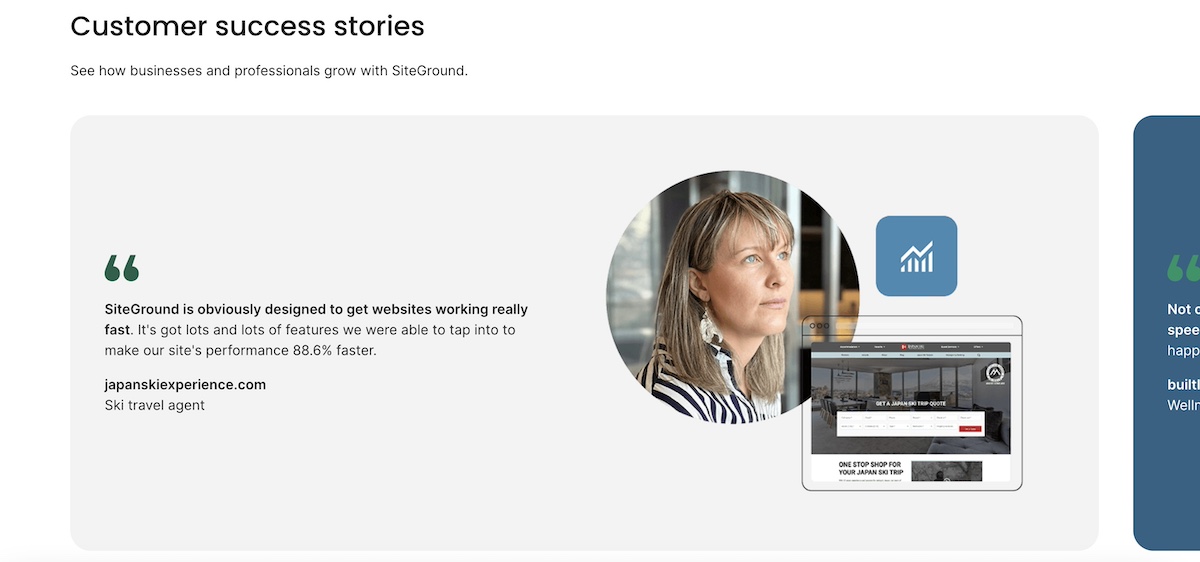
- Establishing Trust means being transparent about who you are, how you operate, and what your customers think of you. Display customer reviews prominently, include a clear privacy policy and terms of service, use HTTPS, and make it easy for visitors to contact you. Trust signals like this are good for conversion, and also good for search. For example, SiteGround dedicates an entire section on the homepage to customer success stories.
Structuring content for maximum visibility
How you format your content is as important as what it says, so don’t sleep on this step.
- Question-answer formatting is the most reliable way to appear in both featured snippets and AI-generated responses. Structure your content so that a clear question is followed immediately by a clear, complete answer within the same paragraph or section. This is exactly how AI engines extract content to cite.
- Write definitive, quotable statements. Vague, hedging language is the enemy of AI citations.Instead of “email marketing is a pretty good way to stay in touch with customers,” write “email marketing generates an average of $36 for every $1 spent — a higher ROI than paid ads, social media, and SEO combined.” Clear, confident, specific.
- Use structured formats strategically. Lists and tables aren’t just easier to read, they’re more likely to appear as featured snippets. Use bulleted lists when presenting multiple items of equal weight, numbered lists for sequential steps, and tables when comparing options or presenting data. But don’t overdo it: blocks of prose are also valuable, especially for nuanced explanations that benefit from context.
- Answer questions completely. A half-answered question sends users back to the search results, and tells Google your content didn’t satisfy the intent. Aim to be the last stop: give enough depth that readers don’t need to go anywhere else.
4. Address technical SEO
Technical SEO isn’t as scary as it sounds. You don’t need to be a developer to handle the essentials, and getting the foundations right will have a significant impact on your rankings.
But first: what is technical SEO? It refers to the behind-the-scenes elements of your website that help search engines crawl, understand, and index your content. Let’s examine how to optimize it.
Mobile & performance
- Test your mobile responsiveness. More than half of all web traffic now comes from mobile devices. In fact, Google uses mobile-first indexing, which means it primarily uses the mobile version of your site for ranking.

- Understand Core Web Vitals. These are Google’s user experience metrics, and they’re a direct ranking factor. There are three to know:
- LCP (Largest Contentful Paint): How quickly does the main content of your page load? Aim for under 2.5 seconds.
- INP (Interaction to Next Paint): How quickly does your page respond when a user interacts with it? Under 200ms is the target.
- CLS (Cumulative Layout Shift): Does your page content jump around while it loads? A score below 0.1 is ideal.
- Optimize page speed. Compress images before uploading, minimize unnecessary plugins, use a content delivery network (CDN), and choose a fast web hosting. Every extra second of load time increases your bounce rate, and hurts your rankings.
SiteGround is built for speed. SiteGround’s infrastructure includes a global CDN, built-in caching, and server-level optimizations designed to keep your Core Web Vitals in the green. It’s one of the fastest hosting environments available for small business websites, without requiring any technical configuration on your end. Plus, websites built with the SiteGround Website Builder are all built and optimized for mobile so that you can rest assured that your site performs at the very best no matter the screen.
Site structure & crawlability
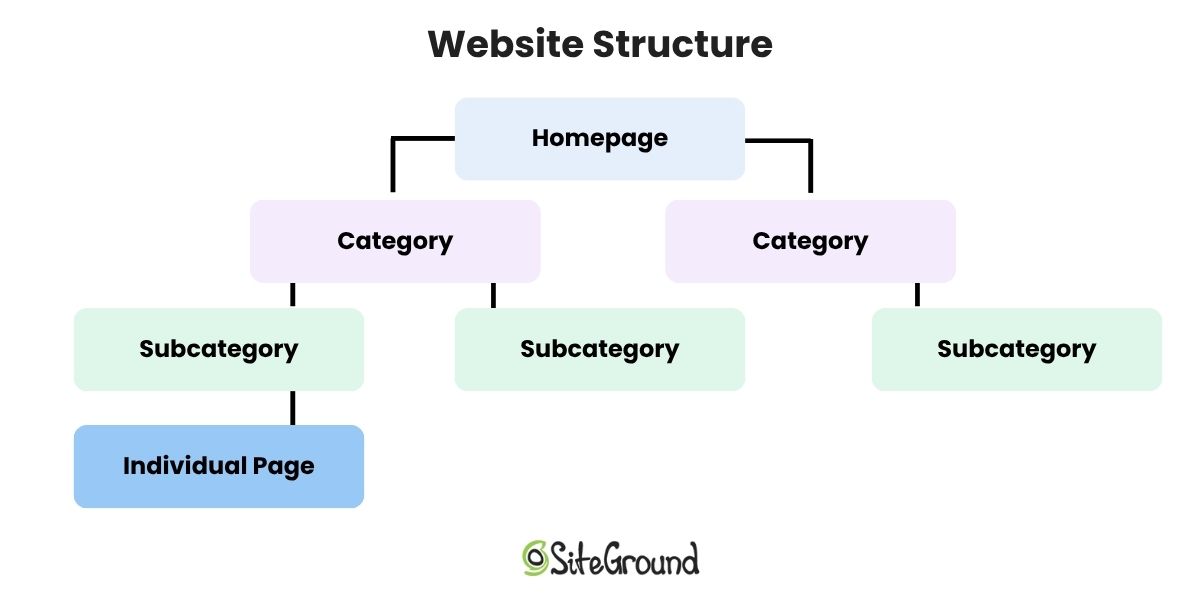
- Apply the 3-click rule. Every page on your site should be reachable within three clicks from your homepage. If important content is buried deep in your website structure, search engines may not crawl it effectively, and users definitely won’t find it easily.
- Fix crawl errors in Search Console. Google Search Console’s Coverage report shows any pages that couldn’t be indexed and why. Common issues include 404 errors (pages that no longer exist), pages blocked by robots.txt, and redirect chains. Address these regularly.
Common technical issues to resolve
- Duplicate content and canonical tags. If the same content appears at multiple URLs on your site, use canonical tags to tell search engines which version is the “official” one.
- Broken link detection and repair. Broken links (both internal and external) hurt user experience and waste crawl budget, meaning Google spends its limited time crawling dead pages instead of your good ones.
- 301 redirects. When you delete a page or change a URL, always set up a 301 redirect from the old URL to the most relevant new one. This preserves any SEO value the old page had and prevents users from landing on a 404.
- Orphaned pages. Pages with no internal links pointing to them are essentially invisible to search engines (and users). Do a site audit for orphaned pages and either delete them, redirect them, or add internal links to them from relevant content.
5. Implement structured data: Your visibility multiplier
Structured data (also called schema markup) is a type of code added to your web pages to help search engines understand exactly what your content is about: your business, your products, your content, your location. Without it, Google and AI engines have to figure that out on their own.
With schema markup in place, you’re more likely to appear in rich search results (think star ratings, product details, and FAQ dropdowns), and more likely to be cited as a source in AI-generated answers. Not every small business bothers with it, which means doing it well is a genuine competitive advantage.

Using the SiteGround Website Builder?
Product schema markup is built in automatically for your store, so your product listings are already set up to display pricing, availability, and review information directly in search results.
6. Tackle AI visibility must-dos
You’ve covered a lot of ground. Before moving on to tracking, here’s a quick roundup of the AI-specific actions that matter most, pulled from everything above, plus a couple of extras worth calling out on their own.
- Write in clear, quotable statements. AI engines cite short, direct excerpts, not long paragraphs. Aim for 2–3 sentence answers that can stand alone.
- Use conversational language throughout. Write how your customers actually talk, not how a textbook reads.
- Embed Q&A pairs in your content. A question followed immediately by a complete answer is the format AI engines are built to process.
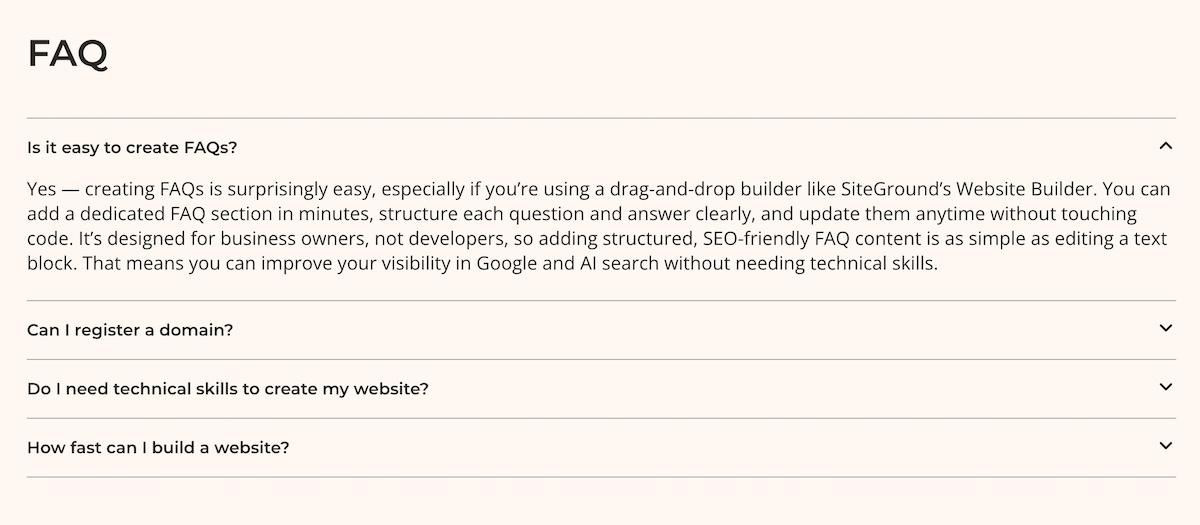
- Add FAQ sections and keep FAQ answers between 50–150 words. Complete enough to be useful, tight enough to be citable.
- Make author credentials visible on every content page.
- Cite your sources. Linking out to credible external references signals that your content is part of a trustworthy information ecosystem, and not just opinion.
- Keep content fresh. Outdated information is a red flag for AI engines. Build a regular update cadence into your content rhythm (more on this in the 90-day plan below).
If you’ve worked through Sections 1–5 with care, most of these should already be in motion. Consider this your final AI readiness check before you hit publish.
7. Tracking across all search platforms
You can’t improve what you don’t measure. Tracking SEO performance in 2026 means keeping an eye on both your traditional Google digital marketing metrics and your visibility in AI-generated responses.
Tracking traditional search performance
What to measure:
- Keyword rankings (which positions are you holding, improving, or losing?)
- Organic traffic (how many visitors are from search engine traffic?)
- Click-through rates (are your titles and meta descriptions earning the click?)
- Conversions and revenue (is your SEO actually driving business outcomes?)
How to track it:
- Google Search Console shows your average ranking position, impressions, clicks, and CTR for every query driving traffic to your site.
- Google Analytics 4 shows what organic traffic does once it arrives, which pages they visit, how long they stay, and whether they convert.
- Your ecommerce platform dashboard shows how your store is actually performing — revenue, orders, and product trends that connect your SEO efforts directly to business outcomes. If you’re using the SiteGround Website Builder, this is built in.
Tracking AI search visibility
This is the newer, less automated side of tracking, but it’s increasingly important. There are no comprehensive tools yet (and certainly not free tools) that fully automate AI search monitoring, so the most reliable approach right now is a structured manual process.
What to measure:
- Whether your brand is mentioned in AI responses
- Whether your site is being cited as a source
- Which topics you’re being referenced for
- How the quality and frequency of citations changes over time
How to track it (30-minute weekly process):
Before you start optimizing, run the below process once as a baseline, even if you don’t expect to show up yet. Knowing where you’re starting from is what makes your Month 3 results meaningful.
- Make a list of your 10–15 most important topics and keywords from your Section 2 research. Then, for each one, craft 2–3 natural, conversational questions that a customer might actually ask — the kind of thing someone would type into ChatGPT rather than Google. For example, instead of searching “local bakery SEO,” you’d ask something like “what’s the best bakery in [city]?” or “where should I order a custom wedding cake in [city]?”
- Search those questions in ChatGPT, Perplexity, Claude, Google AI Overviews, etc, and note whether your business or website shows up in the responses and keywords.
- Note whether your site is cited, your brand is mentioned, or a competitor is referenced instead.
- Record results in a simple spreadsheet like the one below.
AI visibility tracking template:
| Date | Query | Platform | Your site cited? | Competitor cited? | Notes |
| Day 0 | The question you asked | ChatGPT, Claude or others | yes/no | yes/no/who | Any observations |
| Month 1 | |||||
| Month 2 |
Compare performance side-by-side
Once you have a few weeks of data, look for patterns using this comparison framework:
| Scenario | What it means | What to do |
| Ranks well in Google + gets AI citations | This is your best-performing content | Leave the existing content alone — it’s working. Instead, build more supporting content around this topic to strengthen your cluster and capture related searches. |
| Ranks well in Google + no AI citations | Good foundation, not AI-optimized | Add clearer Q&A sections, FAQs, and definitive statements |
| Gets AI citations + weak Google rankings | Strong content, weak technical foundation | Improve backlinks, fix technical issues and broken links, strengthen on-page SEO |
| Neither ranks nor gets cited | Low-priority or low-quality content | Update, consolidate, or redirect |
Monthly action triggers:
- If you’re seeing strong Google rankings but zero AI citations, then improve content structure and website navigation, add clear questions and answers, and sharpen your authority signals.
- If you’re getting AI citations but weak traditional rankings, focus on technical SEO, link building, and on-page optimization.
Your 90-Day SEO implementation plan
Knowing what to do is one thing. Knowing when to do it is what turns an SEO checklist into actual progress. Here’s a practical 90-day plan designed for small businesses working with limited time and budget.
Month 1: Setup, research & benchmarking
- Install and configure Google Search Console, Google Analytics 4, and an SEO plugin if relevant
- Conduct keyword research for both traditional and AI search — identify your topic clusters and priority web pages
- Establish your baseline: current keyword rankings, organic traffic levels, and an initial AI citation check
- Do an existing content site audit: what’s working, what needs updating (E-E-A-T optimization, technical fixes, and so on), and what should be retired
- Create your content plan: pillar pages, supporting articles, and a realistic publishing schedule
- Fix any critical technical issues: mobile responsiveness, HTTPS, Core Web Vitals
Month 2: Execute content strategy & technical foundation
- Update existing content: add E-E-A-T signals (author bios, credentials, citations), improve on-page elements, restructure for AI readability.
- Publish your first pillar page, supported by 2–3 related articles.
- Continue working through your technical fixes: site structure, crawl errors, broken links.
- End-of-month check-in: review Search Console data, run your AI citation spot-check.
Month 3: Expand & optimize
- Expand your content ecosystem: add more cluster content, strengthen internal linking.
- Compare Month 1 baseline to Month 3 results: keyword rankings, traffic, and AI citation frequency.
- Identify your top 3 performing pages and add supporting content around each. Then pick your 3 weakest pages and run them through the on-page SEO checklist in Section 3.
- Identify your next 90-day priorities based on what the data tells you.
After Month 3: Your ongoing SEO rhythm
- Publish 1–2 new content pieces per month.
- Update 2–3 existing posts per month based on performance data.
- Monthly 30-minute review: Search Console + GA4 + AI citation check.
- Quarterly deep dive: competitor analysis, content audit, strategy adjustments.
- Stay on top of the future of SEO, as the environment is constantly changing.
A note on realistic expectations: SEO is not a tap you turn on; it’s more like a garden you tend. Most small businesses start seeing measurable improvements in organic traffic within 3–6 months of consistent effort. Ranking for competitive keywords can take longer, sometimes 6–12 months. AI citation visibility can happen faster for well-optimized content, sometimes within weeks of publishing. The key is consistency: small, regular improvements compound into significant results over time. Don’t let the slow start discourage you. The businesses that win at SEO are the ones that show up every month.
Start using this SEO checklist today
Remember that AI chatbot recommending your competitor? It’s about to have a new favorite. Because once you’re showing up with the right structure, the right content, and the right signals, you’re the one who gets cited.
Work through the below SEO checklist at your own pace and you’ll have covered more SEO ground than most small businesses ever do. If you want the technical foundations handled for you from day one, SiteGround’s Website Builder has speed, SSL, and SEO tools built right in.
Quick SEO checklist
Essential Setup
- Google Business Profile claimed and verified
- Google Search Console installed and sitemap submitted
- Google Analytics 4 installed
- SSL/HTTPS active
- Robots.txt verified or handled by platform
- Plugins installed for WordPress SEO (if using)
Keyword Research & Content Planning
- Long-tail and question-based keywords identified
- Search intent matched to content type
- Topic clusters mapped (pillar + supporting content)
- Content calendar built around cluster strategy
On-Page & Content
- Title tags and meta descriptions optimized
- Header hierarchy used correctly (H1–H6)
- URLs short, descriptive, and keyword-inclusive
- Images optimized with descriptive alt text
- Internal linking throughout content
- E-E-A-T signals included (author bios, credentials, sources, link building)
- Question-answer formatting used throughout
- Definitive, quotable statements included
- Content answers questions completely
Technical SEO
- Mobile responsiveness confirmed
- Core Web Vitals passing (LCP, INP, CLS)
- Page speed optimized
- 3-click rule applied to site architecture
- Crawl errors resolved in Search Console
- Duplicate content addressed with canonical tags
- Broken links fixed
- 301 redirects in place for changed/deleted URLs
- Orphaned pages addressed
Structured data
- Structured data implemented for your platform
- Product schema markup active if selling online
AI visibility double-check
- Clear, citable 2–3 sentence statements throughout content
- Conversational language used
- Q&A pairs embedded in content
- FAQ sections on priority pages
- Author credentials visible on all content
- External sources cited with links
- Content update schedule in place
Tracking
- Search and analytics monitoring
- AI visibility tracking spreadsheet created
- Baseline AI citation check completed
- Monthly comparison process in place
SEO checklist: Frequently asked questions
An SEO checklist is a structured list of tasks that helps ensure your website is optimized for search engines. For small businesses, it provides a prioritized, practical roadmap so you’re not trying to do everything at once, but steadily building the foundations that drive sustainable organic traffic and visibility.
Most small businesses start seeing measurable improvements in organic traffic within 3–6 months of consistent effort. Competitive keywords can take 6–12 months to rank for. AI citation visibility can sometimes appear faster — within weeks of publishing well-optimized content. SEO is a long-term investment, but the results compound over time.
The good news is that it’s less different than you might think. Both reward authoritative, well-structured, clearly written content. The main differences are in formatting: AI engines particularly favor FAQ sections, question-answer pairs, and concise definitive statements that can be directly cited.
Most small businesses can handle the fundamentals themselves, especially with the right tools and a clear SEO checklist. Technical issues, content creation, and basic structured data are all manageable without an agency. Consider hiring an SEO specialist if you’re in a highly competitive market, need a faster turnaround, or want expert-level strategy work. Many businesses use a hybrid approach by doing the day-to-day work themselves and bringing in help for specific projects.
At the most basic level, getting your site set up with good hosting, Google Search Console, and GA4 costs very little — many of the most important tools are free. The SiteGround Website Builder, for example, comes with a 30-day free trial, after which the StartUp plan runs $2.99 a month for the first year. It bundles hosting, SSL, mobile optimization, and built-in SEO tools into one plan, so you’re not cobbling together separate tools to cover the basics.
If you want to go deeper on keyword research and competitor analysis, tools like Ahrefs or Semrush run $100–$130 per month. And if you want expert help (whether for content creation, technical fixes, or strategy) freelance SEO support typically runs $500–$2,000 per project. Start with the basics, and layer in more investment as your business grows.
In order of priority: set up Google Search Console and GA4, fix any critical technical issues (HTTPS, mobile, speed), claim your Google Business Profile, and start creating well-structured content targeting question-based keywords in your niche. These four steps alone will put you ahead of a significant portion of small business competitors.
No, but you do need to format your content with both in mind. Content that answers questions clearly, uses structured formatting, and demonstrates E-E-A-T performs well in both environments. You’re not writing two versions of the same content; you’re writing one version that’s well-optimized for both.
Track keyword rankings and organic traffic in Google Search Console and GA4, and also run a monthly AI citation check across AI search platforms. Compare month-on-month and quarter-on-quarter data against the baseline you established at the start. Rising traffic, improving rankings, and growing AI citation frequency are all positive signals. Staying on top of SEO trends also helps you know whether your strategy needs adjusting as the landscape shifts.
On-page SEO refers to everything you do within the content and structure of individual pages, such as title tags, headers, body copy, internal links, and E-E-A-T signals. Technical SEO refers to the behind-the-scenes infrastructure of your site, including crawlability, page speed, mobile responsiveness, structured data, and site architecture. Both are necessary; neither works as well without the other.






Comments ( 0 )
Thanks! Your comment will be held for moderation and will be shortly published, if it is related to this blog article. Comments for support inquiries or issues will not be published, if you have such please report it through our official channels of communication.
Leave a comment
Thanks! Your comment will be held for moderation and will be shortly published, if it is related to this blog article. Comments for support inquiries or issues will not be published, if you have such please report it through our official channels of communication.