How to Choose a Website Builder Without the Overwhelm + Quiz

Website builders make it easier than ever to create a professional-looking site, but alas choosing which one to use can still feel intimidating. Every platform seems to promise reliability and great design—until you start digging into pricing tiers, templates, integrations, and technical trade-offs. Suddenly things don’t seem so rosy and straight forward.
Let’s fix that. Picking the right website builder gets much easier when you stop looking at all the possible features and instead focus on what you actually need your website to do. Once you’re clear on your goals, the best-fit platform becomes much more obvious. Today, we’re going to give you that clarity!
This guide walks you step-by-step through the questions that actually matter, so you can choose a builder confidently and avoid the dreaded analysis paralysis. Plus, we’ve put together a super handy quiz so that you can quickly assess your needs and confidently take the next step.
Key takeaways
- The best website builder isn’t the one with the most features—it’s the one that matches what your site actually needs to do.
- Clarifying your goals, timeline, and tech comfort upfront makes choosing a builder far less overwhelming.
- Most people don’t need advanced customization; a simple, all-in-one builder is often faster and more effective.
- Speed, maintenance, and long-term cost matter just as much as design and flexibility.
- A quick self-assessment (or quiz) can save you hours of comparison and help you choose with confidence.
Take the Quiz: Discover Your Ideal Website Builder Quickly identify which builder type is right for your goals, skills, and long-term plans.
Google reCAPTCHA used. Privacy Policy and Terms of Service apply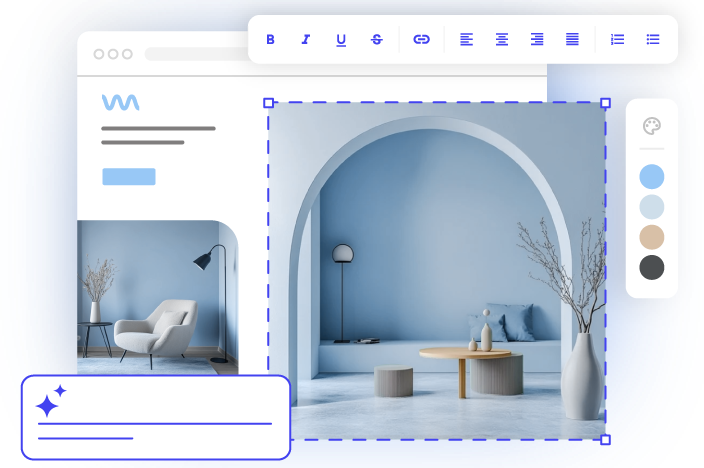
What is a Website Builder?
A website builder is a tool that allows you to create a professional site without needing to write code or fork over the big bucks to hire a developer. Instead of building everything from scratch, you start with a visual editor and customizable templates, which makes the whole process faster, more beginner-friendly, and easier on your budget.
Not all builders, however, are designed for the same type of user. Some prioritize simplicity and speed; others offer deeper customization. And that’s where your own goals come in—because the builder that feels “easy” for one business might feel limiting or overkill for another.
So let’s find the best website builder for you.
Key Questions to Identify the Best Website Builder
Before you choose a platform—or even start comparing features—it helps to step back and get clear on what your website actually needs to do for you. The questions below act like a filter: the clearer your answers, the easier it becomes to narrow your choices. Treat this as a quick self-assessment to help you match your goals, skills, and timeline with the right type of platform.
1. What Job Does My Website Actually Need to Do?
Instead of tackling website planning and looking at templates or pricing pages, the first—and most important—step is clarifying why you need a website in the first place. Your goal determines everything that follows: the builder you choose, the features worth paying for, and how much flexibility you’ll actually need.
Determine your main goal
Some sites simply act like digital business cards. Others are full storefronts, booking engines, or content hubs. If you name the primary “job” your site needs to do, you’ll immediately filter out platforms that aren’t built for it.
Typical goals include:
- Building credibility and having a “home base” online
- Showcasing creative work or a portfolio
- Selling products or services (with or without shipping)
- Educating through content
- Generating leads or building your email list
- Running events, bookings, or memberships
If your site has more than one goal, great—but try to rank them. The builder that’s perfect for selling digital products isn’t always the one that makes email marketing effortless, and vice versa.
To really nail your top priority, ask yourself: If I could only achieve one outcome with my site, what would it be? That’s your anchor.
Identify features you actually need
Once you know the main job of your website, the next step is figuring out which features truly support that goal. To make this easier (and avoid feature overwhelm), think of features in three buckets:
Must-have features
These are the core tools most small businesses, freelancers, and personal brands actually need to launch and operate effectively.
- Mobile-responsive templates
- Basic SEO (page titles, meta descriptions, alt text)
- Contact forms or lead capture
- Easy content editing (visual builder)
- Built-in hosting + SSL
Nice-to-haves (useful if they fit your goals)
These only matter depending on your priorities and business model.
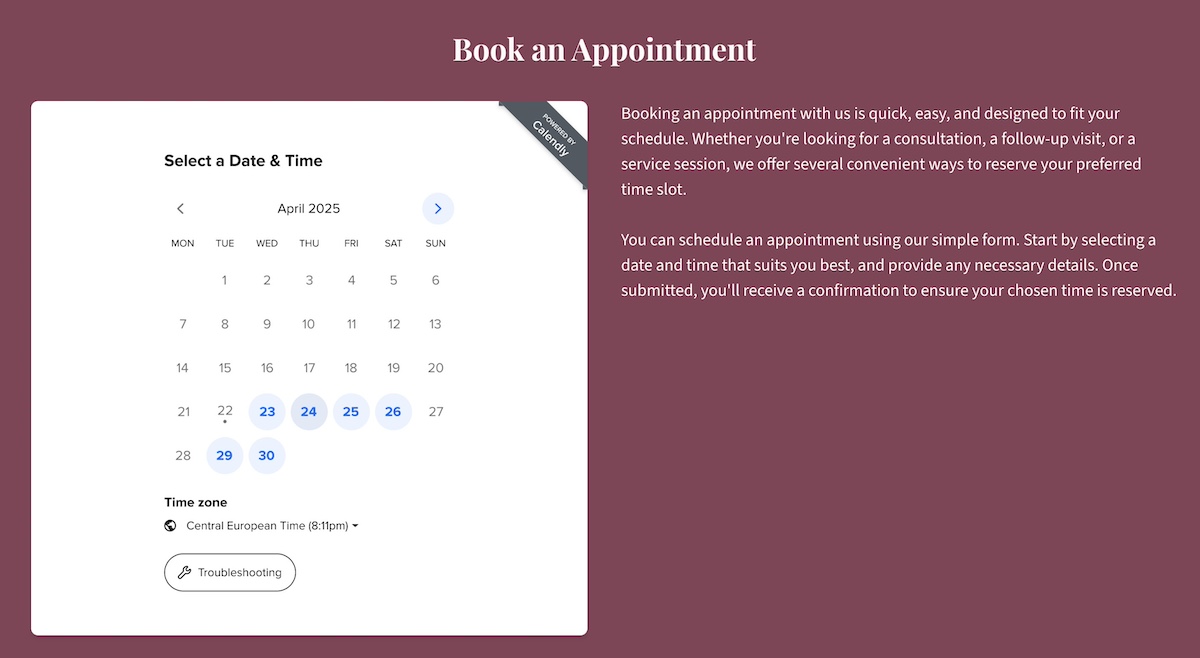
- Appointment booking or scheduling
- Integrated email marketing / newsletters
- Ecommerce or payment processing
- AI writing or image tools
- Blogging / content management features
- Membership or gated content
Advanced or edge-case features (skip unless you know you need them)
These are helpful for highly customized sites or complex workflows, but unnecessary for most people—and often come with a steeper learning curve.
- Custom databases or dynamic content
- Deep workflow automation
- Advanced SEO schema controls
- Multi-language or multi-site architecture
- Developer-level customization or code injection
- Third-party integrations that require configuration
If you’re unsure whether you need something today or later, ask: “Will this feature meaningfully help me reach my main goal?” If the answer is no, it’s optional, and not essential.
Built-In Tools That Make Your Website Work Harder
SiteGround’s Website Builder makes it easy to launch a site that does more than just look good:
-Email marketing made simple: Create and send newsletters directly from your site.
AI-powered content creation: Built-in AI writer and image generator help you produce copy and visuals quickly.
-SEO tools included: Optimize pages for search engines without extra plugins or guesswork.
-Booking & scheduling: Add your calendar to let visitors book appointments seamlessly.
Whether you’re selling products, showcasing your work, or managing bookings, SiteGround’s Website Builder gives you the features you need—all in one place.
Consider Your Business or Project Type
After clarifying goals and features, it can help to think about what type of website creator or business you are. This is less about strict rules and more about shortcutting your decision based on your typical needs and challenges.
- Portfolio Creator / Hobbyist: You want a clean, simple site to showcase work, a portfolio, or a personal project. Low maintenance, fast setup, and visually polished templates are most important. A basic visual builder is ideal.
- Small Business Owner / Online Store: You need tools for selling products, managing email, and tracking analytics—but you don’t want to spend weeks learning the platform. An easy-to-use website builder with growth tools hits the sweet spot.
- Scaling Business Planning for Big Growth : You’re handling a lot of content, memberships, or community features. You need moderate customization and workflow control. A CMS platform (like WordPress) is likely the best fit.
- Businesses or Users Requiring Custom or High-Budget Builds: You require unique layouts, advanced integrations, or complex workflows. You enjoy tinkering and can handle technical setup. Developer-friendly platforms (like WordPress) or fully custom solutions are appropriate. Before taking the leap, really evaluate whether a website builder or custom site is the best choice for you.
The bottom line: For most users—freelancers, hobbyists, small business owners, or anyone who just wants a clean, functional online presence—a simple site builder is all you need. It’s easy to use, requires minimal setup, and gets you online quickly.
If your needs are more complex—running a large online store with hundreds of products, managing thousands of blog posts, or building membership-based sites with advanced workflows—you’ll likely benefit from more specialized or developer-friendly solutions that can handle those requirements.
For the vast majority, sticking with a simple, all-in-one website builder is the smartest, fastest path forward.
If you’re still unsure exactly where you fall, take our “Find Your Perfect Website Builder” quiz. Your answers will highlight the builder type that best matches your goals and priorities—helping you skip the guesswork and get online faster, with less frustration.
2: How Quickly Do I Need My Site Live?
Your timeline plays a bigger role than most people realize. If you need to launch fast—for a product drop, a campaign, or a new business that “needs a website yesterday”—then speed and simplicity matter more than deep customization. If you have a longer runway, you can afford more flexibility, complexity, and personalization.
Templates and layout constraints
Templates are a huge time-saver, especially when you’re starting from a clean slate. Some builders give you highly structured templates that guide you toward a polished web design quickly. Others give you almost endless layout freedom—which can be powerful, but also slow you down because every decision is on you.
More freedom also means more decisions, more tinkering, and more time spent polishing instead of publishing. Customization feels like an upgrade, but in practice it creates extra work unless you have a specific design reason for needing it.
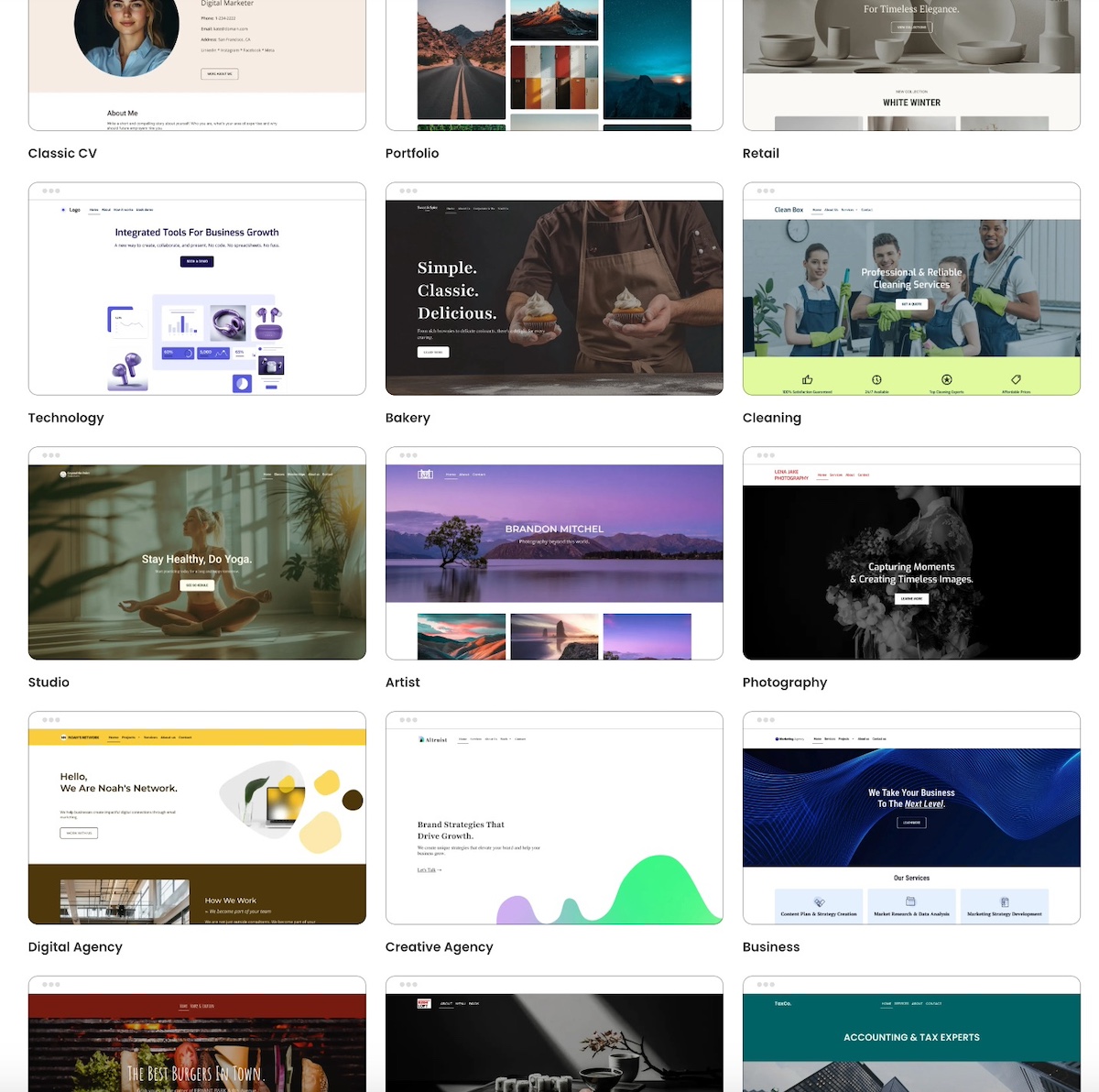
If you need to launch fast, a more straightforward builder is your friend, because it limits design rabbit holes. So really it comes down to: do you want faster, easier decisions or more design freedom?
Accessible web design is worth keeping in mind too. High-contrast text, a clear website structure, proper heading hierarchies, and keyboard-friendly layouts not only broaden your audience but also improve SEO and usability. Many modern builders, including the SiteGround Website Builder, offer templates with accessibility features like this built in. Alternatively, highly customizable options may not automatically implement such best practices.
Mobile responsiveness
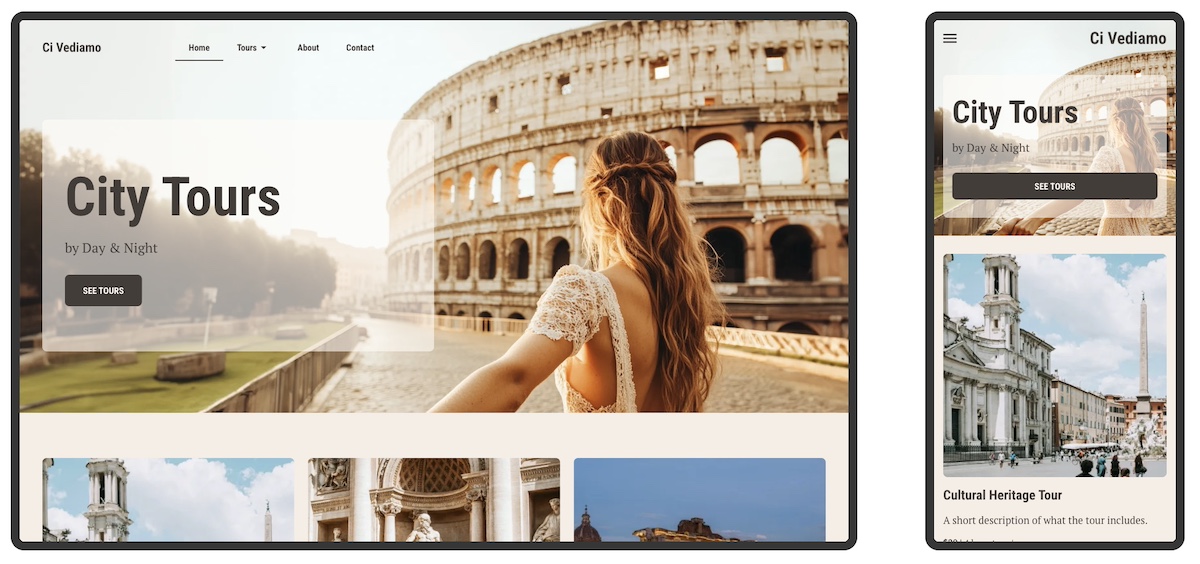
Most visitors will see your site on a phone first, so a builder that handles mobile layouts professionally—without you tweaking every section manually—is a major time win. Some platforms auto-adjust beautifully. Others require additional layout editing for small screens.
If you need to launch quickly (or simply want to avoid headaches), prioritize a builder that offers:
- Templates featuring mobile web design: Templates that are optimized for phones from the start.
- Automatic stacking and spacing: Page elements adjust automatically for smaller screens.
- Minimal-to-no manual resizing: You shouldn’t have to tweak every margin or padding to make the site look right.
Ease-of-use versus learning curve
Every builder comes with a trade-off: the easier it is to use, the less technical freedom it usually gives you. Platforms built for speed often have fewer knobs to turn—the point is to remove complexity so you can go live sooner.
If you only have a weekend to build a site, a short learning curve matters more than customization. But if this website will be a long-term growth engine, a slightly steeper learning curve can pay off over time.
The bottom line: If you need to get online fast—whether it’s for a product launch, a campaign, or a new business—a straightforward, easy-to-use site builder is your best friend. It handles mobile layouts, accessibility, and design basics automatically, so you can focus on publishing instead of tweaking.
If your timeline is more flexible and long-term growth or unique design is a priority, you can afford a platform with more customization and control—but be ready for a longer setup and more hands-on work.
3: How Comfortable Am I With Tech and Setup?
Even the “easiest” website builder will feel frustrating if it asks more of you than you’re comfortable handling. The right platform should match your level of tech confidence—not force you into workarounds or overwhelm you with settings you never fully understand.
Visual builders vs. advanced customization
Some website builders are designed to be fully visual: you drag and drop blocks, swap images, and change text—all without touching a single line of code. They make it easy to launch a beautiful and functional site quickly, and with minimal technical knowledge.
Other builders offer advanced customization. These platforms (like WordPress, for example) give you more flexibility to tweak layouts, design interactions, and fine-tune functionality. You’re not usually writing heavy code, but you do need a higher comfort level with configuration, themes, and settings. Now, this flexibility is great if you want a unique design or plan to scale features over time, but it can slow down your launch if you’re not used to tinkering.
And it’s worth calling out: customization is not automatically a benefit. It gives you more control, but it also adds more decisions, more upkeep, and more complexity. Unless you have a clear reason you need that control, it tends to create friction, not freedom.
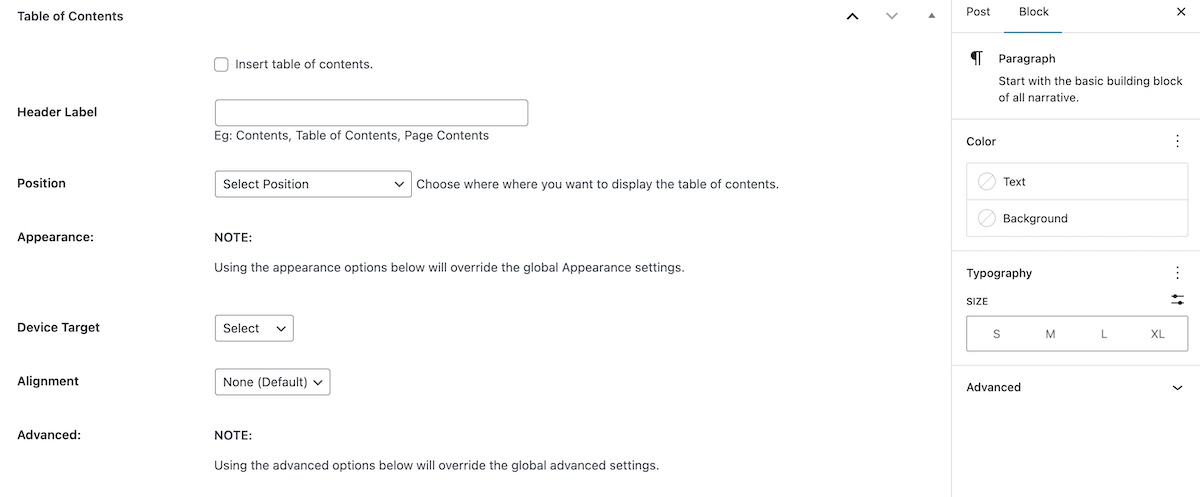
For example, as you can see in the WordPress image below: you have lots of customization options, but oftentimes this can be overwhelming if you don’t know how to use them.
This said, a platform like WordPress can also occupy a middle ground. With the right plugins, you can work visually for most of your site while still having access to deeper customization if needed. This makes WordPress a versatile option for users who want both simplicity and long-term control. That said, it’s very worth noting that it still comes with a pretty steep learning curve.
Quick takeaway:
- Visual builders: Fast, intuitive, low technical load. Great for quick launches and low-maintenance sites.
- Advanced customization: More flexible, more options, can be more complex. Better if you need unique layouts or plan to scale.
Reality check: If you don’t already know why you need deep customization, you probably don’t—and a simpler builder will serve you better.
Layout constraints
This is one of the hidden pain points for beginners. Some platforms limit where you can place elements on the page in order to keep the website layout tidy and responsive. Others let you put anything anywhere—and while that’s powerful, it can also create alignment issues and extra time tweaking margins.
If you hate fussy design work, constraints are a plus; if you want total control, constraints can feel like a cage. Be realistic about where you are on the spectrum and choose accordingly.
SEO tools
A pretty website won’t help your business if no traffic ever gets sent to it, and that’s where SEO comes in. But your comfort with tech will affect how much SEO control you can realistically handle.
Visual builders usually cover the SEO essentials: page titles, meta descriptions, alt text for images, and basic analytics. These are enough for most small businesses or freelancers.
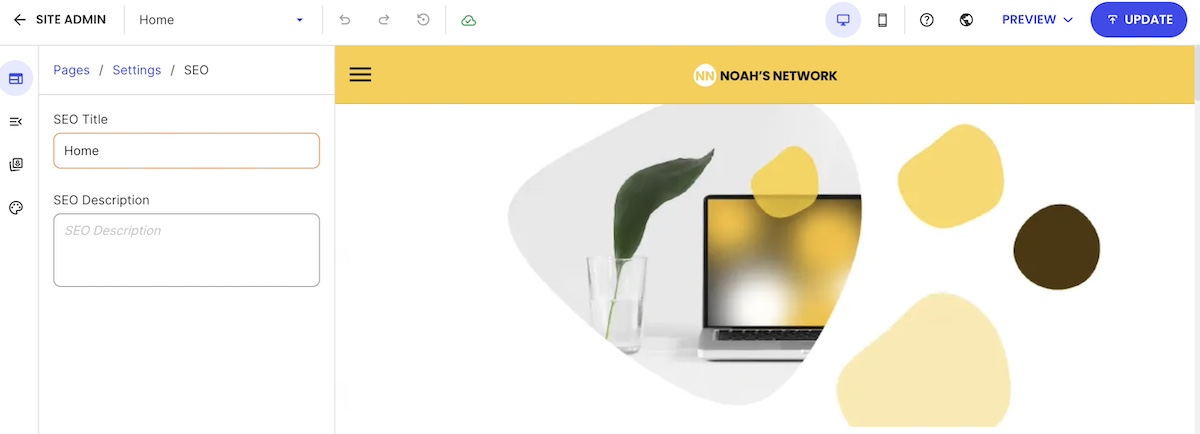
Advanced or hybrid builders (like WordPress) give you deeper SEO capabilities: custom URLs, redirects, structured data, advanced meta control, and site speed optimization. That said, to get the most out of these, you’ll need some familiarity with site settings and, occasionally, how to make technical tweaks.
General rule of thumb: If SEO is central to your strategy, choose a builder that matches your technical comfort. Otherwise, keep it simple.
The bottom line: For most users—freelancers, hobbyists, or small business owners—a visual, drag-and-drop builder is more than enough. It’s fast, intuitive, handles essential SEO, and keeps technical headaches to a minimum.
If you’re comfortable with configuration, themes, plugins, and more detailed SEO or design tweaks—or you need unique layouts and long-term scalability—a more specialized or developer-friendly platform (like WordPress) can give you that control. Just be aware it comes with a steeper learning curve and more ongoing maintenance.
4: Will I Realistically Maintain the Site Myself?
Once you build a website, the fun—shall we say—doesn’t stop; you need to keep it running smoothly over time. That’s why it’s important to consider what you’re willing and able to manage so that you don’t hit a frustration roadblock later on.
Let’s break down what maintenance looks like realistically, so your site doesn’t become a chore.
Technical updates
Most builders handle updates automatically, but if you’re using a hybrid platform like WordPress, you may need to manually update plugins, themes, or even the core system. Falling behind can cause errors, slow performance, or even security risks.
So a good question to yourself: Am I willing to regularly check for updates and apply them, or do I want the platform to do it for me? The answer can guide whether a fully managed builder or a more flexible, self-managed one is the right choice.
Speed, security, and performance optimization
Depending on the website builder, performance and security can either be handled automatically—or left for you to manage manually.
Some platforms (especially fully hosted website builders) optimize things like caching, image compression, and threat protection in the background, so your site stays fast and secure without extra maintenance.
Others—particularly open platforms or those relying heavily on plugins—may require you to stay on top of updates, install security tools, and manage performance settings yourself.
So if site speed, uptime, and security are mission-critical—especially for ecommerce or sites with high traffic —choosing a platform with built-in optimization and active protection can prevent slowdowns and reduce risk over time.
Support and troubleshooting
Problems will happen. The difference is how much support you have when they do. Some platforms offer 24/7 support or live chat. Others rely on community forums or documentation.
Consider your tolerance for figuring things out on your own. If you want a hands-off experience, prioritize a builder with robust, well-reviewed support and quick response times. If you enjoy troubleshooting or have developer resources, you can opt for a platform that offers more flexibility but less hand-holding.
The bottom line: For most users who prefer a hands-off experience, a fully managed website builder is the easiest path. It handles updates, performance optimization, and security automatically—so you can focus on content and growth, not tech headaches.
If you’re comfortable with ongoing updates, troubleshooting, and technical setup—or if your site requires advanced customizations or unique workflows—a self-managed or hybrid platform can offer more flexibility. Just be prepared to invest time in maintenance to keep your site running smoothly.
5: What is the Real Cost Over Time?
Price isn’t just what you see on the signup page. The “real” cost of a website includes hosting, domain fees, SSL certificates, add-ons, and sometimes multiple subscriptions for different tools. Knowing the total cost upfront helps avoid surprises and ensures you pick a builder that fits your budget long-term.
Think of it as looking beyond the sticker price—a small monthly difference can add up over years.
Hosting
Some builders include hosting in their monthly fee, while others, like WordPress, require you to buy hosting separately. Managed WordPress hosting can save time and worry, but comes at a slightly higher cost. Consider:
- Bandwidth or storage limits
- Automatic backups
- Performance optimization included
Domain name
Your domain is your web address—the “.com” that people type in. Some builders (like SiteGround!) give a free domain for the first year; others charge separately.
SSL
SSL certificates keep your site secure and are essential for SEO and visitor trust. Many builders include SSL automatically, but some require a separate purchase. Make sure your plan covers it without extra fees.
The ability to test-drive your builder
Before you commit to paying long term, it helps to see what you’re actually getting for your money. Many platforms allow you to build and explore the interface before checkout—use that opportunity to see whether essential features are included in the plan you’ll ultimately need, or if key tools are locked behind higher tiers. A quick test-drive can prevent surprises later, like realizing you have to upgrade just to access ecommerce, analytics, or email marketing.
All-in-one vs. multiple subscriptions
Some platforms bundle everything—hosting, email marketing, SEO, and ecommerce—into one plan. Others require separate subscriptions for tools like email providers, analytics, or booking systems.
When choosing an all-in-one solution with ecommerce, also check whether the platform charges its own transaction fees on every sale. Some do, which cuts into your margins over time, while others (like SiteGround Ecommerce) don’t take a revenue share—only the standard payment processor fee applies.
Ultimately, think about how much you want to manage yourself versus paying for built-in convenience.
The bottom line: The true cost of a website goes beyond the signup price. For most small businesses, freelancers, or personal projects, an all-in-one builder that includes hosting, a domain, SSL, and essential features is the most cost-effective and low-maintenance choice.
If you’re building a larger or more complex site—like an ecommerce store with many products, or a content-heavy site with memberships and integrations—you may need separate hosting, plugins, or add-ons, which increases costs and maintenance. In those cases, plan for ongoing subscriptions and potential transaction fees to understand the full long-term investment.
SiteGround Website Builder: Your All-in-One Solution
Looking for a website builder that does it all? The SiteGround Website Builder combines ease-of-use with powerful features so you can focus on growing your site, not managing it.
-All-in-one platform: Hosting, domain, email marketing, and more—everything you need in one place.
-Beautiful templates & mobile-ready design: Launch a professional-looking site that looks great on any device.
–SiteGround Ecommerce ready: Add ecommerce functionality in just click—no extra tools, plugins, or platforms required.
-Fast, high-performance websites: Optimized for speed and reliability.
-Built-in security & free SSL: Keep your site safe and secure without extra effort.
-No updates required: The platform handles maintenance so you can focus on content.
-Free domain for the first year: Get started without additional cost.
-Top-rated 24/7 support: Expert help whenever you need it.
Whether you’re building a portfolio, small business site, or online store, the SiteGround Website Builder makes it simple, fast, and optimized for your success.
The Best Website Builder Is the One That Matches Your Goals
At the end of the day, there is no universally “best” website builder—there’s only the one that best fits what you are trying to achieve. Once you’re clear on your goals, the right choice becomes far easier to see. The more aligned your platform is with your real needs (not your hypothetical ones), the smoother your build and growth experience will be.
And if you want a solution that checks the major boxes most people care about—built-in tools, easy ecommerce, strong performance, security, and room to grow—the SiteGround Website Builder gives you all of that in a single platform. You can start designing immediately, test the experience before committing, and launch on a foundation that is fast, secure, mobile-ready, and supported by a world-class team whenever you need help.






Comments ( 0 )
Thanks! Your comment will be held for moderation and will be shortly published, if it is related to this blog article. Comments for support inquiries or issues will not be published, if you have such please report it through our official channels of communication.
Leave a comment
Thanks! Your comment will be held for moderation and will be shortly published, if it is related to this blog article. Comments for support inquiries or issues will not be published, if you have such please report it through our official channels of communication.