How to Buy a Domain Name: What to Do Before & After
Buying a domain name might seem as simple as picking your favorite name and clicking “purchase.” But if you want to avoid surprises, protect your brand, and keep full control of your online presence? Well, that means how you buy a name requires a little extra thought. Whether it’s hidden fees, renewal costs, security features, or simply getting everything set up, knowing the right steps ahead of time can save you headaches down the road.
In this guide, we’ll walk you through everything you need to consider before hitting “buy,” what to do during domain registration, and how to set up and maintain your domain once it’s yours. By the end, you’ll be ready to choose, secure, and manage your domain confidently—giving your website a strong, worry-free foundation from day one.
Your Free Website Planning Checklist Build with clarity, launch with confidence
Google reCAPTCHA used. Privacy Policy and Terms of Service apply
What is a Domain Name?
A domain name is your website’s address on the internet—it’s the URL people type into their browser to find you, like, say, www.mybusiness.com. Choosing and buying a domain name is an important step because it’s so much more than just a web address: it represents your brand, helps people find your site, and is essential for email and other online services. So the decision around buying a domain is bigger than it might initially seem.
Technically, a domain name consists of a few parts:
- Second-level domain (SLD): This is the main part of your domain (like “mybusiness” in mybusiness.com)
- Top-level domain (TLD): This is the extension, such as .com, .net, .org, or country-specific ones like .es or .uk.
- Subdomains (optional): Additional prefixes like blog.mybusiness.com that organize different parts of your site.

If you don’t quite have a handle on these terms and how to use them just yet, don’t worry. By the time we’re done here, you’ll have a full understanding of what to know before buying your domain, how to buy it, and then what to do after.
Before You Buy a Domain—What to Check First
Before we get to the “buy” part of acquiring your domain, there are a handful of very important considerations to keep in mind. Think of this as a pre-flight domain checklist:
Come Up With Domain Name Ideas
Before it’s time to buy, brainstorm a few domain options that reflect your brand and will be easy for people to remember. Having multiple ideas ready helps you adapt if your first choice is already taken.
Quick tips for choosing a domain name:
- Keep it short and memorable: Shorter domains are easier to type, share, and recall.
- Reflect your brand or business purpose: Choose a domain name that gives visitors an idea of what you do.
- Avoid hyphens or unusual characters: They can be confusing, hard to type, and are often forgotten.
- Consider your TLD: The domain extension you choose (.com, .shop, .org, etc.) affects credibility, audience perception, and availability. Stick to widely recognized TLDs unless a niche one fits your brand purpose.
- Prepare alternatives: Have several options in mind so you can pivot quickly if your desired domain name isn’t available.
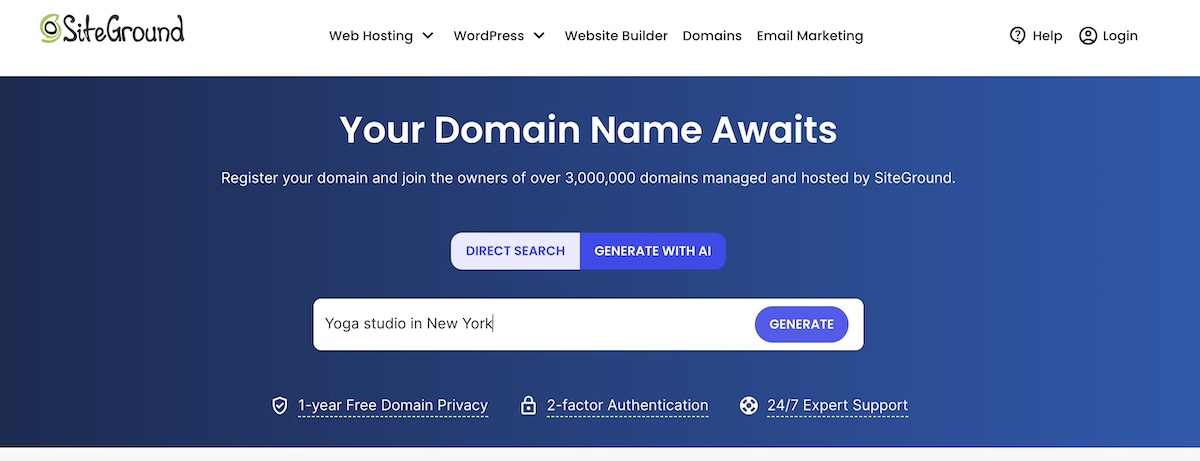
Super pro tip: If you’re stuck, tools like SiteGround’s AI domain name generator can help. Not only does it suggest domain name ideas on the fly (based on your keywords, brand concept or whatever you fancy), but it only suggests available domain names, which means you can make the buying process even easier. Idea creation and time savings all in one.
Understand Registrar versus Reseller
Not all domain sellers are the same, so understanding the difference can help you make a smarter purchase. Most importantly: what’s the difference between a domain registrar and a reseller? Let’s unpack.
- Registrar: An ICANN-accredited company authorized to register domains directly. Offers full control, reliable support, and standard management features.
- Reseller: A third party that sells domains through a registrar. May charge extra fees, offer limited features, or have slower support.
A few helpful tips when deciding which kind of domain seller to buy through:
- Whenever possible, buy directly from a registrar for more control and better service.
- Verify that the registrar is ICANN-accredited.
- Be cautious with resellers—check reviews and understand their policies before buying.
What is ICANN?
ICANN stands for the Internet Corporation for Assigned Names and Numbers. It’s the nonprofit organization responsible for coordinating and managing the global domain name system (DNS).
Examine Initial Price versus Renewal Price
Just like that low-cost phone plan deal you thought you scored, the cost of a domain isn’t just the sticker price isn’t always what you see on the first page. Domain price can be a combination of the initial domain registration fee, renewal costs, and any optional extras. So while a low first-year price can be tempting, it’s important to look at the bigger picture before making a decision.
As you compare domain pricing options, consider:
- First-year cost versus long-term cost: Some domains are cheap to start but renew at higher rates.
- Additional fees: Privacy protection, ICANN fees, or premium add-ons can affect the total price.
- Value alongside other factors: Pricing is one piece of the puzzle—reliability of the domain name registrar, security features, and customer support are just as important.
Verify Security Options
It might seem like a tiny, trivial detail, but in reality your domain is one of your most important online assets—it represents your brand, your website, and even your email communications. So losing control of it can have major consequences, and that’s why security is such a big deal and definitely not something to take lightly.
With that in mind, here are the security features to look for when deciding where to buy your domain:
Two-factor authentication (2FA):
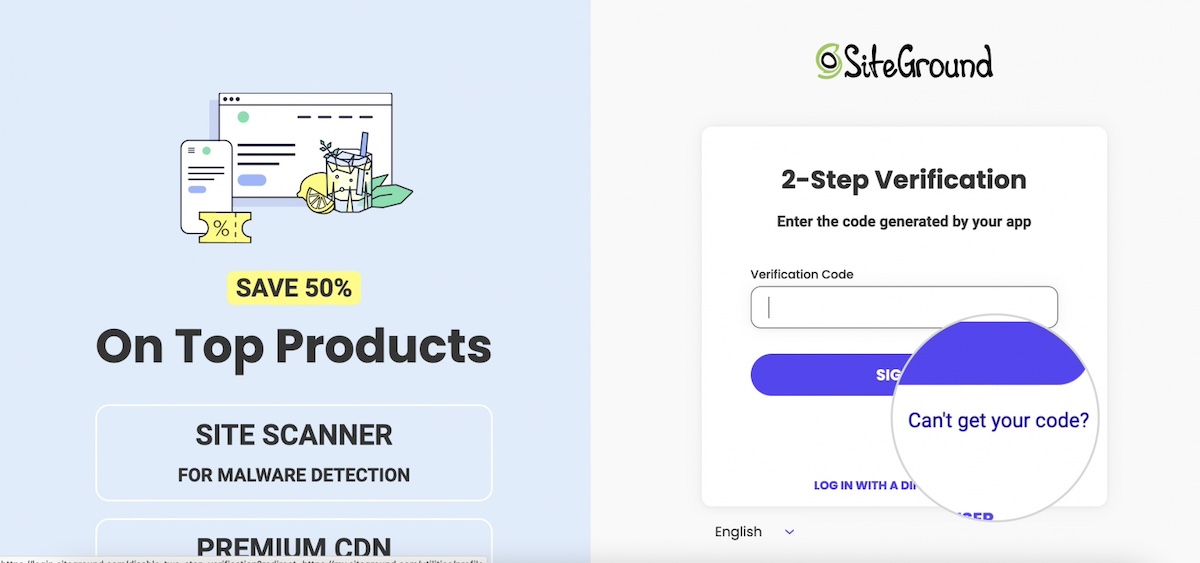
2FA adds an extra layer of security to your domain registrar account by requiring a second form of verification—usually a code sent to your phone or generated by an app—every time you log in. Even if someone gets hold of your password, two-factor authentication can prevent unauthorized access. Not all domain name registrars offer this, so be sure to double check before making your purchase.
Domain lock:
Most registrars offer a domain lock (or registrar lock) feature that prevents your domain from being transferred without your approval. Enabling this lock ensures that even if someone tries to hijack your domain, it cannot be moved to another registrar without your consent.
Privacy protection:
When you register a domain, your personal information—like name, email, and phone number—is recorded in the public WHOIS database. That means anyone can look up your domain name, see who owns it, and even the mailing address associated with it. Domain privacy protection hides this personal information, keeping it private and reducing spam or phishing attempts aimed at your contact info. With this said, note that not all domain extensions are eligible for domain privacy.
What is the WHOIS?
WHOIS is a publicly accessible database that stores information about registered domain names. When you register a domain, certain details are collected and can be looked up via a WHOIS search.
Look for Ease of Domain Management
Before you buy, think about how simple it will be to manage your domain after purchase—because you will likely want to actually use your domain, and it being easily usable is an important part of making that happen. Some registrars provide intuitive dashboards and clear workflows, while others make even basic tasks like updating contact info, renewing, or locking your domain confusing.
Here’s what to look for in a user-friendly registrar:
- Dashboard usability: Look for a dashboard that’s easy to use, navigate, and understand. If the registrar doesn’t clearly emphasize usability on their website, check forums and reviews for feedback from real users.
- Domain lock and transfers: Domain locking is essential for security, and transfers may be needed in the future. Make sure these actions are easy to perform. Generally, if the dashboard is intuitive, these features will be user-friendly as well.
- Support access: Can you quickly reach help if you encounter issues with transfers, WHOIS info, or DNS configuration? Confirm that the registrar offers reliable support to guide you through any step of domain management.
- Check DNS capabilities beforehand: Make sure the registrar provides easy-to-use DNS management, and integrates smoothly with hosting—this will save you time and headaches after purchase.
What is DNS?
DNS (Domain Name System) is the system that translates human-friendly domain names, like www.example.com, into the IP addresses computers use to locate websites on the internet.
How to Buy a Domain Name—Step by Step
You know what to look for, now it’s time for the fun part: actually buying your domain. But how? Here are the quick steps for buying a domain name:
1. Choose a Registrar
You’ve already done your homework here, so you know what to look for. But before diving into the details, it’s helpful to understand the cost:
How much does it cost to buy a domain name?
A typical domain costs around $10–$20 per year, but the final price can vary depending on the extension you choose, how many years you register it for, and whether the provider offers a first-year discount. Many registrars offer lower introductory pricing for the first year (and with SiteGround, your domain is free for the first year when you purchase hosting, making getting started even more affordable).
Now, when evaluating registrars, keep these factors in mind:
- Pricing transparency: Compare first-year costs, renewal rates, and any optional fees (privacy protection, ICANN fees, add-ons).
- Security features: Look for two-factor authentication (2FA), domain lock, and privacy protection to safeguard your domain.
- Registrar vs. reseller: Prefer ICANN-accredited registrars for full control, reliable support, and standard management features.
- Dashboard usability: Choose a registrar with an intuitive, easy-to-navigate dashboard. If unclear, check user reviews and forums.
Why Choose SiteGround for Your Domain?
SiteGround makes buying and managing your domain simple, secure, and worry-free. When you register a domain with SiteGround, you get a free domain and domain privacy for the first year (when paired with hosting), and robust security features like two-factor authentication and domain lock. Domains also come with free unlimited subdomains, free unlimited SSL certificates, and free professional email, so you can fully set up your site from day one. Plus, their 24/7 support and intuitive dashboard make managing DNS, WHOIS info, and domain settings effortless, giving you peace of mind and control every step of the way.
2. Search for Availability
After having done your brainstorming, you should have a list of potential domain names you want to check out. So now’s the time to verify which ones are actually available. That said, if you already used SiteGround’s AI domain name generator, you can skip this step—every domain it suggests is already available, so you can move straight to purchasing your favorite option.
Tips to search for domain name availability:
- Go to the registrar you chose in step one to use their search tool: Enter your desired domain name to see if it’s available with your preferred TLD (.com, .net, etc.).
- Consider alternative TLDs: If your first choice is taken, try other well-recognized domain extensions, or niche ones that fit your brand.
- Modify your domain name slightly: Add a keyword, shorten it, or use synonyms to create a variation that’s still memorable.
- Explore premium options cautiously: Sometimes people choose to sell their domain name, and oftentimes it can then be purchased through brokers at a higher price—decide if it’s worth the investment.

And again, if you can’t find the ideal available domain name, lean on AI like SiteGround’s domain name generator to help you find one that meets your needs.
3. Complete Your Purchase
Once you’ve found an available domain, it’s time to close the deal. Keep in mind that what you’re doing at this stage is buying your domain for a specific and finite amount of time. So here are some key points to keep in mind as you finalize your domain registration and purchase and :
- Add to cart and review extras: Consider optional add-ons like email forwarding, hosting bundles, and domain privacy (if it’s not included, or, if necessary, making sure to add it to your cart if it’s a free option).
- Check the total cost: We touched on this before, but now’s the time to dot your i’s and cross your t’s. That means looking at both the first-year domain name registration fee and renewal price, as well as any additional services, to make sure you haven’t overlooked any hidden costs.
- Provide accurate contact information: The administrative contact you enter will be listed in WHOIS records, which are public unless you enable domain privacy—more on how to do that in a minute.
With SiteGround, finding and registering your domain is straightforward and stress-free. The AI-powered domain name generator helps you come up with available options in seconds, and the intuitive dashboard makes managing your domain simple—everything is designed to keep the process user-friendly from start to finish.
After You Buy—Set Up and Secure Your Domain
You have a domain name, but now what? Too often people go through the process of domain registration, and forget the importance of everything that comes after. But the reality is that to get the most out of your domain, you need to do more than just purchase it.
So let’s take a look at how to set up and secure your domain.
1. Enable Domain Privacy
As we’ve already discussed, domain privacy is a really important step in protecting your personal information. It’s also one of the easiest and most important ways to secure your domain. By default, your information is public, but by simply making it private, you save yourself the heartache of exposure that can lead to spam, phishing attempts, and even domain hijacking. Let’s fix that.
Here’s how to enable domain privacy:
- Make sure it’s enabled: if you purchased it (or it was offered for free), double check to make sure it’s enabled.
- Buy it as an add on: If you missed acquiring it during purchase, it’s not too late. Usually you can simply purchase it as an add on.
- Review your WHOIS info periodically: Confirm that your personal info remains hidden and that only the registrar’s details appear publicly. For example, if you accidentally forget to renew your domain privacy, your information may suddenly become public.
- Again, keep in mind that domain privacy isn’t available for all domains, particularly certain country-specific ones.

2. Verify Ownership Email
When you register a domain, your registrar will typically send a confirmation email to the address you provided. This isn’t a formality like confirming an email newsletter; it’s actually essential for maintaining control of your domain. Many registrars, including SiteGround, require verification to comply with ICANN rules.
Here’s how to verify your domain ownership email:
- Check your inbox (and spam folder) for an email from your registrar immediately after purchase
- Click the verification link provided in the email
- If you don’t receive it within 24 hours, request a new verification email from your registrar
- Keep your email account secure—this is your main way to manage ownership confirmations
Important to note: Until you verify your email, some registrars may limit certain domain functions, such as transferring the domain or updating DNS settings. Verifying promptly ensures full access and avoids potential delays.
2. Turn on Two-Factor Authentication (2FA)
We talked about the importance of two-factor authentication before: if someone gains access to your domain registrar login, they could transfer your domain, change DNS settings, or take your website offline altogether. 2FA prevents this by adding an additional layer of security. So now’s when you’ll want to make sure to put this feature to good use.
Here’s how you would typically set up 2FA via most registrars:
- Log into your account
- Go to Security or Account Settings
- Find and enable Two-Factor Authentication / 2FA
- Choose a verification method (SMS or authenticator app)
- Enter the code sent to your phone or generated by the app
- Confirm setup
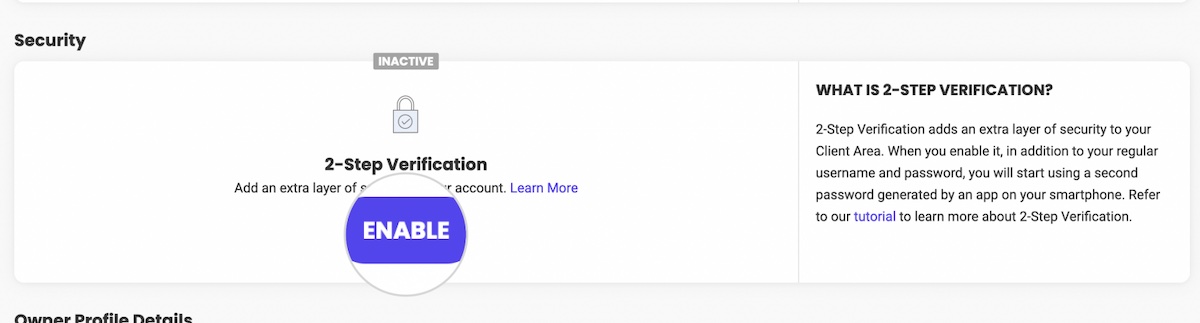
SiteGround actually goes a few steps further with security by offering:
-App-based 2FA (which is more secure) instead of SMS
-Backup codes or phone recovery
-A clear setup flow in the dashboard
-Seamless integration with domain/hosting account interface
4. Lock Your Domain
Turning on 2FA protects your login, but domain lock (or registrar lock as it is often called) protects the domain itself. Without it, someone could still request a transfer and move the domain away, even if they never logged into your account.
Assuming your registrar offers it (which they should, given your “before you buy” research), it’s still possible that you may need to enable it.
Here’s what to keep in mind when it comes to locking your domain:
- Some registrars offer domain lock but don’t enable it by default
- Some registrars hide it under “advanced” settings
- As a best practice, leave your domain locked at all times unless you are actively transferring it.
- Note that not all domain extensions (particularly certain country-specific ones) allow you to lock your domain.
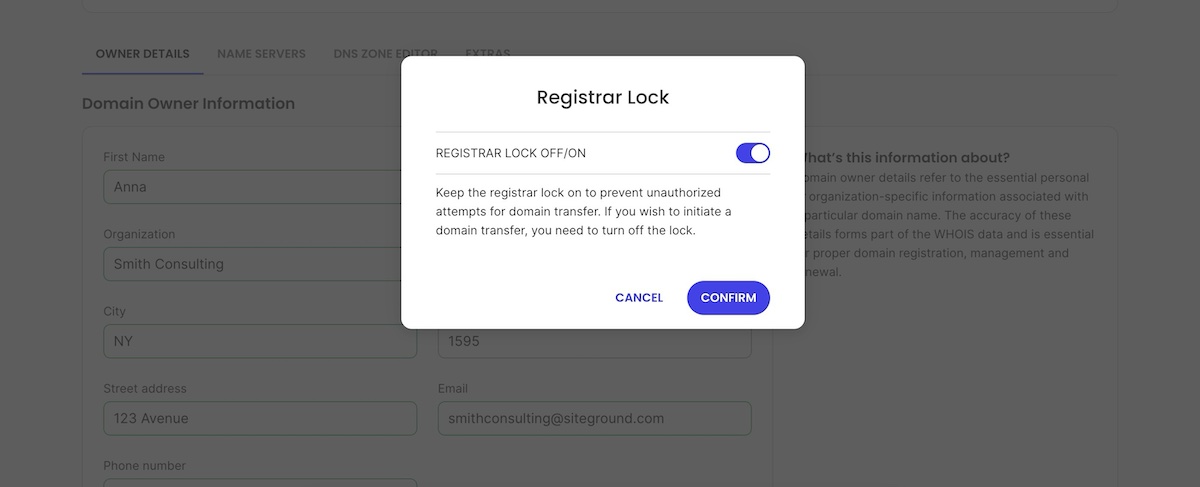
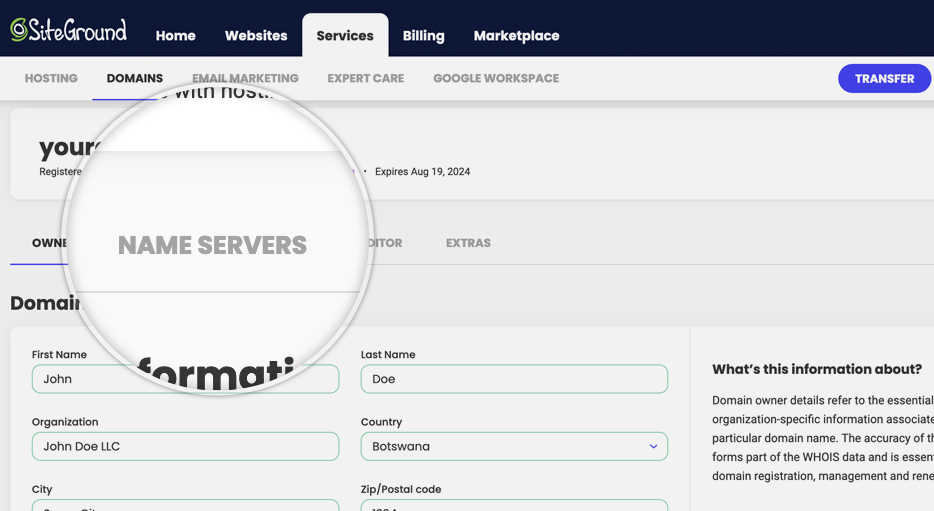
For those of you using SiteGround: note that domain lock is enabled automatically for qualifying domains, and is located clearly under your domain settings (Client Area > Services > Domains > Settings) so that it’s easy to verify.
5. Set Up DNS and Connect Your Hosting
Once your domain is registered, it’s essentially a blank address on the internet. To actually use it, you’ll need to connect it to your website and email by configuring your DNS settings. Remember: DNS acts like a phone book for the internet, translating your domain name into the IP address of your website’s server.
Steps to set up your domain properly:
- Point your domain to your hosting: If you purchased web hosting at the same registrar, this may be automatic. Otherwise, update the nameservers or A/CNAME records to point to your hosting provider.
- Verify email routing (if applicable): If you plan to use email linked to your domain, ensure MX records are correctly set so messages are delivered reliably.
- Consult support: This step can get confusing, so if you’ve chosen a good registrar, you can lean on support to walk you through any issues you encounter.
- Keep in mind: After updating DNS, it can take up to 48 hours for changes to propagate fully across the internet. During this time, some visitors may still reach your old server or see an error page, which is normal.
6. Monitor Your Domain Name
Owning a domain isn’t a no-maintenance kind of thing: there are high consequences if you neglect it and something goes amiss. Your brand, your sales, your communication—it’s all at risk. So it’s important to keep tabs on your domain and react quickly if something looks off.
What to monitor for your domain name:
- WHOIS changes: Keep an eye on your publicly listed contact details. Any unexpected changes could signal unauthorized admin updates or hijack attempts.
- Unusual domain activity or look-alikes: Domain squatting occurs when someone registers a close variation of your brand name (for example, you own yourbrand.com, and someone registers yourbrand-online.com or yourbrandstore.net) and uses it to confuse visitors or cheat your traffic. Being alert means you can act before it becomes a problem.
- Domain transfer attempts or login alerts: Some registrars and providers offer alerts or logs that show when someone tries to change settings or access your domain account.
- DNS settings / redirection changes: If your domain begins routing unexpectedly or your email stops working, it could mean someone has changed your DNS records. Regularly check where it points.
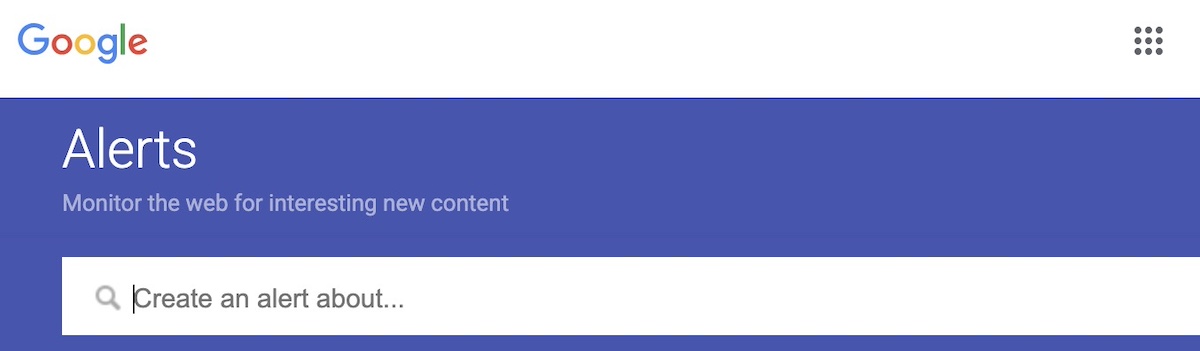
Pro tip: Set up Google Alerts or a similar service for your brand name plus common misspellings—this helps you spot potential squatter domains or phishing attempts impersonating you.
7. Renew Your Domain Name
Indeed, domain ownership is not in fact permanent: it’s more like a rental that you can renew for a year or years at a time. So in order to keep using your domain, make sure do the following:
- Enable auto-renew: A simple step that ensures your domain name registration is automatically renewed before it expires, preventing accidental loss because you somehow missed a renewal email or your credit card expired.
- Keep your payment information up to date: Speaking of expired credit cards, double check that your payment methods are current to avoid interruptions in service.
- Set calendar reminders: Whether auto-renew is available or not, you may wish to set calendar reminders just to make sure you don’t miss renewal alert or issue.
You’re Ready to Buy Your Domain
Buying a domain seemed so simple, and indeed it is, but making sure your set up for success requires a little extra homework: that means choosing the right registrar, selecting the optimal domain name, and securing your domain properly. And now you know the drill. With the right preparation, you can confidently register, set up, and maintain a domain that supports your website and business goals.
For a seamless, secure, and hassle-free experience, SiteGround makes domain management simple. You get free domain privacy for the first year, two-factor authentication, domain lock, and unlimited SSL certificates. (If you also sign up for web hosting, your domain is free for the first year, making site and domain management even easier!) You also get free professional email, unlimited subdomains, 24/7 support, and an intuitive dashboard that makes managing your domain effortless—everything you need to get your website online safely and efficiently from day one.
FAQs for How to Buy a Domain Name
Can I buy a domain name without hosting?
Yes, you can register a domain without buying hosting. Many people do this to reserve the domain name before their website is ready. The domain will simply remain “parked” until you connect it to a hosting provider later. Services like SiteGround Web Hosting make it easy to link your domain to hosting when you’re ready, and you’ll just need to keep the domain registration active through yearly renewals (or multi-year renewals if you prefer).
Does the country I live in affect my domain name?
Not usually in terms of who can buy a domain, but it can affect SEO and eligibility depending on the extension you choose. Most global extensions (like .com, .net, .org) can be registered from anywhere and are treated neutrally by search engines. However, country-code domains (like .es, .fr, or .ca) are often used as a signal of geographic relevance, which can help your SEO in that specific country. Some of these ccTLDs also require you to live in—or have a business registered in—that country before you can purchase them.
How can I buy a domain name that is taken?
If the domain you want is already registered, you still have a few options. You can try variations of your domain name or a different top-level domain (TLD) like .net or .info. Some domains are available for sale through brokers or marketplaces, where you can negotiate a purchase with the current owner. Another option is to backorder the domain so you have a chance to claim it if it becomes available. Finally, you can contact the current owner directly to see if they’re willing to sell. Keep in mind that premium domains may come at a higher price, so consider the value to your brand before making an offer.
Can I buy a domain name permanently?
No, you can’t buy a domain name permanently. Domains are registered for a set period, usually between one and ten years, and must be renewed before they expire to maintain ownership. Most registrars, including SiteGround, offer auto-renewal options so you don’t accidentally lose your domain. As long as you keep renewing it, you can essentially maintain control indefinitely, but there’s no one-time “forever purchase” option.







Comments ( 0 )
Thanks! Your comment will be held for moderation and will be shortly published, if it is related to this blog article. Comments for support inquiries or issues will not be published, if you have such please report it through our official channels of communication.
Leave a comment
Thanks! Your comment will be held for moderation and will be shortly published, if it is related to this blog article. Comments for support inquiries or issues will not be published, if you have such please report it through our official channels of communication.