How AI Is Changing Marketing: A Guide for Small Business
You’ve been meaning to post on Instagram for days. That blog post? Still sitting in drafts since February. The promotional email is “almost done”—from a week ago…or was that last month?
Meanwhile, your competitors are posting daily, their websites look slick, and their ads are everywhere. Do they have a whole team you don’t know about?
Probably not. They’re just using AI.
And you can too. Unlike most digital marketing trends that need big budgets or specialized skills, artificial intelligence is actually more accessible for small businesses. No tech degree required, no marketing team, no massive budget.
This guide shows you how AI is changing digital marketing—and how to use it to finally cross off that never-ending to-do list and to actually get ahead.
Key Takeaways:
- Leverage AI’s advantage: Small businesses can move fast, experiment, and get more done with fewer resources.
- Create content faster: Draft blogs, emails, social posts, and product copy quickly while staying on brand.
- Streamline social and design: Schedule posts, auto-reply to comments, and generate visuals without a designer.
- Simplify websites and ads: Build and optimize sites, run campaigns, and track performance with AI assistance.
- Test, refine, and scale: Start small, review results, and expand AI use while keeping humans in control.
Why Small Businesses Have a Unique Advantage Right Now
Small businesses are in a surprisingly strong position when it comes to AI—it’s the great equalizer. Unlike large companies, you’re not slowed down by layers of approvals, big budgets, or complex tech stacks. You can more easily shift to an AI-first mindset, experimenting faster, switching tools quickly, and adapting as artificial intelligence evolves. This is a major competitive advantage in a space that advances more quickly than big-business processes can.
Even better, today’s AI tools make tasks that used to require specialized skills or big budgets accessible to anyone. You can create high-quality content, design professional-looking assets, schedule social media posts, or even build and optimize websites—all without hiring a full team of experts.
The big takeaway here is that AI allows small businesses to multiply their output, tackle projects that were previously out of reach, and do more with less.
Types of AI in Digital Marketing
AI shows up in a lot of different ways in digital marketing, but you don’t need to understand every technical detail to make it work for your business. That said, let’s wrangle a few terms first before we get started.
Here are the main types of AI you’ll run into, explained so you can quickly see what each one does and how it fits into your digital marketing:
- Generative AI – Creates new content like text, images, videos, and layouts. Large language models (LLMs) like ChatGPT, Claude, and Gemini fall here, powering tools that write blog posts, draft emails, design graphics, or turn ideas into social-ready content. These tools rely on natural language processing (NLP), which allows AI to understand, interpret, and generate human-like text—so it can draft content, respond to questions, and maintain your brand voice. This will likely be your go-to type of AI.
- Predictive AI – Uses past data to forecast what might happen next. These tools rely on machine learning (ML) to analyze patterns and trends, helping you spot high-value leads, anticipate customer behavior, and make smarter decisions about where to spend your digital marketing budget.
- Conversational AI – Chatbots and virtual assistants that communicate naturally with customers. When LLMs are embedded in these tools, they can answer questions, recommend products, and handle basic support without you needing to be online 24/7.
- Personalization AI – Adjusts content in real time based on each person’s behavior or preferences. It powers personalized emails, recommended products, and tailored website experiences that feel “made for you.”
- Programmatic/Ad AI – Automates the ad process, from choosing audiences to optimizing performance. Powered by machine learning, these tools continuously learn from campaign and customer data to target the right people at the right time, adjust budgets, and improve ROI without constant manual intervention.
Get Your Free "Marketing with ChatGPT" Cheat Sheet Looking to level up your marketing game? This cheat sheet will help you improve your marketing efforts across the board.
Google reCAPTCHA used. Privacy Policy and Terms of Service apply
5 Big Trends in Digital Marketing
Content, social, design, websites, ads—AI is quietly doing the heavy lifting in all of them. Lucky for you, small businesses can jump in fast. Here’s the lowdown on the top five AI trends shaping digital marketing today—and how to put them to work for your brand.
- Instant, On-Brand Content
- Smarter Social Media
- Effortless Design Assets
- AI-Powered Websites
- Optimized Ads & PR
1. Instant, On-Brand Content
Just a few short years ago, creating content meant hours of writing, editing, and second-guessing every headline. It was enough to make you want to put off the whole task altogether. But flash forward, and now small businesses can produce high-quality, on-brand content in minutes, even if they don’t have a dedicated writer on staff.
AI has now taken over the most tedious parts of the content process (thank goodness!). LLMs like ChatGPT and Claude can draft blog posts, write video scripts, and brainstorm ideas. At the same time, built-in AI writers inside platforms (like the AI writer in the SiteGround Website Builder) let you create content right where you’re already working. Gone are the days of content-creation procrastination.
Why this matters for small businesses:
You’re no longer limited by time, budget, or writing confidence. AI lets you keep up with (or even surpass) competitors who have larger digital marketing teams.
Where this shows up for small businesses:
- Blog posts & articles written in minutes, then refined by a human for tone and accuracy
- Email newsletters drafted in seconds
- Video script drafts for YouTube, TikTok, or Reels
- Product descriptions that match your brand voice automatically
- SEO content like meta descriptions, keywords, and FAQs
- AI agents that can take on multi-step tasks (such as researching, drafting, formatting)
What you can do right now:
- Brush up on your ChatGPT prompt skills so that you can get the most out of LLMs as they aid with content.
- Use an LLM to outline and draft your next blog post or landing page.
- Let a built-in AI writer help with site or email content.
- Use artificial intelligence to repurpose one piece of content into multiple formats: captions, emails, video scripts. For example, below you can see how with a simple but clear prompt, AI can turn a blog post into a well-crafted email.
- Create a simple voice guide (3–5 bullet points) based on your brand and paste it into your prompts to keep everything consistent.
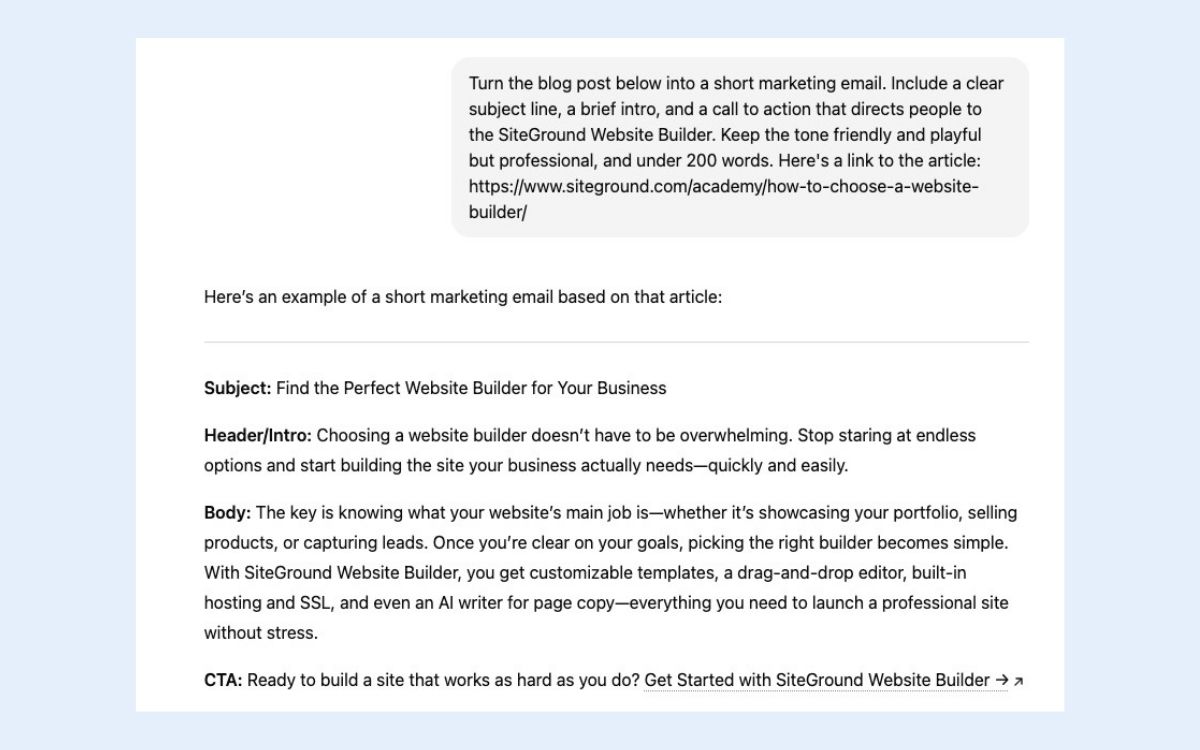
Pro tip: It’s always, always important to keep in mind that you’re still the boss. Don’t let AI run wild with content creation. Review it, refine it, and make sure it’s on brand, accurate, and sounds like you.
2. Smarter Social Media
Most small businesses struggle with social media marketing for the same reason: it feels endless. There are too many platforms, too many formats, and not enough hours in the day. So AI is basically stepping in as the (never-tired and always-available) “social media assistant” most small businesses never had.
AI business tools can now plan posts, write captions, suggest hashtags, design visuals, schedule everything, and even handle basic customer engagement. Instead of hopping between Instagram, Facebook, TikTok, and LinkedIn manually, you can manage it (competently!) all from fewer places—and with way less mental load.
Why this trend matters for small businesses:
Visibility requires consistency—but consistency is hard when you’re already juggling 15 other priorities. AI makes it possible to show up daily without burning out or hiring a full-time social manager.
Where this shows up for small businesses:
- AI-powered schedulers that plan posts in a few minutes
- Caption generators that match your brand voice and platform style (short punchy for TikTok social media marketing, more detailed for LinkedIn)
- Hashtag and trend suggestions based on what’s performing in your niche
- AI auto-replies for common comments or DMs
- Content repurposing: turn a blog post into 10 short-form posts without starting from scratch
What you can do right now:
- Use an AI planner to generate a week’s worth of posts at once
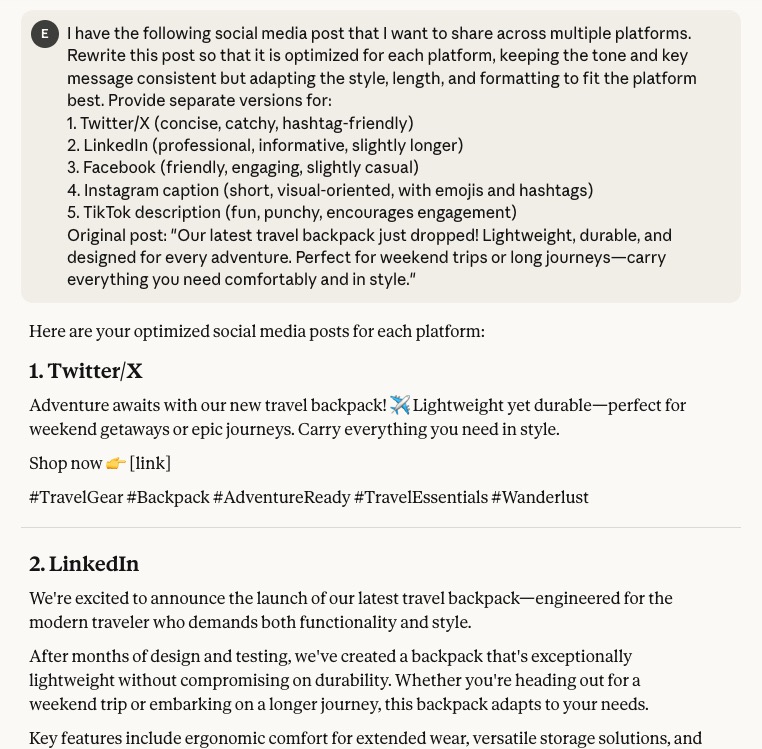
- Use AI to rewrite the same post for multiple platforms automatically. In the example below, clear instructions identify tone and length, and let’s AI do the rest.
- Automate replies to simple comments (“What’s the price?,” “Do you ship to…?”)
- Let AI turn your existing blog posts or videos into bite-sized content
- Create a simple prompt library for your brand—a small collection of ready-to-use AI instructions—so captions always feel consistent
3. Effortless Design Assets
Design used to be a resource problem for most small businesses: not enough time, not enough skills, and definitely not enough budget to make everything look polished and professional. AI flips that completely (finally!). You can now produce high-quality, on-brand visuals on demand, and all without waiting for a designer or scaling the massive learning curve that is Photoshop.
You can now create almost any visual asset—social graphics, product images, logos, ads, illustrations, thumbnails, and more—using artificial intelligence. It can match your branding basics, resize your designs for different platforms, and help you build an entire visual system without starting from scratch.
Why this matters for small businesses:
You don’t need a designer for every little thing anymore. AI lets you produce more visuals, faster, and at a quality level that used to require a marketing professional. And the more polished your brand looks, the more credible you appear—especially online. The effects are far reaching.
Where this shows up for small businesses:
- Instant social graphics based on a short prompt (“Create a bold, modern Instagram post announcing a sale”)
- AI image generators that create product mockups, lifestyle scenes, or brand imagery
- Logo and branding kits automatically generated from a few style inputs
- Automatic resizing for platforms (Instagram → TikTok → Facebook → Pinterest)
- Background removal + cleanup for product photos
- Templates created by AI to keep your visual identity consistent even if you’re not a designer
What you can do right now:
- Generate a set of reusable templates for social posts, ads, and banners
- Use AI to create product images or mockups if you’re short on photography
- Let AI remix one design into multiple formats for different platforms
- Build a quick brand kit (fonts, colors, vibe) and use it in your prompts
- Use AI to refresh outdated graphics so your brand feels more modern
4. AI-Powered Websites
If you’ve ever wrestled with plugins, code, or endless settings panels, you know the pain of traditional website management. AI is basically removing all those barriers. Even if you’re not “technical,” you can now build, edit, and maintain a professional website just by…talking to it.
Now, many AI-powered website platforms can generate full pages, write copy, suggest layouts, fix issues, and guide you step-by-step through tasks that once required a developer. Some platforms even let you manage your site through a chat interface—“add a new services page,” “rewrite this section,” “optimize this for SEO,” etc.
Why this matters for small businesses:
You no longer need to hire a developer for every update, or put off important changes because they feel too technical. AI lets you keep your website fresh, fast, and optimized without all the complexity. And when your website feels current and easy to navigate, customers trust you more.
Where this shows up for small businesses:
- AI website builders that create full site layouts from just a short description
- AI that writes or rewrites website copy to match your tone and industry
- SEO assistants that suggest keywords, fix metadata, and optimize your pages
- Chat-based editing (“Make this headline shorter,” “Add a contact form here”)
- Automatic accessibility improvements like alt text generation
- Error detection and performance optimizations you don’t have to hunt for manually
What you can do right now:
- Use AI to create new landing page content in minutes
- Ask a chat-style assistant to rewrite your homepage in a clearer, more compelling voice
- Let AI generate SEO-friendly titles and meta descriptions
- Ask AI to add a plugin to speed up your website
- Use AI to analyze your site and suggest quick wins for clarity, speed, or conversions
- Repurpose your best content (blog → landing page → email) with AI’s help
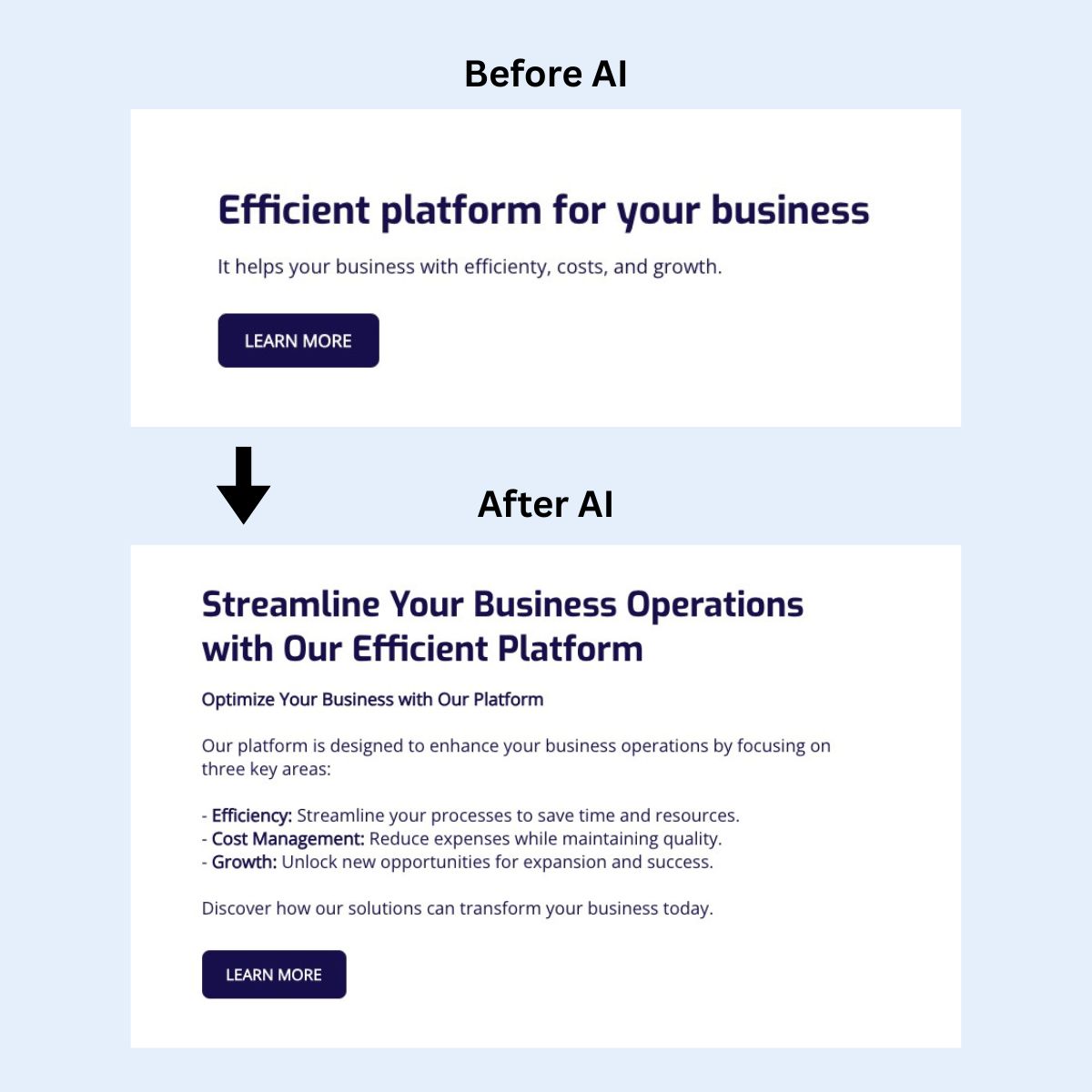
SiteGround Website Builder makes building a professional‑looking site straightforward—even if you’re not tech‑savvy. You get a library of customizable templates, a drag‑and‑drop editor, and mobile‑ready design by default. It includes a built‑in AI writer for copy (transforming website text, as seen in the example above), access to a huge stock‑image gallery, automatic image resizing, and integrated marketing tools like SEO settings, and analytics. Plus SiteGround Ecommerce lets you add products and checkout directly within the same platform—no extra tools required.
5. Optimized Ads & PR
PR and advertising have always felt a bit like gambling for small businesses: you put money or effort in, you hope something works, and you cross your fingers hard that you didn’t waste time or budget. AI is taking that uncertainty and replacing it with data, precision, and real strategic insight—the kind only big companies used to afford.
Today’s AI can now write ad copy, design ad creatives, pick audiences, set budgets, optimize marketing campaigns, and even track your brand reputation across the internet. Instead of guessing what will work, AI analyzes patterns in real time and adjusts automatically.
Why this matters for small businesses:
You get the kind of advertising intelligence and PR visibility that used to require an agency, but without the steep costs. AI helps stretch your budget further, improve ROI, and catch reputational issues early.
Where this shows up for small businesses:
- AI-generated ad creatives (images and copy) customized to each platform
- Audience targeting based on behavior, interests, and likelihood to convert
- Automatic budget optimization that moves money toward the best-performing ads
- Sentiment and reputation analysis that alerts you when brand mentions shift positive or negative
- PR assistants that help draft press releases or pitch emails
- Real-time performance recommendations (“pause this ad,” “increase spend here”)
- Predictive analytics to forecast which marketing campaigns will perform best before you even run them
What you can do right now:
- Use an AI tool to draft ad copy and generate ad visuals
- Test 2–3 variations of ads using AI to compare performance
- Let AI suggest your target audience, instead of guessing
- Use a listening tool to monitor your brand mentions across social and news
- Use predictive insights to avoid campaigns that are likely to underperform
How to Apply AI Marketing Trends in Your Business
AI can feel overwhelming, but small businesses can make real progress by focusing on one area at a time.
Here’s a simple, actionable framework to start putting the trends into practice. Each step is designed to help you experiment, measure, and scale without getting bogged down.
Step 1: Define Your Goal
Before you start experimenting, be clear on what you want to achieve with AI. This keeps your marketing efforts focused and measurable.
- Examples: Increase social media engagement by 20%, cut content creation time in half, improve ad ROI, or generate leads.
- Having a goal helps you choose the right tools, track performance, and evaluate success.
Step 2: Identify Your Biggest Opportunity
Start by looking at your digital marketing workflow and pinpoint where AI could make the biggest impact. This might be the area that takes the most time or has the biggest gap in performance.
- Ask yourself: Where could AI save time or improve results most?
- Example: A small ecommerce shop might start with AI content for product descriptions or social media scheduling, since these are repetitive but crucial tasks.
Step 3: Start With Tools You Already Have
Don’t feel like you need a massive toolkit. Begin with the AI features already built into the platforms you use daily. This reduces friction and lets you experiment safely.
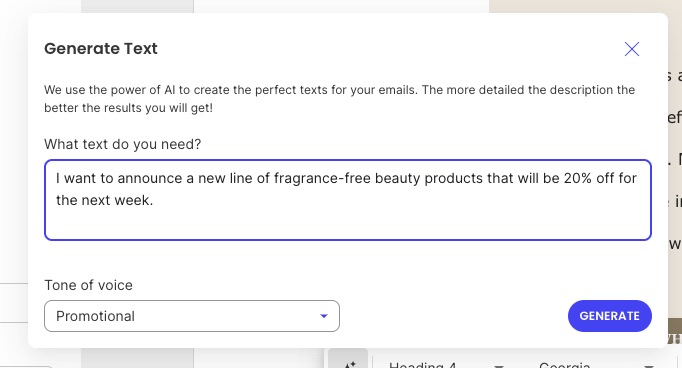
- Explore built-in AI features in your website builder, email platform, or social scheduler. For example, with the SiteGround Website Builder, you can simply tell it the text you need, and the tone of voice, and it will whip up copy on the spot.
- Supplement with an LLM tool like ChatGPT or an AI image generator to test quick drafts or visuals.
Step 4: Test, Learn, and Refine
Treat AI like a partner, not a magic solution. Experiment with one workflow at a time and see what works for your business.
- Pick a single task—drafting emails, generating social posts, or creating graphics.
- Measure your digital marketing metrics: look at customer engagement, clicks, or conversions.
- Refine prompts, tool settings, or timing based on what performs best, keeping in mind that many AI tools use machine learning to learn from data and improve results over time.
Step 5: Scale Gradually
Once you’ve found a workflow that works, expand to other marketing areas. Scaling gradually prevents overwhelm and ensures quality stays high.
- Apply AI to additional tasks, like web copy, ad creatives, or branding assets.
- Combine tools when possible to reduce manual work, such as connecting AI content creation with your social scheduler.
- As you scale, be sure to use AI ethically for your marketing by being transparent about AI-generated content, protecting customer data, and keeping a human in the loop to avoid bias or misleading outputs.
| AI Digital Marketing Trend | Actionable Tips for Small Businesses |
| On-Brand Content | Start with short-form content like social captions or emails. Test AI for blog drafts. Always review outputs to maintain your brand voice. |
| Smart Social Media | Plan a week of posts in advance. Automate comment responses. Test different post formats and timing to see what works best. |
| Easy Brand Assets | Quickly generate graphics, banners, or logos. Resize assets for multiple platforms. Ensure visual consistency across channels. |
| AI-Powered Website | Use AI to create landing pages or optimize site copy. Leverage chat-driven tools for updates. Run AI-powered SEO checks. |
| Optimized Ads & PR | Test AI-generated ad creatives. Monitor brand mentions and sentiment. Adjust campaigns based on AI recommendations and insights. |
AI in Marketing: The New Competitive Reality
Remember that never-ending marketing to-do list from the beginning? AI doesn’t make it disappear, but it does make it very manageable.
You don’t need to master every AI tool or trend overnight. Start with one area—content, social media, design, whatever drains your time most—and experiment. The businesses winning with AI right now aren’t the ones with the biggest budgets. They’re the ones that started small, tested what worked, and kept going.
And if you’re looking for a simple place to start? The SiteGround Website Builder makes it easy. Its built-in AI writer helps you generate page copy, while pre-designed templates, stock images, and drag-and-drop sections let you build a professional site without touching a line of code. Selling online? SiteGround Ecommerce makes it extra easy. No jumping between tools, no extra subscriptions—just faster, easier website updates.
Your competitors aren’t waiting. Neither should you.







Comments ( 0 )
Thanks! Your comment will be held for moderation and will be shortly published, if it is related to this blog article. Comments for support inquiries or issues will not be published, if you have such please report it through our official channels of communication.
Leave a comment
Thanks! Your comment will be held for moderation and will be shortly published, if it is related to this blog article. Comments for support inquiries or issues will not be published, if you have such please report it through our official channels of communication.