12 Proven Email Marketing Tips for Small Businesses
-
- What Are the Best Practices for Email Marketing Success?
- 1. Build and Maintain a Quality Email List
- 2. Write Catchy Email Subject Lines and Preview Text
- 3. Craft Compelling, Scannable Copy
- 4. Have Clear Calls to Action
- 5. Design Beautiful Emails with Appealing Images
- 6. Ensure Mobile Responsiveness
- 7. Apply Smart Segmentation and Personalization
- 8. Utilize Email Automation
- 9. Optimize Your Send Times
- 10. Track and Analyze Performance Statistics
- 11. Perform A/B Testing
- 12. Maintain Strong Email Deliverability
- Implement These Email Marketing Tips in Your Next Campaign
- What Are the Best Practices for Email Marketing Success?
Email marketing keeps evolving, but here’s what hasn’t changed: the right tactics can turn your campaigns from “meh” to “wow, that actually worked.”
Whether you’re crafting your first campaign or fine-tuning your hundredth, these email marketing tips & strategies will help you cut through the noise, land in inboxes, and actually get people to click—without the trial-and-error headaches.
From building a quality subscriber list to keeping your emails out of spam folders, this guide covers everything you need to connect with your audience and drive real results.
Ready? Let’s dive into the email marketing tips that actually move the needle for small businesses.
What Are the Best Practices for Email Marketing Success?
- Build and Maintain a Quality Email List
- Write Catchy Subject Line and Preview Text
- Craft Compelling, Scannable Copy
- Have Clear Calls to Action
- Design Beautiful Emails with Appealing Images
- Design Beautiful Emails with Appealing Images
- Apply Smart Segmentation and Personalization
- Utilize Email Automation
- Optimize Your Send Times
- Track and Analyze Performance Statistics
- Perform A/B Testing
- Maintain Strong Email Deliverability
Let’s break down each of these strategies to help you create emails that convert.
1. Build and Maintain a Quality Email List
Your email list is the foundation of successful email marketing. A quality list filled with engaged subscribers will always outperform a large list of uninterested contacts.
How to build your email list the right way:
Create valuable signup incentives
People need a reason to share their email address. So offer something specific and relevant, like a discount code, free guide, exclusive content, or early access to sales. Make the value clear upfront. Generic promises like “stay updated” rarely convert as well as concrete offers like “Get 15% off your first order” or “Download our free social media calendar.”
Use double opt-in
While it adds an extra step, double opt-in confirms that subscribers genuinely want to hear from you. That’s because after someone fills out your signup form, they receive an email asking them to confirm their subscription. This simple practice improves engagement rates and protects your sender reputation by filtering out fake or mistyped email addresses. Yes, you might lose a few signups, but the subscribers you keep will be far more engaged.
Never buy email lists
Purchased lists violate most email marketing regulations and damage your deliverability. These contacts haven’t agreed to hear from you, which leads to high spam complaints, low engagement, and potential legal issues under laws like GDPR and CAN-SPAM. Beyond the legal risks, bought lists simply don’t work—people who didn’t ask to hear from you won’t engage with your emails.
Clean your list regularly
Remove inactive subscribers every few months. If someone hasn’t opened your emails in six months, send a re-engagement email campaign with a compelling subject like “We miss you! Here’s 20% off to come back.” If they still don’t respond, remove them. A smaller, engaged list of 500 active subscribers will always outperform 5,000 inactive ones. Clean lists improve your deliverability, open rates, and overall campaign performance.
Make signup forms easy to find
Place signup forms on your homepage, at the end of blog posts, on your checkout page, and in your website footer. Or even consider adding a popup or slide-in form for visitors who spend time on your site. The easier you make it for interested people to join your list, the faster it will grow.
That said, be patient with growth. Building a quality email list from scratch takes time. Focus on placing consistent signup opportunities across your website rather than expecting overnight results. If growth feels slow, remember: 500 engaged subscribers who open and click are far more valuable than 5,000 people who ignore your emails. Quality always beats quantity in email marketing.
2. Write Catchy Email Subject Lines and Preview Text
Your email subject line and preview text are your first – and often only – chance to grab attention in a crowded inbox. Together, they determine whether recipients open your email or scroll past.
Spark curiosity and show value
Your subject line should be clickable, but not spammy. It should make recipients want to learn more about what’s inside, without misleading them about what to expect. Address your audience’s pain points and state the benefit clearly. This builds trust and credibility. For example, “3 ways to cut your email workload in half” is specific and valuable, while “Amazing email tips inside!” is vague and forgettable.

Use personalization strategically
While adding a recipient’s first name helps (“Hi Sarah”), go further with location, past purchases, or interests: “Sarah, your Chicago store favorites are 20% off” outperforms generic subject lines. Use the data you have about your subscribers to make subject lines feel relevant to their specific situation.
Personalized subject lines consistently outperform generic ones—making this one of the highest-impact tactics for improving email performance. Industry studies regularly show double-digit percentage improvements in open rates from personalization alone. Keep it concise and actionable
Use action verbs and benefit-focused language. “Get your free guide” outperforms “Our guide is available.” And keep in mind that it’s best to produce subject lines that are 50 characters or less to ensure full visibility on most devices—mobile users will only see the first 30-40 characters before deciding whether to open.
Quick note: If adding a recipient’s name pushes your subject line over 50 characters, the personalization wins—it matters more than length. Personalized subject lines on mobile (even if truncated) still outperform generic subject lines that display fully.
Create urgency carefully
For promotional and sales emails, create a sense of urgency to encourage immediate action. Use phrases like “last chance,” “ends tonight,” or “only a few hours left.” Meanwhile, avoid spam triggers that combine urgency with money words like “Free cash now” or “Urgent—act now for free money.” Write naturally rather than desperately. Instead of “FREE MONEY – ACT NOW!!!,” try “Your exclusive offer expires Friday.” Same urgency, but professional and trustworthy. Avoid using all caps for your entire subject line.
Don’t use default preview text
Many businesses forget to customize preview text, leaving recipients with “View this email in your browser” or random body copy from the email. This wastes valuable inbox real estate. Preview text (also known as preheader text) appears alongside your subject line in the inbox, offering a sneak peek at your email’s content. It’s your last chance to make a convincing argument that your email should be opened.
Write preview text that complements—not repeats—your subject line, giving readers another compelling reason to open. Use it to provide a bit more detail about what readers can expect inside your email. While this text can be up to 90 characters, the ideal length is between 35 and 40 characters to ensure it displays fully across most devices.

3. Craft Compelling, Scannable Copy
One of the most important email marketing tips is to thoughtfully craft your email content. After all, it’s the relevant content that captures your readers’ attention and keeps them engaged with your message.
Let’s explore the best email copywriting tips:
- Start with relevance
Whether you’re writing an informational, educational, or promotional email, rule #1 is to make your content relevant to your audience. Your content should address your subscribers’ needs and pain points, offering them value that motivates them to take action—whether it’s making a purchase or subscribing to your newsletter. Having a strong value proposition will get you one step closer to increasing your conversion rates.
- How long should your emails be?
Keep promotional messages between 150-300 words and email newsletters between 300-500 words. Readers decide within seconds whether to engage, so front-load your most important message—put the key benefit or offer in the first two sentences.
- Make your content scannable
Most people don’t read emails word-for-word; they scan in seconds. Structure your content accordingly: use short paragraphs (2-3 sentences max), clear headings, bullet points, and plenty of white space. Don’t overstuff your content with unnecessary words—get straight to the point. Readers should grasp your main message within 10 seconds of opening. If they have to work to understand your point, they’ll simply move on to the next email.
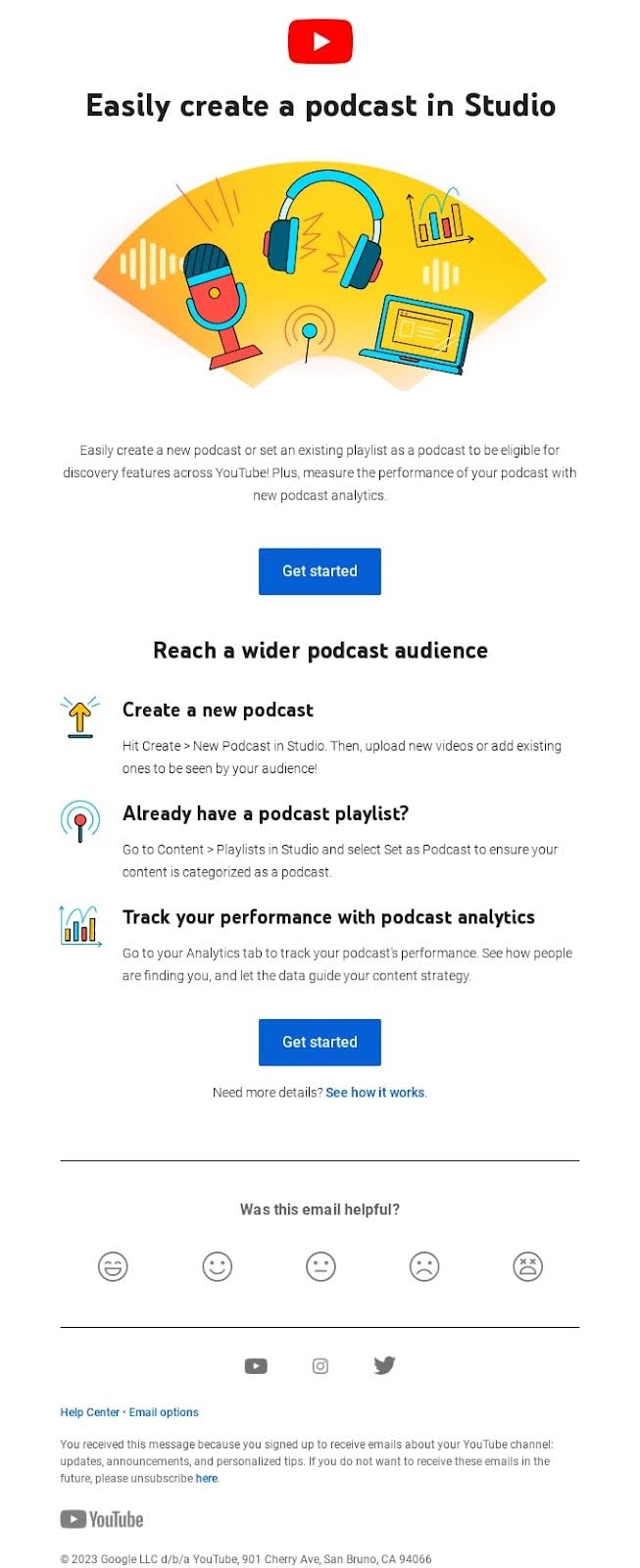
For example, here’s an email from YouTube Studio. See how scannable it is? That’s because of the bigger, bold email font in the title, followed by a catchy image, and a short paragraph. Then, it naturally flows to the blue call-to-action (CTA) button, which stands out well against the white background—a great example of how strategic colors in email marketing can guide reader attention. What’s more, the content is broken down into bullet points that are easy to scan because of the small icons at the beginning of each row.
To help you better understand and implement these tips in your next email marketing campaign, we have a guide on how to write marketing emails, including specific examples and best strategies.
AI can also help with content creation, but knowing how to write effective ChatGPT prompts is key to getting useful results. We’ve compiled an extensive guide on how to write email prompts to help you get better output from AI tools.
Get Ready-To-Use Email Prompts Download our free ChatGPT email prompt templates prepared by AI professionals. Try them out to create engaging and successful emails in no time.
Google reCAPTCHA used. Privacy Policy and Terms of Service apply
4. Have Clear Calls to Action
Your next crucial step is having clear calls to action. Here’s how to achieve that:
Since the main purpose of an email CTA is to drive readers to take a specific action, your first goal should be to define what you want them to do. Do you want your readers to make a purchase, sign up for your newsletter, download an eBook, or visit a sales landing page of your new product or service?
Equally important is the design and wording of your CTA buttons, as both play a vital role in driving user action. Make sure to include short and actionable words on your CTA buttons, preferably verbs. Use phrases like “Buy now,” “Read more,” or “Get started.”
The visual design of your buttons is also essential—they need to stand out and grab attention. Use contrasting colors that differentiate them from your email’s background, and opt for bold, clear fonts to ensure they are easily visible and clickable.
Last but not least, instead of a button, you can also use an image as a CTA. In this case, one of the most notable email marketing hacks is to include an alt text for that image. Since some email providers might not display your image, your alt text will “show” people what the image was all about. Make your alt text short, yet descriptive and actionable—just as you would with regular CTA button copy.
Limit CTAs per email
Too many calls to action confuse readers and dilute your message. Stick to one primary CTA. If you absolutely need a secondary action (like “Read our blog” after a “Shop now” button), make the visual hierarchy clear through size, placement, and color. Your primary CTA should be impossible to miss.
Position your primary CTA within the first scroll—readers shouldn’t need to hunt for it. If your email is longer than 300 words (common for newsletters), repeat your CTA at the bottom so people who read through don’t have to scroll back up to take action.
Optional: Add social sharing buttons
While not essential for most promotional emails, social sharing buttons (Facebook, X, LinkedIn) can extend your reach when subscribers share your content. This works best for newsletters, blog roundups, or educational content—skip them for sales-focused emails where you want readers taking one action (buying, not sharing). Keep buttons small and place them in your footer so they don’t compete with your primary CTA.
5. Design Beautiful Emails with Appealing Images
No matter how closely you follow the best email marketing techniques, if your email doesn’t have an appealing design and compelling visuals, your engagement will suffer. Beautiful emails combine smart templates, relevant images, and strong brand consistency.
Start with responsive templates
If you’re just starting with email marketing, one of the best email marketing tips you can embrace is to consider using an email marketing platform. It will not only make your life much easier, but it will also help your email campaigns become measurable, optimizable, and ultimately more successful.
Most email marketing platforms will provide you with ready-to-use templates or easily customizable layouts. With SiteGround Email Marketing, you can create stunning emails fast with our free email templates, which leverage expert best practices. We have a template for every need—promotional, newsletter, welcome emails, or seasonal (such as Black Friday emails and Cyber Monday emails).
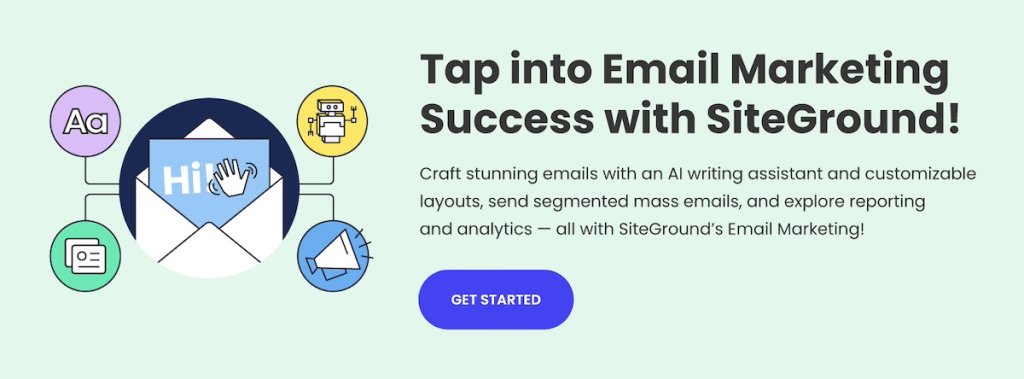
You can also lean on layouts for building your email campaigns. Layouts allow you to play around with the different elements of your email and customize them based on your own preferences and brand criteria.
What’s the difference? Templates are pre-designed emails you can customize (colors, text, images). Layouts are structural frameworks that show where images and text blocks go, which you build from scratch. New to email marketing? Start with templates. Want complete brand consistency? Create a custom layout once and reuse it. To help you create engaging email campaigns, we’ve also compiled a list of email layout examples.
Choose compelling visuals
Whether you’re using an email template or email layout, you must complement it with appealing images. This is one of the best email marketing tips, as most people interact with your emails primarily through visuals. You need to grab their attention with the images in your email campaign.
Images should be relevant to your content and value proposition, whether you’re using individual images or creating engaging photo collages to enhance your message. They should correspond with your brand guidelines, so that readers can recognize right away that the email is coming from your brand (even if they don’t notice your logo immediately).
Appealing images are hard to find, though. That means you either need to use free stock images, invest in paid images, or even hire a professional photographer.
Another way to address this is by using SiteGround’s Email Marketing platform, which offers a free built-in AI image gallery, and provides you with a wide range of photographs and illustrations in a variety of categories.
Include alt text for all images
Just like with CTA images, the rest of your images should also include alt text. Some email clients block images by default, so alt text describes what’s in the image so readers understand your message even when images don’t load. Keep alt text short, descriptive, and actionable—especially for CTA images.
Make images clickable
You should also make sure to have your images linked to whatever page you want your readers to visit, whether that’s your sales page, downloadable assets page, or otherwise. If you decide to include a button on the image, ensure that the whole image is a link, not just the button, as users tend to pay more attention to images rather than text. People tap images more often than small text links.
6. Ensure Mobile Responsiveness
More people check email on their phones every day, and poorly formatted emails drive subscribers to delete messages or unsubscribe. If your emails don’t work well on mobile devices, you’re losing potential customers before they even read your content.
Here are some strategies to verify your emails are optimized for mobile devices:
Use responsive email templates
Start with a responsive email template that automatically adjusts to different screen sizes. Many email marketing platforms offer pre-designed templates that are mobile-ready, saving you time and ensuring consistency across devices.
Optimize image sizes
Large images can slow down load times, particularly on mobile devices without fast internet connections. Compress images without losing quality and use formats like JPEG or PNG. Additionally, consider using CSS for background images to further improve load speed.
Design clickable CTA buttons
Make sure your call-to-action buttons are easily clickable on small screens. Use a minimum size of 44×44 pixels for touch-friendly buttons, and ensure they are visually distinct with ample spacing between other elements to prevent accidental clicks.
Ensure adequate sizing of links and text
Text links should be large enough to tap easily. Avoid placing links too close together, and use a font size of at least 14 pixels for body text to maintain readability without zooming.
Prioritize key content at the top
Place the most important content and CTAs at the top of your email. This approach works because even if recipients don’t scroll, they will see the key message and action you want them to take. This is increasingly important with features like AI email summaries, which can push your content further down the screen—making that first visible section even more critical for engagement.
Test across devices
Before sending out your email, test it on various devices and email clients to catch any display issues. By implementing these email marketing tips for mobile, you can improve the mobile responsiveness of your emails, leading to higher engagement rates and improved customer interactions.
Don’t have access to multiple devices? Use your email platform’s preview feature or free tools for basic testing. Most email platforms show how your email renders on different devices before you send.
7. Apply Smart Segmentation and Personalization
One of the best tips for effective email marketing is to apply segmentation and personalization in your email campaigns.
When you segment contacts based on criteria like subscriber activity and engagement levels, you can deliver messages that are more relevant and valuable to each recipient. This targeted approach transforms generic broadcasts into personalized communications that resonate with specific audience groups.
When customers receive content that feels personal, they are more likely to feel valued and understood. This creates a stronger connection with your brand, leading to increased loyalty and long-term customer relationships, as well as higher conversions.
Here’s how to implement smart email segmentation and personalization:
Start with basic segments
If you’re new to segmentation or have a small list, start simple. With SiteGround Email Marketing, you can segment contacts based on how they interact with your campaigns—who opens your emails, who clicks through, or who hasn’t engaged recently.
After sending a campaign, check your Analytics to see who performed specific actions, then assign those contacts to groups. For example, create one group for subscribers who opened your last few campaigns and another for those who haven’t engaged in months. This lets you send re-engagement offers to inactive subscribers while rewarding engaged ones with exclusive content.
Even basic segmentation like this significantly outperforms sending the same message to everyone. Start with simple engagement-based groups and refine your approach over time. The key is to treat your subscribers as individuals with different engagement levels, not just email addresses.
8. Utilize Email Automation
Your next step in the field of email marketing best practices is automations. By leveraging email automations, you can streamline your marketing efforts, deliver personalized experiences, and achieve better results with less manual effort.
Automations not only save time but also make certain that every subscriber receives the right message at the right time, improving their journey with your brand.
Here’s how to implement email automation:
Identify key opportunities
Start by identifying opportunities within your email customer journey where automation can add value. Welcome emails for new subscribers and re-engagement campaigns for inactive contacts are two high-impact automations that save time while keeping your audience engaged.
Choose the right tools
Select an email marketing platform that supports automation features. SiteGround Email Marketing offers automated welcome emails and allows you to create email sequences based on specific triggers—making it easy to nurture new subscribers and maintain consistent communication automatically.
Define your workflows
Map out the email customer journey and design workflows that align with your marketing goals. Determine the triggers (such as signing up for a newsletter or reaching a certain engagement milestone) and the corresponding email sequence.
For example, a three-email welcome sequence might include:
- Immediate: Deliver your promised lead magnet or discount
- Day 2-3: Share your story, best content, or customer success stories
- Day 7: Introduce your products or services with a special new-subscriber offer
This works for most small businesses. B2B companies or higher-ticket services often extend this to 5-7 emails over 2-3 weeks, adding educational content and case studies.
The welcome sequence runs automatically when someone subscribes, separate from your regular broadcast campaigns. So if you send weekly newsletters every Tuesday, a subscriber who joins on Wednesday would get the welcome sequence (three emails that week) PLUS your regular Tuesday newsletter. This doesn’t violate the frequency guidelines—new subscribers expect to hear from you more often initially.
Create personalized content
Develop email templates and content that are tailored to each stage of the workflow. Personalize messages using dynamic content and segmentation for maximum relevance.
9. Optimize Your Send Times
Timing matters more than many businesses realize. Sending your email when your audience is most likely to check their inbox can significantly improve open and engagement rates.
Test different days and times
While email marketing benchmarks suggest Tuesday through Thursday mornings perform well, your audience might behave differently. Test various send times and track which gets the best response. B2B audiences often engage during work hours (9 AM – 3 PM), while B2C audiences may respond better in evenings (6 PM – 9 PM) or weekends. Don’t assume—test with your specific subscribers.
Consider time zones
If your subscriber list spans multiple time zones, segment by location and schedule sends so emails arrive at optimal local times. Sending at 10 AM EST might work for New York subscribers, but means 7 AM for your West Coast audience—and most people don’t want marketing emails with their morning coffee.
This matters most for time-sensitive emails like flash sales or event invitations. For weekly newsletters, time zone optimization is less critical.
Watch for inbox competition
Avoid sending when your subscribers’ inboxes are flooded. Monday mornings often see heavy email volume as businesses catch up from the weekend. Similarly, sending right before major holidays when people are traveling or away from work can hurt your metrics.
Pay attention to your industry’s patterns—for example, retailers need to strategically time campaigns like finding the best time to send Black Friday emails, since inboxes become extremely crowded during major shopping events. Many successful retailers send early Thursday evening or very early Friday morning to stand out before the inbox flood begins.
Maintain consistency
Once you find a schedule that works, stick with it. But what’s the right frequency? Start with weekly emails if you have regular, valuable content to share. Many small businesses find success with one email per week, while others thrive with 2-3 monthly emails for higher-value content.
Here’s how to decide:
- Send your welcome email immediately when someone subscribes
- For regular campaigns, weekly works for most ecommerce and content-driven businesses
- B2B service businesses often succeed with 2-4 emails per month
- Watch your unsubscribe rate—if it spikes after increasing frequency, pull back
Whatever you choose, consistency matters more than frequency. If subscribers expect your newsletter every Tuesday at 10 AM, that consistency builds anticipation and habit. They’ll start looking for your email at that time. Breaking this pattern without warning can confuse subscribers and reduce engagement.
10. Track and Analyze Performance Statistics
Tracking and analyzing your email marketing metrics and KPIs is crucial for understanding the effectiveness of your campaigns and making data-driven decisions. Without tracking, you can’t accurately measure the success of your email campaigns.
Understanding how your emails perform helps you gauge whether you’re meeting your marketing goals. Analyzing data over time also allows you to spot trends and patterns in your audience’s behavior, helping you tailor future campaigns to their preferences and habits. By pinpointing what works and what doesn’t, you can make informed adjustments to your content, design, and email marketing strategy to improve engagement and conversion rates.
Focus on metrics that matter
Open rates and click-through rates are useful, but go deeper.
Compare your performance against your own past campaigns first—that’s more valuable than generic industry benchmarks. Then look at industry averages and email marketing benchmarks to see if there are areas where you’re significantly underperforming.
Track conversion rates (the percentage of recipients who complete your desired action), revenue per email, and unsubscribe rates. These metrics tie directly to business results, not just email activity. A 50% open rate means nothing if nobody buys. Conversely, a 15% open rate that generates $5,000 in sales is excellent.
How to track and analyze email marketing statistics
Before diving into analytics, establish clear objectives for your email campaigns. Whether it’s increasing open rates, boosting click-through rates, or driving conversions, having defined goals will guide your analysis.
Next, leverage the analytics features of your email marketing platform to track these metrics. SiteGround Email Marketing, for example, offers detailed reports and insights into your email performance.
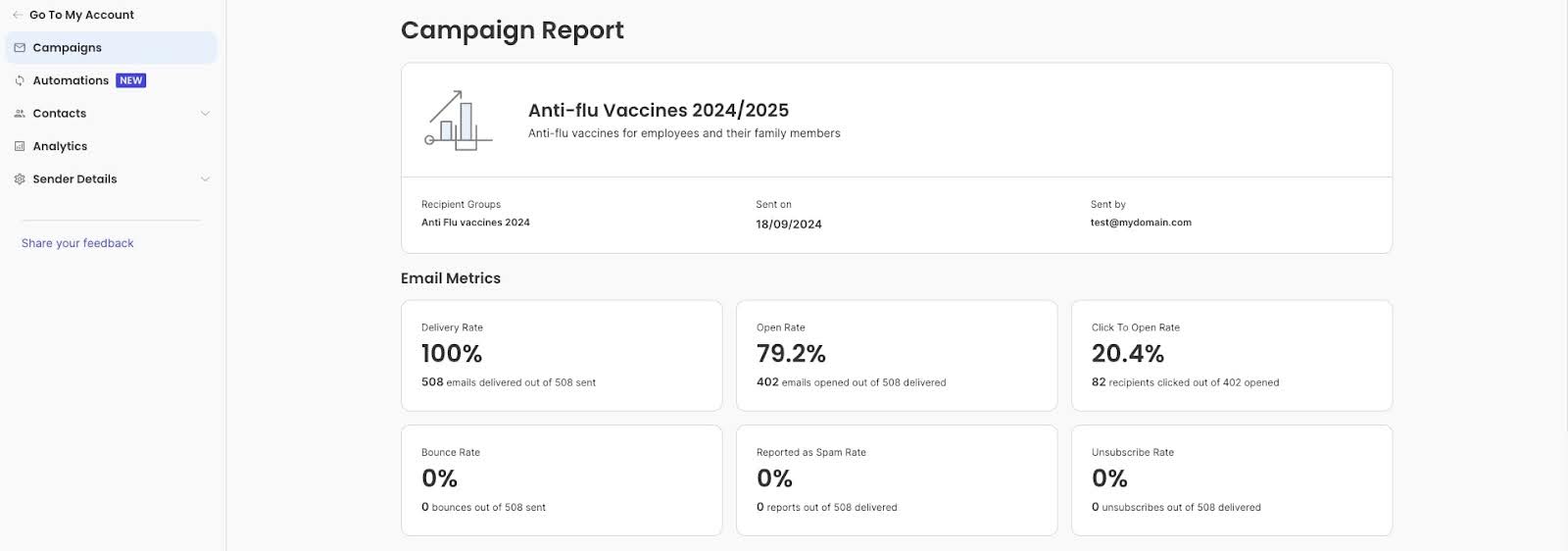
Compare performance across various campaigns to determine what the most effective marketing strategies are.
What numbers should you aim for?
Rather than chasing arbitrary email marketing benchmarks, focus on improving your own baseline. Track your averages over 3-6 months, then work to beat them.
Small business ranges typically fall around 20-25% for open rates, 2-5% for click-through rates, and under 0.5% for unsubscribe rates (according to email platform industry reports)—but these vary significantly by sector, audience size, and business model.
11. Perform A/B Testing
Another of our email marketing recommendations is to perform A/B testing to optimize your email campaigns. A/B testing, also known as split testing, is a powerful technique that allows you to compare two versions of an email to determine which one performs better.
Here’s how you can implement A/B testing effectively:
Start by identifying what you want to achieve with your A/B test. Are you looking to improve open rates, increase click-through rates, or boost conversions? Having a clear goal will guide your testing strategy.
Then, select one element to test at a time to ensure clear results. Some common variables include: subject lines, email content, calls to action, and send times.
As a next step, divide your email list into two random, equal-sized groups. Send version A to one group and version B to the other. Ensure the sample size is large enough to yield statistically significant results.
Send out your emails and allow enough time to gather data—typically 24 hours minimum to account for different checking habits. If you send weekly, wait until your full subscriber base has had a chance to open before declaring a winner.
When you get the results, compare the performance of the two versions based on your chosen metric (including open rate, click-through rate, etc.). Use statistical significance to determine if the results are due to chance. Once you’ve identified the better-performing version, roll it out to your entire audience. Use the insights gained to inform future campaigns and continue testing new variables.
When A/B testing makes sense
You need sufficient volume for reliable results. If your list is small (under 200 subscribers), focus on testing subject lines only—they require smaller sample sizes than testing content or design changes.
With very small lists, manual observation often works better than formal A/B tests—send an email, see what happens, try something different next time.
However, remember that A/B testing is an ongoing process. Continuously test new ideas and refine your approach to keep improving your email marketing strategy.
12. Maintain Strong Email Deliverability
You can craft the perfect email, but if it lands in spam folders, your efforts are wasted. Strong email deliverability gets your messages into inboxes where they belong.
Set up SPF, DKIM, and DMARC authentication protocols. These technical standards verify you’re a legitimate sender, not a spammer impersonating your domain. Think of them as digital signatures proving your emails are really from you. Most email platforms provide step-by-step guides for setting these up with your DNS provider. While the setup requires a bit of technical work (or IT support), it’s necessary for maintaining high deliverability rates.
Avoid spam trigger words
We touched on this earlier when discussing subject lines, but spam trigger words don’t just affect whether people open your emails—they also determine whether your emails reach inboxes at all. Phrases like “100% free,” “Act now!!!,” “Limited time only,” “Cash bonus,” and excessive punctuation can trigger spam filters. Write naturally and avoid language that sounds overly salesy or desperate. Instead of “CLICK HERE FOR $$$,” try “Limited spots available this weekend.” You create urgency while maintaining credibility.Retry
Monitor your sender reputation
Your sender reputation is like a credit score for your email domain. High spam complaints, bounce rates, or low engagement damage this score, making it harder to reach inboxes. Email providers like Gmail and Outlook watch how recipients interact with your emails. If lots of people delete without opening, mark as spam, or never engage, your reputation drops. Monitor your reputation using tools like Google Postmaster or your email platform’s deliverability reports.
Make unsubscribing easy
It sounds counterintuitive, but a clear, easy-to-find unsubscribe link actually helps deliverability. If people can’t unsubscribe easily, they’ll mark you as spam instead—which seriously damages your sender reputation. Include an obvious unsubscribe link in every email footer. Losing an uninterested subscriber is far better than getting spam complaints.
Stay compliant with regulations
Follow email marketing laws like CAN-SPAM (US), GDPR (EU), and CASL (Canada). Key requirements include: adding your physical business address to every email, honoring opt-out requests immediately (within 10 business days), and only emailing people who’ve given permission.
SiteGround Email Marketing handles key compliance requirements automatically—every email includes an unsubscribe link and opt-outs are processed immediately. You’ll need to add your business address to your template, but the platform takes care of the technical requirements. Beyond avoiding legal penalties, compliance builds trust with subscribers and improves deliverability.
Implement These Email Marketing Tips in Your Next Campaign
These 12 tips provide a complete framework for successful email marketing campaigns. Start with the fundamentals—building a quality list and maintaining strong deliverability—then layer in personalization, automation, and continuous testing. Track your results, learn what resonates with your audience, and refine your approach over time.
The businesses that succeed with email marketing aren’t necessarily the ones with the biggest lists or fanciest designs. They’re the ones who consistently apply these proven strategies, pay attention to their metrics, and keep improving.
Let us know in the comments below how your email marketing efforts go, and which of these tips was new and most useful for you.





Comments ( 0 )
Thanks! Your comment will be held for moderation and will be shortly published, if it is related to this blog article. Comments for support inquiries or issues will not be published, if you have such please report it through our official channels of communication.
Leave a comment
Thanks! Your comment will be held for moderation and will be shortly published, if it is related to this blog article. Comments for support inquiries or issues will not be published, if you have such please report it through our official channels of communication.