ChatGPT vs Claude vs Gemini: Which AI is best for writing, coding, research, image generation, and long documents
-
- Key takeaways
- Why different AI models are good at different things
- Best AI model for brainstorming and ideation
- Best AI model for content creation and editing
- Best AI model for research and data gathering
- Best AI model for image creation and editing
- Best AI model for code writing
- Best AI model for data analysis
- Best AI model for customer communication
- Quick reference: Which AI model to use for every task
- Try all of these models in one place
- FAQs
Generative AI is leveling the playing field for small businesses — what used to take hours of writing, research, design, or coding can now happen in minutes. But here’s what you might be missing: different AI models are built with different strengths, and using just one model for everything means you’re not getting the best AI has to offer.
We’ve tested multiple AI models across real-world tasks small business owners do every day. This guide shows you which one to use for what, so you can stop defaulting to one tool and start getting the best possible output.
Key takeaways
- No single AI model is best at everything. Different AI models have different strengths, and matching the right one to the task gets you significantly better outputs.
- Each AI model has its specialty. ChatGPT (OpenAI) is the best pick for brainstorming and customer communication. Claude (Anthropic) leads for content creation and coding. Gemini (Google) excels at research and handling large documents.
- Image generation works best with dedicated image models. Nano Banana Pro and GPT Image 1 each handle different types of visual work, from photorealism to stylized illustrations.
- You don’t need multiple subscriptions. SiteGround AI Studio gives you access to all of these models in one place, so you don’t have to manage multiple accounts.
- The best approach is to experiment. Try different models on the same task and see for yourself what works best.
Why different AI models are good at different things
ChatGPT alone holds over 80% of the AI chatbot market, which means most people never try anything else. In our own research, we’ve seen around 70% of website owners relying on ChatGPT for all their daily work. But here’s what’s interesting: OpenAI’s own data shows the most productive AI users (the ones saving 10+ hours per week) are actually using multiple models across different tasks.
Why? Because different models are genuinely better at different things.
AI models are trained on massive datasets (text, code, images, scientific papers, books, conversations), and the choices their creators make during training shape what they’re good at. Think of it like education. Two people can both be smart, but if one studied literature and the other studied engineering, you’d ask them different questions. AI models work the same way.
- Anthropic’s Claude models (like Claude Sonnet 4.6 and Claude Opus 4.6) are optimized for careful instruction-following, long-form writing, and analytical reasoning.
- OpenAI’s GPT models (like GPT 5.2) are optimized for conversational writing and creative flexibility.
- Google’s Gemini models (like Gemini 3.1 Pro and Gemini 3 Flash) are built for research, long context, and multimodal inputs, with strong integration across Google’s ecosystem.
- There are dedicated image models (like Nano Banana and GPT Image 1), each trained specifically on visual data with different priorities: photorealism, speed, text rendering, or artistic style.
This might sound like a lot to keep track of. It’s actually simpler than it seems. Once you know the basic strengths of each model family, picking the right one becomes second nature, like knowing when to use a spreadsheet versus a slide deck.
Let’s put this into practice by walking through common tasks you’ll typically encounter when launching a new product or service, from the first brainstorm to customer support. We’ll show you which model to reach for at each step.
Best AI model for brainstorming and ideation
Every launch starts with an idea. Or more often, a mess of half-formed ideas that need shaping. This is where AI earns its keep as a thinking partner: helping you explore angles you wouldn’t have considered, pressure-test concepts, and generate dozens of options before you commit to a direction.
Our pick: ChatGPT (GPT 5.2)
We found that GPT 5.2 is the best brainstorming partner of the bunch. It generates a wide, surprising range of ideas and riffs naturally when you push back or redirect. Ask it “give me 20 product name ideas for an organic dog treat brand,” and you’ll have 20 usable options in under 30 seconds. Say “now make them more playful,” and it pivots without missing a beat.
For product naming, positioning exploration, tagline brainstorming, and early-stage “what if” thinking, GPT consistently produces more varied and unexpected output than models that skew more structured and precise. If you’re one of the many people already using ChatGPT daily, make sure to try it out as an ideation buddy.
Runners-up:
- Claude Opus 4.6 – When brainstorming needs to go deeper. If you’re not just generating ideas but evaluating them (weighing trade-offs, thinking through positioning strategy, or developing a rough concept into a full brief), Opus adds the analytical depth that GPT trades away for creative range.
- Gemini 3 Flash – For rapid-fire idea generation when you want volume fast. Useful when you want 20 campaign angles in seconds.
Pro tip: Use GPT to generate the first long draft of ideas, then hand the shortlist to Claude Opus for feedback. Ask Opus “what are the three biggest weaknesses of this product name?” or “which of these five positioning angles would resonate most with first-time parents?” You’ll get a much sharper final answer than either model would give you alone. That’s even easier if you’re using a service such as SiteGround AI Studio, which gives you instant access to all the best AI models in a single workspace.
Best AI model for content creation and editing
You’ve got an idea and a direction. For most launches, the next move is getting words on the page: the landing page, the announcement email, the blog post, the social captions. This is usually the heaviest lift, and it’s where choosing the right model pays off most, because content quality directly affects whether people buy.
Our pick: Claude Sonnet 4.6 (Anthropic)
For the kind of content small businesses produce every day, like blog posts, marketing emails, product descriptions and social media copy, we found that Claude Sonnet 4.6 hits the sweet spot between quality, speed, and cost. It writes polished, natural-sounding prose, follows brand voice instructions well, and delivers results fast enough that you can iterate through multiple drafts without waiting.
What makes Sonnet stand out for content work is its precision. Give it a detailed brief (tone, audience, key points to hit, things to avoid), and it follows those instructions more reliably than most models. For the vast majority of business content tasks, Sonnet gives you 90% of the quality of the most powerful models at significantly faster output.
Runners-up:
- Claude Opus 4.6 – When the stakes are high, step up to Opus. For long-form content that demands nuanced reasoning and editorial precision (a white paper, a detailed case study, a piece of thought leadership), Opus 4.6 produces work that needs minimal human editing. It’s the model to reach for when the content really matters.
- GPT 5.2 – A strong all-round writer, particularly good at conversational, engaging copy and at adapting to different tones. If you’ve been writing marketing emails and ad copy with ChatGPT, you’re in good hands. GPT’s natural warmth makes it especially effective for customer-facing communications.
Pro tip: Always paste your brand voice guidelines (even just 3-5 bullet points describing your tone) into the prompt. Sonnet is especially good at sticking to these, and it’s the single biggest quality improvement you can make without changing models. Also: never publish AI-generated content without reviewing it.
Best AI model for research and data gathering
This is crucial not only for any early stage of every small business or professional, but the tricky part is that you need to do it periodically in order to stay relevant. What does the market look like? What are customers actually asking for? What are your competitors doing to address that? The right model turns hours of reading into structured, actionable intelligence.
Our pick: Gemini 3.1 Pro (Google)
Gemini 3.1 Pro is the standout choice for research, as per our testing. Its deep reasoning capabilities and ability to process extremely long documents in a single session set it apart. Feed it a 50-page industry report and ask for the five most relevant competitive insights, and it delivers a structured summary without losing track of details buried on page 37.
This also makes it the best option for everyday summarization tasks: condensing a lengthy contract into key points, pulling the main takeaways from an industry report, or turning messy meeting notes into a clean summary. If research and document processing are a regular part of your work, Gemini 3.1 Pro should be your default.
Runners-up:
- Claude Opus 4.6 – The best choice when research requires synthesis and judgment rather than just gathering facts. If you need to compare competing strategies, weigh trade-offs, or produce a recommendation from messy, conflicting inputs, Opus 4.6’s reasoning depth is hard to match. Think of Gemini as the better gatherer and Opus as the better synthesizer.
- GPT 5.2 – Strong for exploratory research where you’re iterating on questions and narrowing your focus. GPT’s conversational flow makes it easy to go back and forth (“what about this angle?”, “now compare those two”) in a way that feels natural and productive.
Pro tip: When doing competitive research, don’t just ask the AI to “research my competitors.” Instead, give it a specific document or URL to analyze and ask targeted questions: “What are the three main claims this company makes that we don’t?” or “Summarize the pricing strategy in this report.” Specific inputs get dramatically better outputs, no matter which model you use.
Best AI model for image creation and editing
Product imagery, social media graphics, email banners, ad creatives. A few years ago, this meant hiring a designer or wrestling with Photoshop. Now you can generate and edit professional visuals with a prompt.
Our pick: Nano Banana Pro
Nano Banana Pro is currently the most capable all-round AI image model. It generates images up to 4K resolution with exceptional detail and, importantly for business use, can render readable text within images across multiple languages. That’s a genuine advantage when creating marketing materials like posters, social graphics, or banners with headlines baked in.
It also maintains character consistency across different scenes (so your brand mascot or product looks the same in every visual), handles complex compositions with multiple subjects, and supports editing through natural-language instructions. Want to change the background? Just type “make the background a sunset beach.”
Runners-up:
- Nano Banana 2 – A faster, more affordable alternative to Nano Banana Pro that retains much of its quality. If you need to generate a high volume of visuals quickly, like ad variations, social media batches, or product mockups, Nano Banana 2 gives you strong results at a fraction of the time. It also handles editing well, so it’s a great option for quick tweaks like background swaps or color adjustments.
- GPT Image 1 – Where GPT Image 1 shines is artistic and stylized visuals. Illustrations, branded graphics with a specific aesthetic, creative interpretations of a concept: a hand-drawn feel, a vintage poster style, a whimsical brand mascot. GPT Image 1 produces more distinctive, personality-rich results than photorealistic models. A strong choice for social media content that needs to stand out.
Pro tip: Don’t settle for the first image. Generate 3-4 variations of the same concept, then pick the strongest one and refine it with follow-up instructions (“make the colors warmer,” “zoom in on the product,” “add more white space”). AI image generation is an iterative process, and your best result is almost never the first one (but it can be 2–3 prompts away).
Best AI model for code writing
Whether it’s building a landing page from scratch, customizing your WordPress site, setting up an automation, or creating a simple tool, this is where AI turns your ideas into functional products.
Our pick: Claude Opus 4.6 (Anthropic)
Claude Opus 4.6 is consistently rated as the top coding model available. It handles the full development lifecycle: from understanding what you need, to writing clean code, to debugging when something breaks. It’s particularly strong at complex, multi-step projects and working with large codebases where context matters.
For small business owners who aren’t developers but need to build or modify things (a custom contact form, a simple web app, an automation script), Opus 4.6 translates plain-language descriptions into working code more reliably than any other model.
Runners-up:
- Claude Sonnet 4.6 – Same family as Opus, faster and more affordable. For everyday coding tasks (writing a plugin, building a simple automation, tweaking your site), Sonnet is more than capable and delivers results quickly. Think of Opus as the architect and Sonnet as the builder you call for day-to-day work.
- GPT 5.2 – A very capable coding model, especially for quick prototyping and building web-based tools. If you’re comfortable with ChatGPT and want to build something quickly (a calculator, a form, a landing page), GPT 5.2 handles it well.
Pro tip: If you want to go from idea to live site or a web application without writing code, SiteGround’s Coderick AI is a dedicated vibe coding tool that lets you describe what you want in plain language and generates a complete, deployment-ready project. It’s a different approach from the model-level coding discussed above: purpose-built for going from a concept to a working site or a web app.
Best AI model for data analysis
Your product is live. Now the real questions start: Is it working? What’s selling? Which campaign is actually driving results? This is where most small business owners either drown in spreadsheets or ignore the numbers entirely. The right model turns raw data into decisions.
Our pick: Claude Opus 4.6 (Anthropic)
Opus 4.6 stands out for data analysis because it combines strong mathematical reasoning with the ability to explain what the numbers actually mean. It can analyze spreadsheets and tables, identify patterns and anomalies, perform statistical analysis, and, critically, present findings in plain language that help you decide what to do next, not just understand what happened.
When your sales data or your social media metrics come in messy and ambiguous (and they often do), Opus is the model most likely to tell you what it means and what to do about it.
Runners-up:
- Gemini 3.1 Pro – Excellent when your analysis involves very large datasets or requires cross-referencing with external information. Its ability to process massive amounts of data in a single session means you can feed it your entire sales history alongside an industry report and get a comparative analysis. Think of Gemini 3.1 Pro as the better number-cruncher and Opus as the better strategist.
- GPT 5.2 – Strong for data analysis tasks where you want to explore the numbers conversationally. GPT makes it easy to ask follow-up questions (“now break that down by month,” “what if we exclude returns?”) and iterate your way to an insight. A good choice when you’re not sure what you’re looking for yet.
Pro tip: Don’t just upload a spreadsheet and ask, “What does this data tell me?” Instead, ask a specific business question: “Which of my three marketing channels delivered the best ROI last month?” or “Are there any patterns in when my customers abandon their carts?” The more specific the question, the more actionable the answer, regardless of which model you use.
Best AI model for customer communication
Your products are getting traction – and with that comes the questions. Customer inquiries, feature requests, the occasional complaint, review replies, follow-up emails. This is the part of the business that customers actually remember, and it’s the one place where sounding genuinely natural and helpful matters more than anything else.
Our pick: ChatGPT (GPT 5.2)
When you’re writing back to a customer, the priority is sounding natural, warm, and human. That’s exactly where GPT 5.2 shines. Its conversational tone reads as approachable and empathetic, which matters enormously when you’re handling a complaint, thanking someone for their business, or navigating a tricky support situation.
For a small business owner who needs to respond to a dozen customer emails without sounding robotic or corporate, GPT 5.2 is the most natural fit. It strikes the right balance between professional and personal: friendly without being sloppy, helpful without being stiff.
Runners-up:
- GPT 5.2 Instant – For high-volume, routine responses (order confirmations, shipping updates, simple FAQ answers), Instant gives you the same conversational GPT tone at much faster speed. The quality difference is negligible for straightforward replies, and the speed adds up when you’re working through a full inbox.
- Claude Sonnet 4.6 – Better than GPT when the communication requires careful nuance or precision. Think: a refund negotiation, a response to a complex complaint, or any message where getting the details exactly right matters as much as sounding friendly.
Pro tip: Create a short “response style guide”: just a few bullet points covering your brand’s voice, how you address customers, and any phrases you always (or never) use. Paste it into the prompt whenever you’re drafting customer replies. This is especially powerful with GPT, which naturally adapts to tone cues. It’s the difference between a generic reply and one that sounds unmistakably like your business.
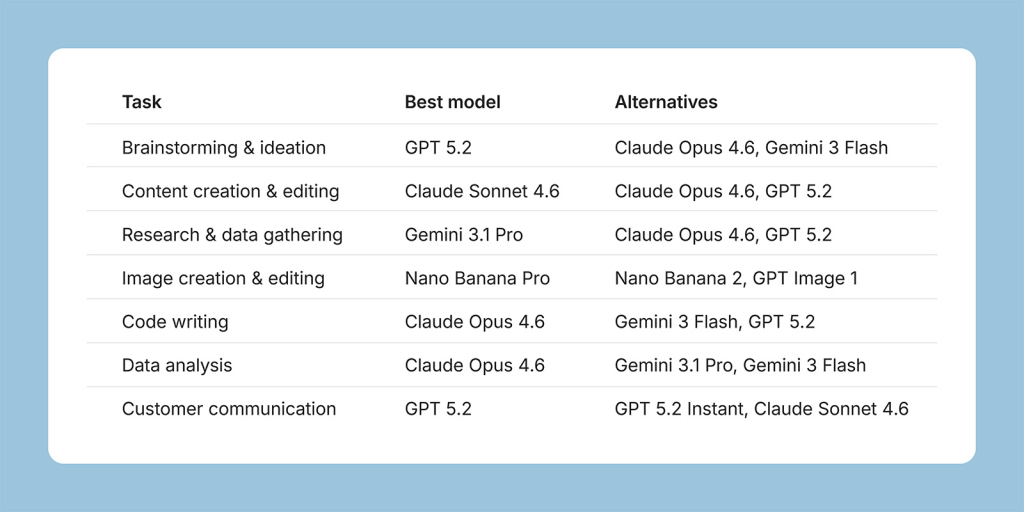
Quick reference: Which AI model to use for every task
Try all of these models in one place
The obvious problem is that managing separate accounts and subscriptions for each AI model is a hassle most small business owners don’t have time for.
That’s one of the hurdles we’re solving with SiteGround AI Studio. It gives you access to all the most popular AI models in one place, with just one subscription. Every SiteGround customer already has access to AI Studio Essential, included automatically in your plan, no setup needed. You get all the models discussed in this article in one workspace. Switch between models in the same interface, compare how different ones handle the same task, and find what works best for your specific needs. You also get the AI Agent for WordPress to manage your WordPress sites through simple chat commands.
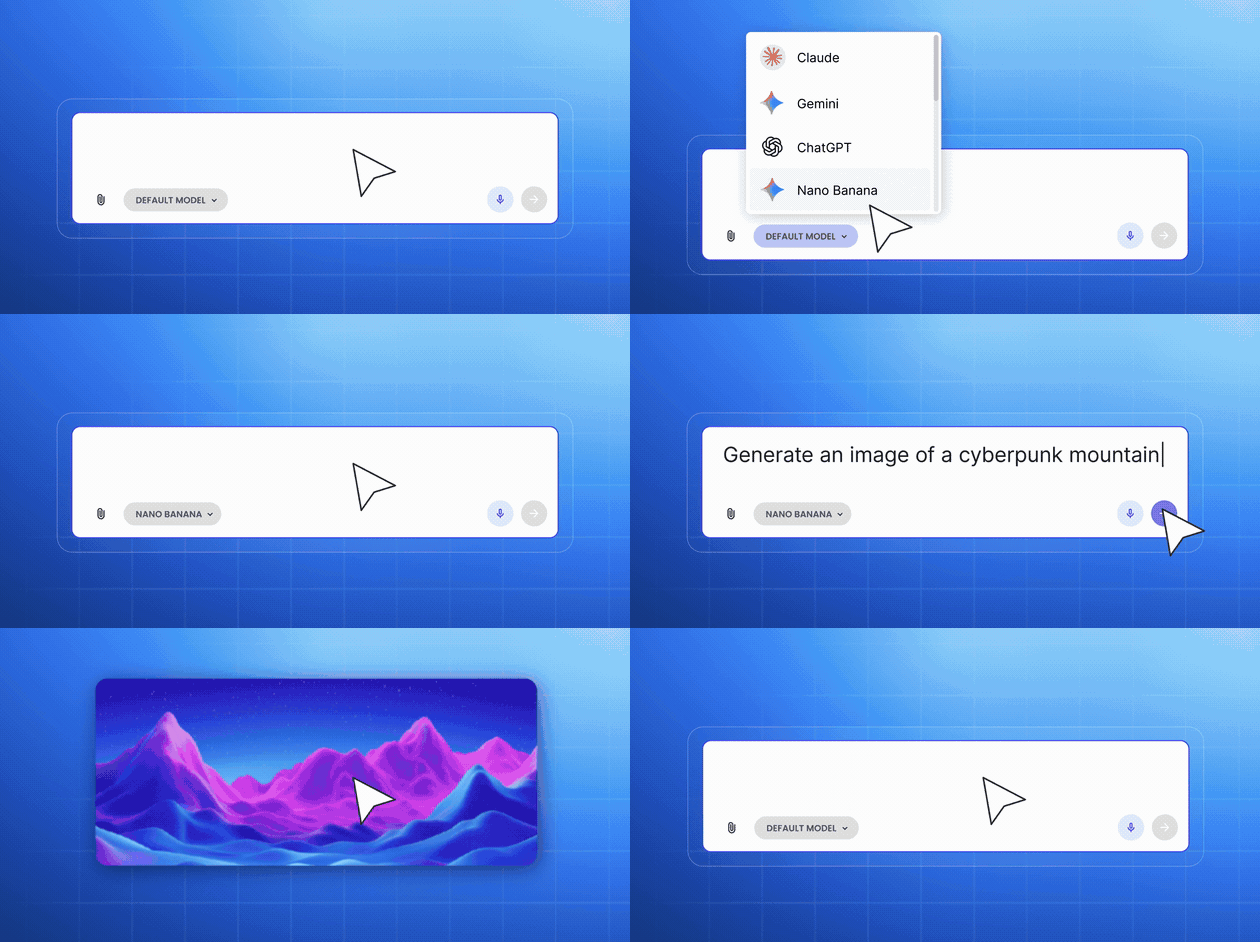
Try AI Studio Plus free for 14 days. You’ll get 100,000 tokens (significantly more room to explore different models across all tasks we’ve covered) plus access to 15+ specialized AI agents for SEO, content creation, reputation management, social media, and more, along with a full prompt library to get you started.
FAQs
Our best pick is Claude Sonnet 4.6 for everyday business content: blog posts, email marketing, product descriptions, social captions. It’s fast, precise, and follows brand voice instructions reliably. For high-stakes long-form content like white papers or case studies, step up to Claude Opus 4.6, which produces more polished and editorially refined output. Use GPT 5.2 when you need conversational, engaging copy. It’s especially strong for marketing emails and ad text where warmth and personality matter. If your writing workflow is tightly connected to Google Docs or Drive, Gemini 3.1 Pro is a solid option that integrates well with that ecosystem.
Claude Opus 4.6 is our top pick for coding. It handles complex, multi-step projects reliably and translates plain-language descriptions into working code better than any other model we tested. Gemini 3 Flash is a strong alternative for quick scripts, snippets, and debugging smaller issues. It’s fast and surprisingly capable for its cost. GPT 5.2 is a good choice if you’re already comfortable with ChatGPT and need to prototype something quickly, like a landing page or a simple web tool. And if you want to build an entire website or web app without writing code yourself, SiteGround’s Coderick AI lets you describe what you need in plain language and generates a deployment-ready project.
It depends on what “research” means for you. If it means processing long documents, analyzing reports, or summarizing contracts, Gemini 3.1 Pro is the best choice. Its ability to handle extremely long inputs in a single session is unmatched. If research means careful synthesis of what you already have (comparing SEO strategies, weighing trade-offs, producing a recommendation from messy inputs), Claude Opus 4.6’s reasoning depth is better suited. GPT 5.2 works well for exploratory research where you’re iterating on questions and narrowing your focus conversationally.
Gemini 3.1 Pro is the strongest option for very large documents and datasets. It can process entire reports, contracts, or research papers in one session without losing track of details. Claude Opus 4.6 is excellent at turning long documents into clean, accurate summaries and structured briefs, especially when you need the output to include strategic interpretation rather than just extraction. GPT 5.2 is still very capable for long documents, especially when you break them into sections and ask targeted questions about each one.
If your business runs on Google Workspace or Google Cloud, Gemini models integrate most naturally with that ecosystem. For most small business owners and solopreneurs, though, the more practical question is which model produces the best output for each task. SiteGround AI Studio gives you access to all major model families in one workspace, so you can pick the best model for the job regardless of which other tools you use.
Yes, capabilities and model lineups change often. Model names, capabilities, and pricing can shift within months. What stays stable is the selection logic: different model families have different architectural strengths, and picking by task rather than brand will consistently get you better results. We’ll keep this guide updated as the landscape evolves, but the core principle (match the model to the task) will hold regardless of which specific version is current.





Comments ( 0 )
Thanks! Your comment will be held for moderation and will be shortly published, if it is related to this blog article. Comments for support inquiries or issues will not be published, if you have such please report it through our official channels of communication.
Leave a comment
Thanks! Your comment will be held for moderation and will be shortly published, if it is related to this blog article. Comments for support inquiries or issues will not be published, if you have such please report it through our official channels of communication.