
This article was original published in January 2025, and updated in December 2025
At first blush, using ChatGPT might seem like you’re unlocking a treasure chest of possibilities. But the reality is that without the right key, you’re likely to end up with a lot of “fluff” (as ChatGPT loves to say) instead of gold. That’s where mastering the art of writing effective ChatGPT prompts comes in — because even the most advanced AI models need clear guidance to deliver useful results.
Whether you’re brainstorming ideas, drafting emails, or solving complex problems, writing effective prompts can transform your interaction with AI from frustrating to fabulous. In this ChatGPT prompt guide, we’ll dive into the dos and don’ts of writing the best prompts for ChatGPT so that your results are precise, creative, and actionable.
Key Takeaways:
- Clear prompts = better results: Specific instructions help ChatGPT produce accurate and useful outputs.
- Provide context: Background information ensures responses are relevant and tailored.
- Specify task, format, and examples: Tell the AI exactly what to do and how to present it.
- Define role and tone: Guiding perspective and style improves alignment with your goals.
- Use constraints and iterate: Limit scope, fact-check, and refine prompts for optimal results.
Get Your Free ChatGPT Prompt Formula Cheat Sheet Whether you’re new to AI or looking to refine your skills, start creating better prompts today!
Google reCAPTCHA used. Privacy Policy and Terms of Service apply
What is a ChatGPT Prompt?
A ChatGPT prompt is the input or instruction you provide to ChatGPT to generate a response. Think of a ChatGPT prompt as a question, statement, or directive that guides the AI’s output. And while ChatGPT is one of the best AI tools for business, the reality is that the quality and structure of your prompt directly influence how much you can really get out of it.
At its core, a good prompt establishes clarity, sets expectations, and provides enough detail for the AI to understand the task. Whether you’re creating content, solving problems, or brainstorming ideas, mastering ChatGPT prompting can revolutionize your AI interactions and experience.
What is a Large Language Model (LLM) and Generative AI?
ChatGPT is powered by a large language model (LLM), a type of AI trained on vast amounts of text to understand language patterns, context, and meaning. As a generative AI, a large language model like this doesn’t just pull information—it creates new text based on the instructions you give it. That’s why the way you write your prompts matters so much: it helps guide the AI to generate desired outputs that are accurate, relevant, and tailored to your needs.
What is Prompt Engineering?
Prompt engineering is the practice of designing and refining ChatGPT prompts to get the most useful, accurate, and creative responses possible. It’s more than just asking questions; it’s about strategically crafting prompts so the generative AI understands exactly what you need. By applying prompt engineering techniques, you can guide ChatGPT to generate outputs that meet your goals.
How to Write ChatGPT Prompts: Dos
The question is then, how to put this prompt engineering in practice? The following dos tackle just that, giving you tools you need to write effective prompts that get the most out of ChatGPT.
Do: Give Context
Let’s start with our first, very-important “do”: context. It’s the background information we give in a prompt—think of it like setting the stage for a conversation. Providing context is one of the key techniques in prompt engineering, as it helps generative AI understand your requirements more accurately. The more context you provide, the better ChatGPT can understand your request and give you a response that actually helps.
For example: Imagine you want it to draft a welcome email for new subscribers. Before you get to the request, give ChatGPT more background info. You could provide the following context: “I run a small, family-owned business selling eco-friendly pet supplies. We offer new email subscribers 20% off with the code WELCOME when they sign up for your newsletter. Please craft a friendly welcome email.”
Or, “I work at an interior design shop and have a team of ten people working for me. The business has done particularly well this last year and we are giving out bonuses to thank employees for their hard work and loyalty. Please craft an email sharing this announcement.”
The first part of each request is the context. We could easily create more detailed prompts in order to produce emails that are even more customized and accurate. Indeed, the more specific your context, the better the AI can align with your expectations rather than giving you generic or unrelated outputs that really don’t get the job done.
Go beyond ChatGPT and get the most of AI right as you create your marketing emails. With SiteGround Email Marketing, you can take advantage of our built-in, email creation-trained AI to help you produce the best emails possible.
Let’s look at another “context” example. Check out the responses for these two prompts. The first one is quite vague with little context, and the second one much more detailed.
ChatGPT Prompt 1—with little context:

ChatGPT Prompt 2—with detailed context:

Notice that the initial prompt didn’t even mention anything about eco-friendly or sustainability. So without specifics, ChatGPT just filled in the blanks, as it is wont to do. Meanwhile, in the second prompt, the response is detailed, informative, and motivating. A little relevant context goes a long way when it comes to getting a quality result.
Do: Identify a Task
Next is the task—this is where you define exactly what you want ChatGPT to do. Do you need advice? A list of ideas? A detailed plan? Or, as was the case in our previous example, an SMS text? Imagine exactly what kind of information you need, and don’t be afraid to tell ChatGPT precisely that by giving it clear instructions and being extra specific.
- “Create a to-do list for throwing a toddler’s birthday party.”
- “Draft an Instagram caption for a summer travel photo for my tourism business.”
- “Brainstorm three unique business ideas related to sustainable fashion.”
- “Please give me 10 domain name ideas for my locally owned house plant business in Detroit.”

By defining the task, you help ChatGPT produce output that is actionable and relevant, and not something that you need to rework and reorganize. Add the aforementioned context, and you’re on your way to much more valuable and relevant responses.
Do: Define a Format
Format involves using clear and specific prompts to clarify how you want the answer to be presented. This could be a bullet-point list, a 100-word paragraph, or even a table. Stating the desired format helps ChatGPT structure its response accordingly, and makes life easier for you. A few examples include:
- “List three benefits of using renewable energy in bullet points.”
- “Create a checklist of ways I can improve my website speed.”
- “Provide a table comparing the population size of the world’s three largest cities.”
- “Write a 500-word dialogue between two teenaged characters discussing their favorite movies.”
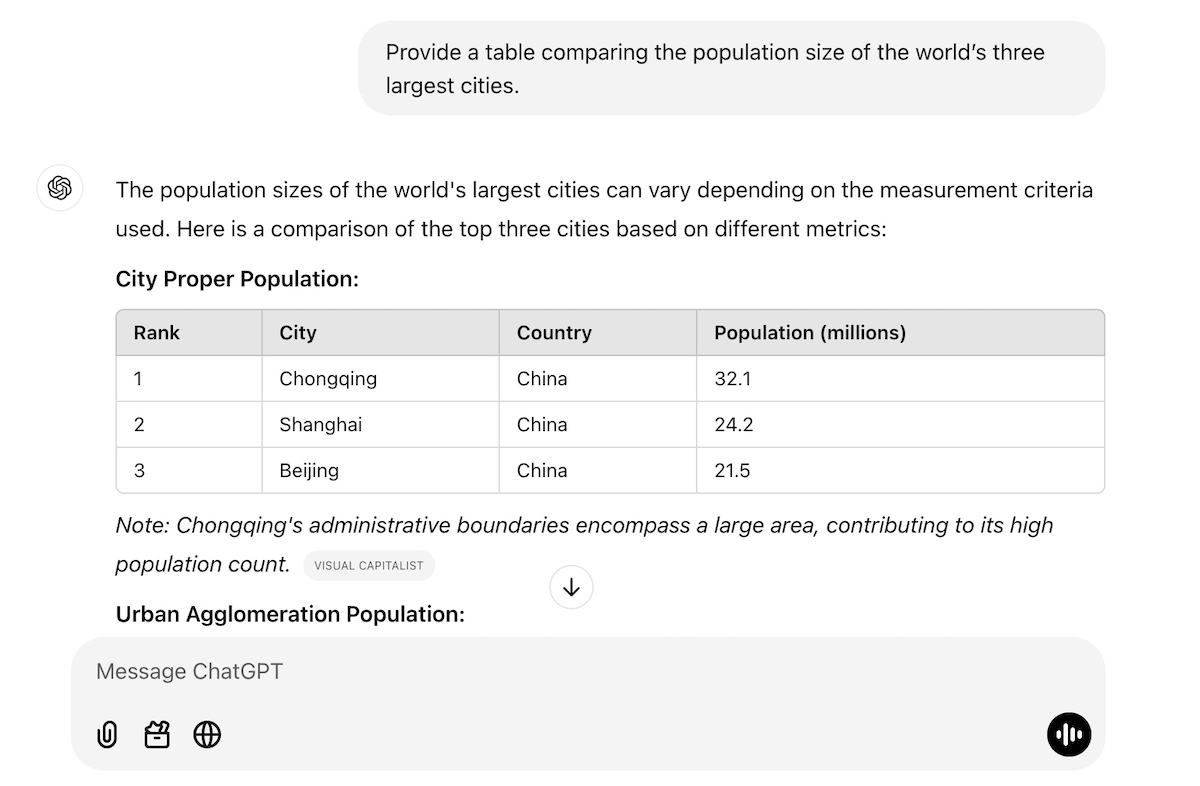
And don’t be shy here! You can get as detailed and specific with the format as you like. You could provide a precise article outline. Or maybe you need your table organized in just the right way—columns that say this, rows that say that. Perhaps you want an example for each bullet point. Really envision the final output, define it, and then tell ChatGPT exactly what you want.
Do: Provide Examples
One of the most effective ways to guide ChatGPT is to provide examples of the kind of content you want it to produce for you. This could mean sharing an existing blog post, a sample press release, or types of emails you’ve previously sent. By doing this, you’re prompting ChatGPT in a way that demonstrates exactly what you’re looking for in terms of style, format, or whatever it is you fancy—even if you’re unsure how to write prompts.
Using examples can be particularly helpful when you’re producing AI-generated content that you want to be similar to what you’ve already produced. So let’s say you sell a bunch of products, each with a product description in a similar format (same length, type of details, format). If you have a new product, you can just tell ChatGPT the new product’s features, provide another product description as an example, and ask it to produce a similar description for your new product.

Do: Specify a Role
By assigning a role in your prompts, you provide additional context that shapes how generative AI creates its reply. This is another prompt engineering tactic that helps align ChatGPT’s output with the perspective or expertise you need. Because when you give the AI a role, it can adopt the necessary tone, terminology, and perspective for the task. Examples include:
- “Act as a personal trainer and create a seven-day beginner workout plan.”
- “You are a marketing expert. Write ten tagline options for a new organic skincare brand.”
- “Pretend you’re a teacher explaining the basics of algebra to middle school students.”

You can get even more creative with role assignment, though. Give ChatGPT a role—such as, let’s say, ask it to pretend to be a job recruiter for a software engineering job that you’re interested in. Provide it with context around the job position and ask it to carry out a mock interview with you.
Or maybe you need to have a tough conversation with a friend about how they are always canceling on you last minute. Again, just tell ChatGPT a bit about the situation (the context), and ask it to act as your friend (the role) and carry out a practice conversation with you (the task).
Do: Clarify Tone of Voice
Tone of voice can completely change the way a copy response feels. Maybe you want a formal, professional tone for an investor proposal, or a casual, friendly tone for your event’s promotional materials and blog post. Specifying this will help you get the vibe you’re looking for.
Whether you’re aiming for professionalism, friendliness, humor, or formality, clarifying the tone helps set the mood for the content. For example:
- “Write a friendly and casual thank-you email for attending a webinar.”
- “Draft a formal letter to request sponsorship for an event.”
- “Create a humorous caption for a dog wearing sunglasses.”
- “Produce ten playful email subject line options about a guided walking tour of Rome.”

Let’s look at this a little more closely with another example. Check out the difference in response when we specify tone. The response differences are subtle, but the vibe definitely changes when we give ChatGPT guidance on tone.
No tone specification

With tone specification

Do: Leverage Constraints
The most effective prompts include constraints in order to guide the AI to focus on specific aspects of the task, making the output more targeted and efficient. Basically, you’re telling ChatGPT what you want it to do and specifically what you don’t want it to do. This helps to keep ChatGPT from wandering off into unwanted territories or providing you something completely different than what you were looking for.
Examples include:
- “Write a summary of this article. It should be no longer than 50 words.”
- “You are a marketing expert. Write ten tagline options for a new organic skincare brand, but the taglines should only have three words.”
- “Create a Black Friday email to go out to my subscribers, but don’t use the words “Christmas” or “Thanksgiving.”
- “Generate a social media post that includes the words ‘adventure awaits,’ and is no longer that 60 characters. ”

In the above example, we’ve given information about the brand, as well as a constraint In the above example, we’ve given information about the brand, as well as a constraint around the length of the tagline, thus refining the results. As you can see, constraints help narrow the scope of the response, ensuring it aligns closely with your requirements.
How to Write ChatGPT Prompts: Don’ts
ChatGPT benefits from constraints and, well, so do we! That’s where the “don’ts” come in. Indeed, as you produce your prompts, there are several “don’ts” to keep in mind.
Don’t: Use Vague ChatGPT Prompts
Vague questions lead to vague answers, and nobody wants that. As we’ve discussed above, ChatGPT thrives on specificity, so the more detail you provide, the more useful the response will be.
For example:
- Instead of asking, “Please give me some good outdoor activity ideas?” try: “What are some fun outdoor activities for kids and families in the Austin area during spring?”
- Instead of saying, “Give me some marketing ideas for my new business,” specify: “Please give me five digital marketing ideas for my new online store that can easily be implemented by someone without a lot of tech knowledge or a big budget. Also provide me with email marketing metrics that I can use to measure success, and tell me how to analyze them.”
In the marketing example, ChatGPT might give you ideas that apply to a brick-and-mortar shop, or perhaps to a business with a big budget. It might tell you to build an elaborate advertising campaign, even though you don’t have the money or know-how. Whereas in the more-detailed ChatGPT prompt, you’ll be getting measurable ideas that are relevant to your online business, within your budget, and likely within your skillset.
Bonus tip: Don’t forget to leverage our previous “dos!” You could identify the format and ask ChatGPT to put all of these ideas into a table, or organize them in any way that would help you to make the results more actionable.
Don’t: Assume Accuracy
While ChatGPT is powerful, it’s not infallible. It may produce outdated or incorrect information, especially when dealing with niche topics or rapidly evolving industries. It’s also, shall we say, kind of a people pleaser. That is, if you ask it a question, it feels compelled to give you an answer, and sometimes this just means it fills in the blanks with random and not-so-accurate info.
As such, always fact-check critical details, such as statistics, dates, or specific claims, to ensure accuracy. For example:
- If ChatGPT provides data about market trends, verify the source before including it in a presentation.
- When using the AI for research, cross-reference the information with reliable, up-to-date sources.
Another way to ensure accuracy is by providing ChatGPT with the source information. So instead of asking it “what is Nike’s value proposition?”, you could provide it with Nike’s website URL, and say, “based on this website, what is Nike’s value proposition?” That way, you know ChatGPT is pulling the answer directly from the source, rather than from unknown and possibly unreliable corners of the internet.
Long story short, this prompt guide highlights how to think of ChatGPT as a helpful assistant, not an authoritative expert. That means you’re the quality control and, when it comes to accuracy, the buck stops with you.
Don’t: Settle for the First Answer
The first response isn’t always the best; this is why iterative prompt engineering is important—you can tweak and refine your prompts until the AI gives you the most useful result. For instance:
- If the response feels too formal, you can say: “Rewrite this with a friendlier tone.” Still not what you’re looking for? Tell it what you do or don’t like, and ask it to try again. And then again…and again, until you’re satisfied.
- If the output lacks depth, try: “Can you expand on this idea with examples?”
- If the answer doesn’t feel actionable enough, ask: “please provide a list of next steps.”
Also, you can totally build on ChatGPT’s answers! So if it gives you a bulleted list, you might decide that you’d like it to turn that list into a table, and maybe even add some extra detail, like costs or action items. The main takeaway here: use ChatGPT’s initial responses as a starting point for crafting the most optimal answer.
Don’t: Assume It Knows Your Goal
ChatGPT can do a lot of things, but it can’t read your mind (yet! Gulp). So don’t assume it knows your intentions unless you make them clear. If you’re looking for specific outcomes or seek to address a particular audience, then you need to spell it out. For example:
- Instead of saying, “Tell me how to grow my email list,” specify: “I want to build leads for my new, seven-day, online public speaking program. Please give me email lead generation tips that I can easily implement in the next couple of months.”
- In place of, “Write a blog post about fitness,” clarify with: “I’m a personal trainer and want to get more clients and want to write a blog to help me do this. Give me ideas about how busy professionals in the Seattle area can fit exercise into their daily routines. Be sure to make mention of personal training.”
- Rather than just saying, “I’m looking for marketing strategies for my online store,” elaborate on what your goals are and what you’re hoping to accomplish, whether that’s more online traffic with a budget of $1,000, or increasing social media followers in the next 60 days.
Paint the full picture, start to finish, so that ChatGPT gives answers that meet your exact needs and goals.
Start Writing the Best Prompts for ChatGPT
Crafting effective prompts for ChatGPT is part science, part art. By following the dos and avoiding the don’ts, you can unlock ChatGPT’s full potential to generate responses that are accurate, creative, and actionable. Treat AI as your creative collaborator, and you’ll get more out of ChatGPT than you could have ever imagined possible.
This article was original published in January 2025, and updated in December 2025







Comments ( 0 )
Thanks! Your comment will be held for moderation and will be shortly published, if it is related to this blog article. Comments for support inquiries or issues will not be published, if you have such please report it through our official channels of communication.
Leave a comment
Thanks! Your comment will be held for moderation and will be shortly published, if it is related to this blog article. Comments for support inquiries or issues will not be published, if you have such please report it through our official channels of communication.